CUBE Manual Page 36 - Revision: 5-24-2017
PROGRAMMING MENU AND INSTRUCTIONS
PROGRAMMING: ENERGY SAVING SLEEP MODE
The Waterlogic CUBE Water Treatment System has an energy saving / sleep mode feature that
minimizes power consumption by shutting down the heater circuit if the machine has not been
operated for either 3 or 72 hours depending on the program setting. The CUBE is shipped with
default set to 3-hour energy saving mode.
Default is set to 3 hours.
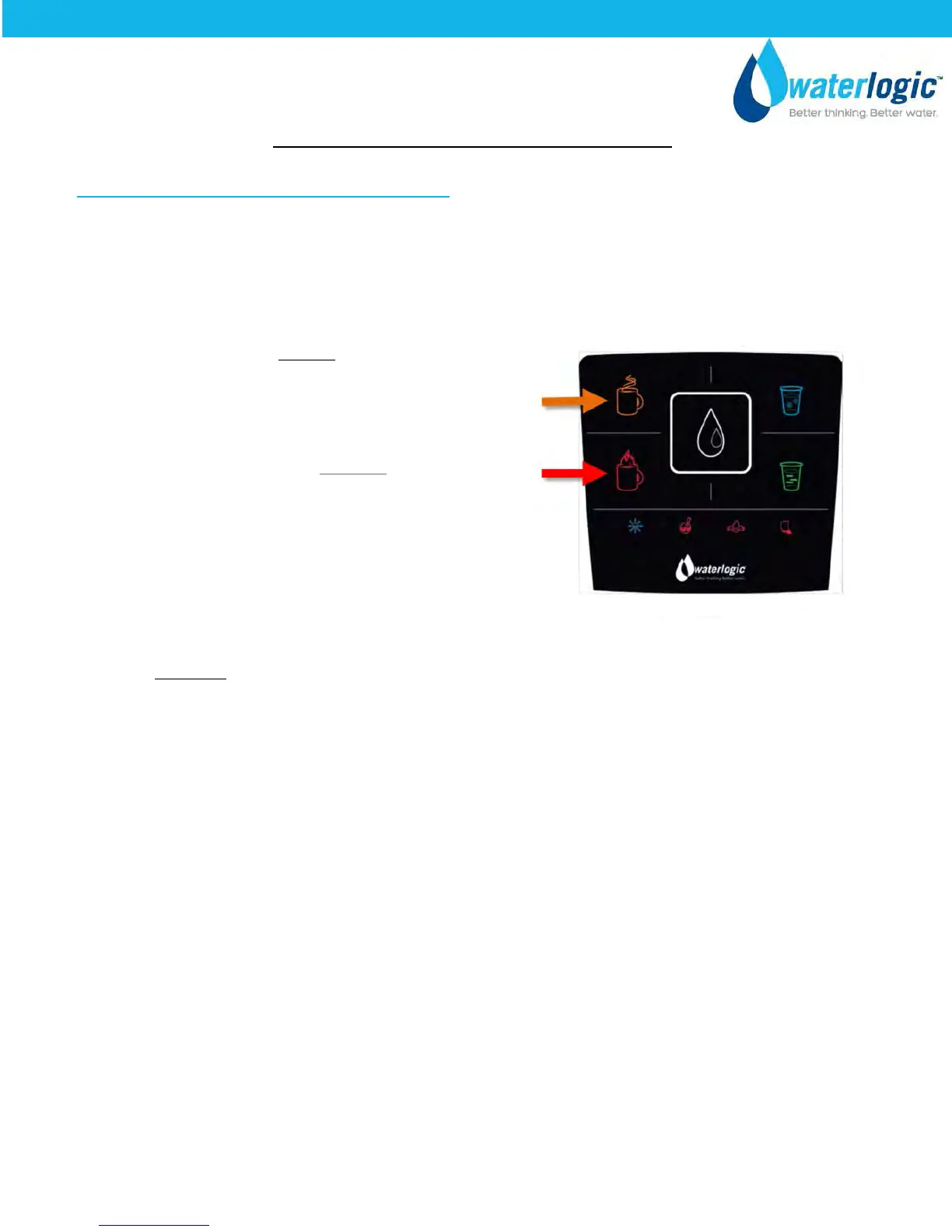
Press and hold Hot Water Icon for 10 seconds,
until you hear the CUBE beeps.
To set Sleep Mode to 72 hours, press and hold
the Extra Hot water icon for 10 seconds
Until the CUBE beeps
Wake up the CUBE out of Energy Saving Mode.
The CUBE will wake up or come out of energy saving mode upon touching any of the main
control buttons. Please note the hot water may take up to 10-12 minutes to reach Hot
Temperature Set Point once the machine is taken out of energy saver mode.


 To Next Page