Watson-Marlow 620DuN and 620Du User Manual 72
between pins 5 and 19 of the lower D-connector. Open switch for clockwise rotation,
closed switch for counter-clockwise rotation. Alternatively a logic signal may be
applied to pin 5 of the lower D-connector, ground to pin 17. Low input for clockwise
rotation, high input for counter-clockwise rotation. With no connection the pump
defaults to clockwise rotation.
23.7 Auto / manual toggle input
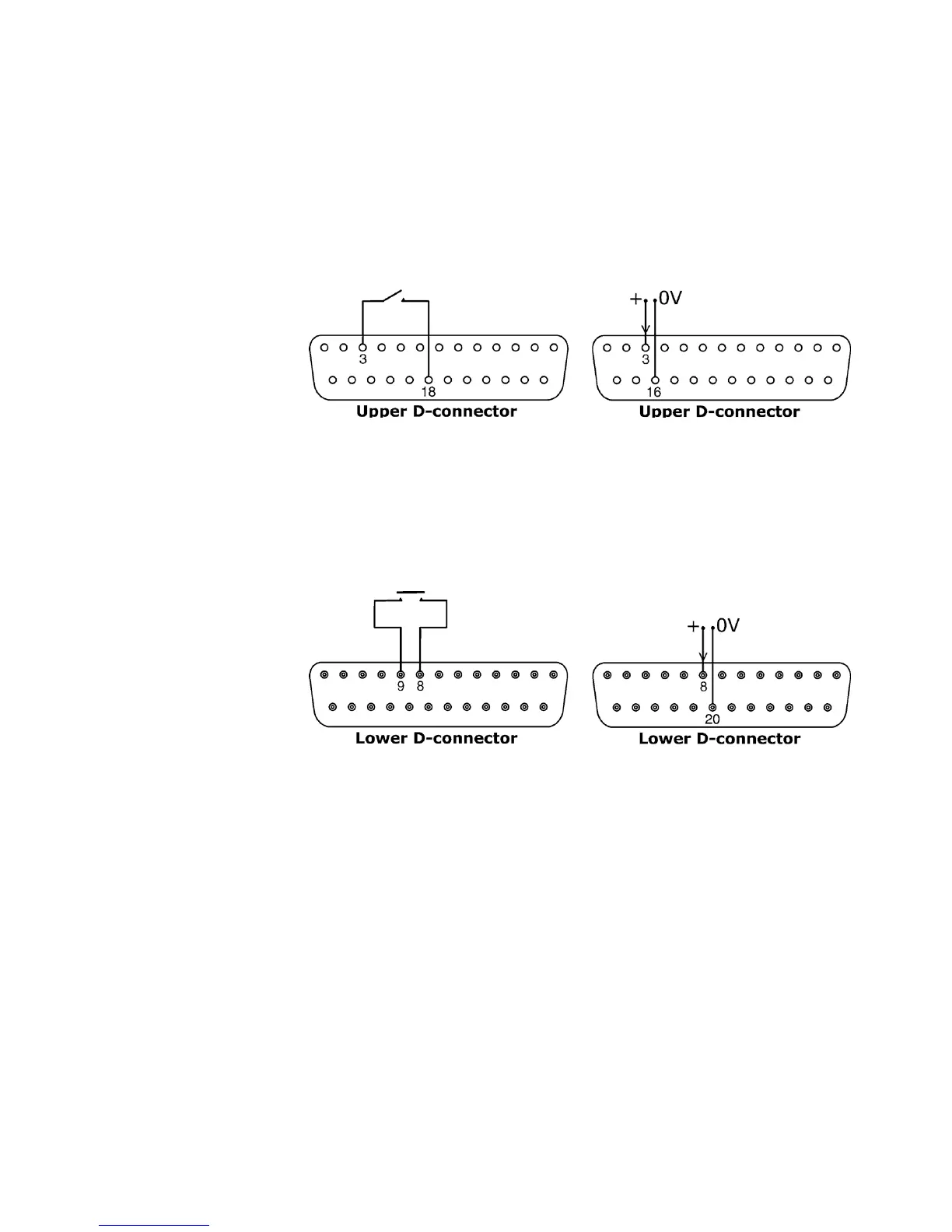
Connect a remote switch between pins 3 and 18 of the upper D-connector. Closed
switch for automatic control; open switch for manual control. Alternatively a logic
input may be applied to pin 3 of the upper D-connector, ground to pin 16. High input
for automatic control; low input for manual control.
23.8 MemoDose input
Connect a momentary contact switch such as a footswitch or a handswitch between
pins 8 and 9 of the lower D-connector. Close the switch to begin a dose. This input
is software-debounced and functions in a similar way to the other remote inputs,
such as with 5V to 24V logic as shown above, using pin 8 as the input and pin 20 as
the 0V (lower D-connector). Note: This input is software-debounced, so the signal
can be either momentary or maintained during the dose. If maintained, the signal
must be removed before the next dose.









 To Next Page