CHAPTER 4 COMMUNICATION 43
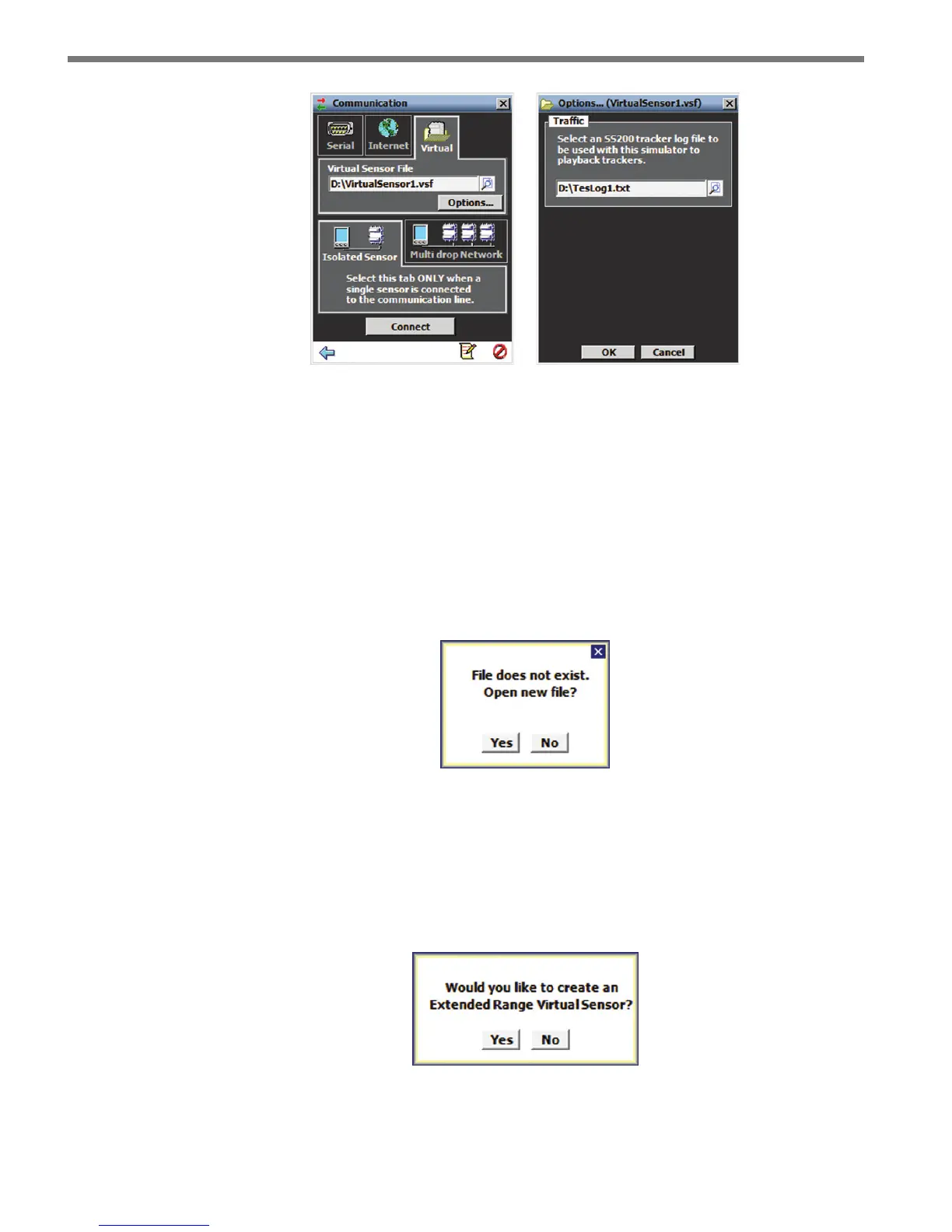
Figure 4.4 – Virtual Connection and Additional Options Screen
Virtual Sensor File
Since a virtual connection is not made to an actual sensor, a virtual sensor le (.vsf) is used
to save the conguration settings much like an actual sensor’s Flash memory. If you are
making a virtual connection for the rst time, you will need to create a virtual sensor le by
clicking on the magnifying glass icon and entering a le name.
When you create a new virtual sensor, you will need to complete two steps. First, you need
to open the new le (see Figure 4.5).
Figure 4.5 – Open New File
Second, you will need to decide whether the new sensor is to be a virtual SmartSensor
Advance Extended Range device of a virtual SmartSensor Advance device (see Figure 4.6).
If you would like the virtual sensor to emulate SmartSensor Advance Extended Range, an-
swer Yes to the second prompt. If you would like the virtual sensor to emulate SmartSensor
Advance answer No to the second prompt.
Figure 4.6 – Type of Virtual Sensor



 To Next Page