74 CHAPTER 7 CHANNELS-ALERTS-ZONES
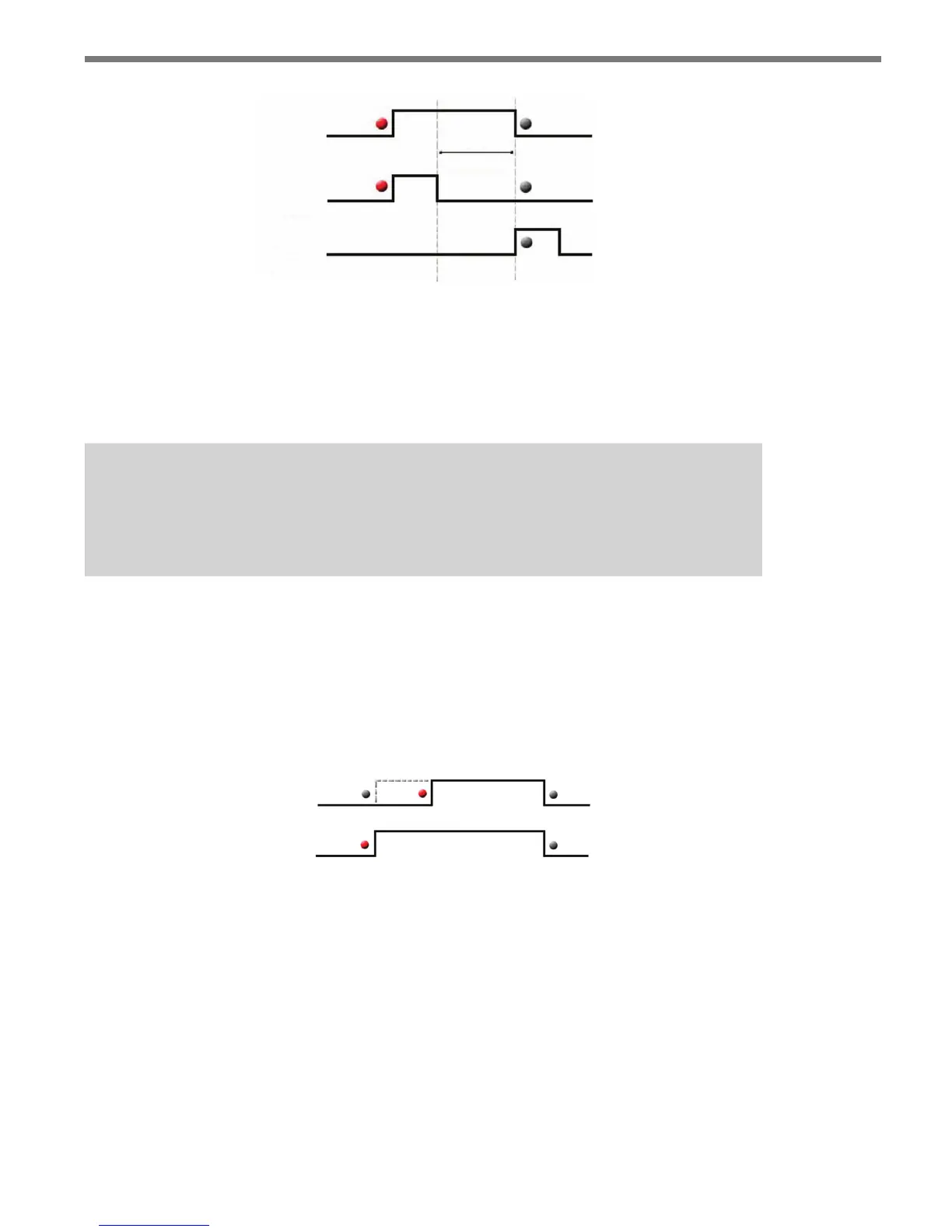
Latched
Channel
output
ON
Alert
OFF
Alert
Figure 7.12 – Latched Channels
For example, a channel’s output will become activated when an ON alert is triggered and
will latch (stay active) even when the ON alert is no longer triggered. Subsequently, if an
OFF alert is triggered, the channel output will be deactivated as soon as all other timing
conditions are satised (e.g. the minimum ON time, channel extend).
Note
When changing a normal channel to a latched channel, alerts 1 and 2 will be used as
the ON and OFF alerts, respectively (alerts 3 and 4 will be disabled).
Delay
e channel delay is used to ignore alert outputs that are shorter than the specied delay
time (see Figure 7.13). Latched channels do not activate outputs until the delay require-
ments have been met (only a channel’s alert and zone logic are applied during the delay
period).
Delay
Channel
output
Alert
Figure 7.13 – Channel Delay
Extend
e extend feature is used to continue a channel output after the required conditions have
been met (see Figure 7.14). For example, if a vehicle enters a zone and activates the channel
output, that channel would remain ON for a specied extend time after the vehicle leaves
the zone.



 To Next Page