9 | Setting up charging
26 / 37 5111967A OI-II Webasto Unite
9 Setting up charging
9.1 Charging cable plug
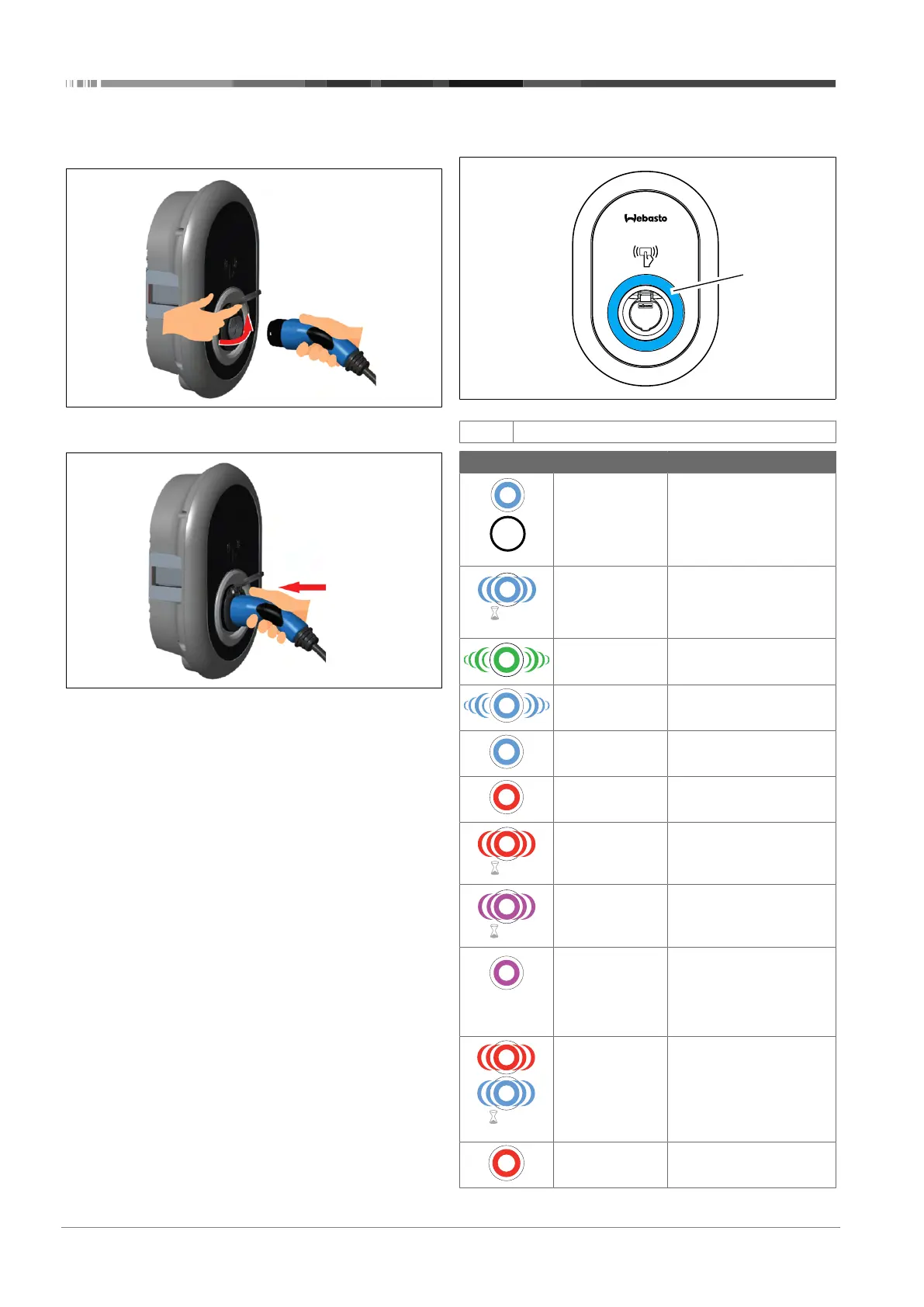
Fig.32
1. Open the hinged lid of the outlet socket.
Fig.33
2. Plug the charging cable plug into the outlet socket.
9.2 Reading the status information
LED
Fig.51
1
Status information LED
LED Description
Constant blue (or
no LED Indication
in power save
mode)
The charger is ready to
charge.
Finished charging with RFID
card.
Blinks blue Electric Vehicle is connec-
ted.
Charging Station is waiting
for RFID card authorization.
Green glowing Charging is authenticated.
Blue glowing Charging in progress.
Constant blue Charging suspended or fin-
ished.
Constant red Fault condition
Blinks red Ventilation required mode.
Blinks purple Charging current limited to
16 A due to over temperat-
ure.
Constant purple Charging is not possible
due to over temperature, or
the power optimizer cur-
rent limit is reached, or the
charger is disabled.
Blinks red and
blue
Charging station is re-
served.
Charging station is waiting
for Eco Time interval.
Charging station is in Delay
Charge Mode.
Constant red Firmware update




 To Next Page