,
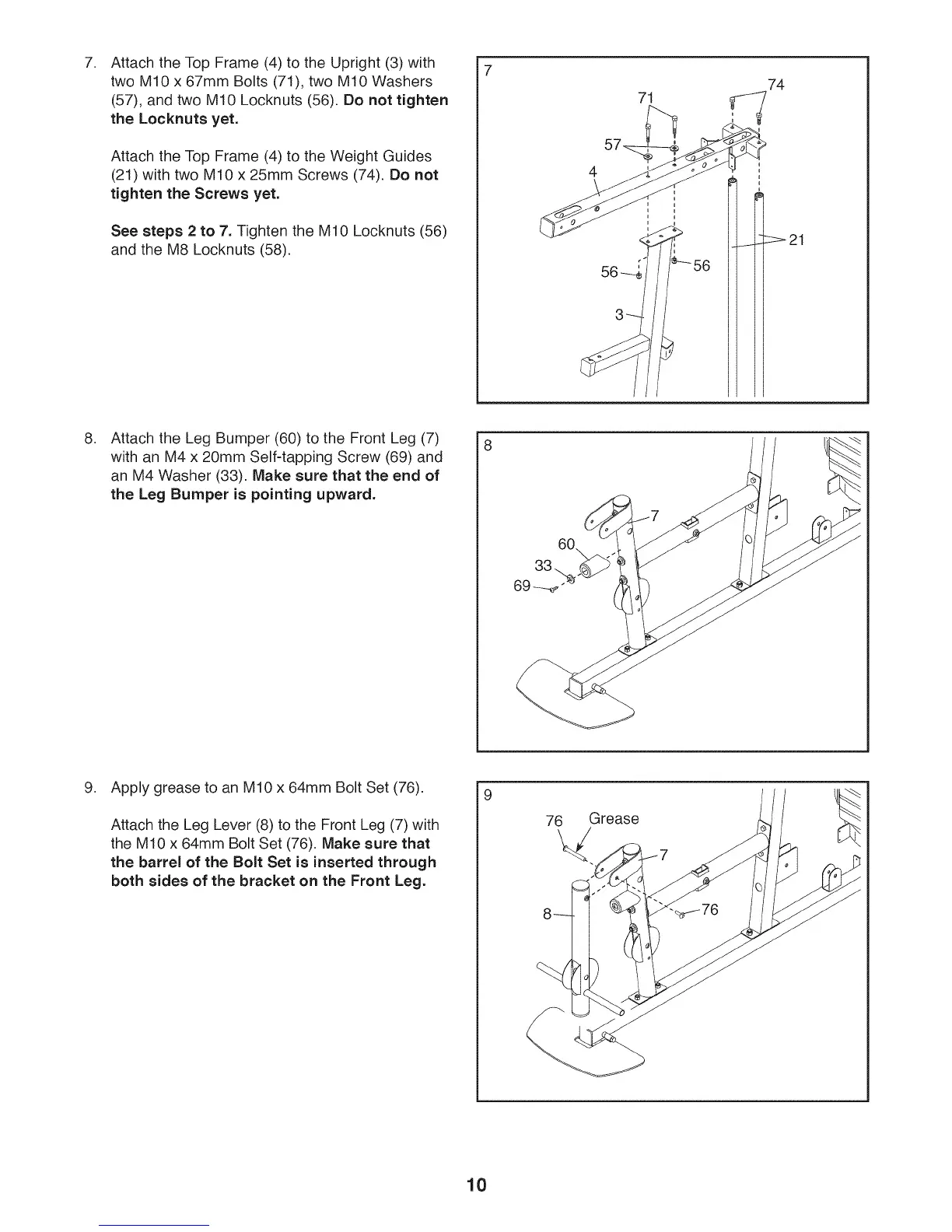
Attach the Top Frame (4) to the Upright (3) with
two M10 x 67mm Bolts (71), two M10 Washers
(57), and two M10 Locknuts (56). Do not tighten
the Locknuts yet.
Attach the Top Frame (4) to the Weight Guides
(21) with two M10 x 25mm Screws (74). Do not
tighten the Screws yet.
See steps 2 to 7. Tighten the M10 Locknuts (56)
and the M8 Locknuts (58).
71
74
,
Attach the Leg Bumper (60) to the Front Leg (7)
with an M4 x 20mm Self-tapping Screw (69) and
an M4 Washer (33). Make sure that the end of
the Leg Bumper is pointing upward.
8
9. Apply grease to an M10 x 64mm Bolt Set (76).
Attach the Leg Lever (8) to the Front Leg (7) with
the M10 x 64mm Bolt Set (76). Make sure that
the barrel of the Bolt Set is inserted through
both sides of the bracket on the Front Leg.
9
76 Grease
10








 To Next Page