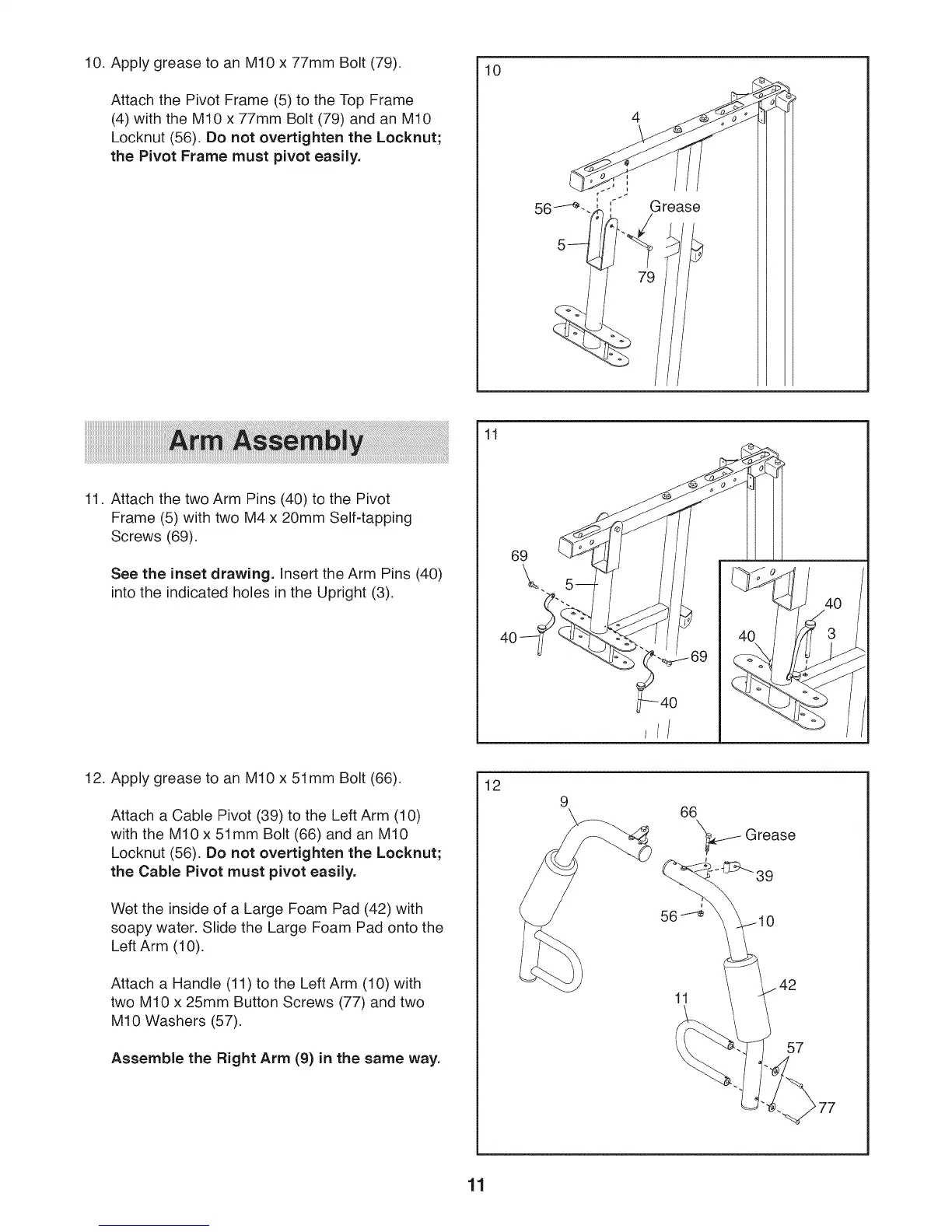
10. Apply grease to an M10 x 77mm Bolt (79).
Attach the Pivot Frame (5) to the Top Frame
(4) with the M10 x 77mm Bolt (79) and an M10
Locknut (56). Do not overtighten the Locknut;
the Pivot Frame must pivot easily.
10
'," Grease
11. Attach the two Arm Pins (40) to the Pivot
Frame (5) with two M4 x 20mm Self-tapping
Screws (69).
See the inset drawing. Insert the Arm Pins (40)
into the indicated holes in the Upright (3).
11
69
/
/
12. Apply grease to an M10 x 51mm Bolt (66).
Attach a Cable Pivot (39)to the Left Arm (10)
with the M10 x 51mm Bolt (66) and an M10
Locknut (56). Do not overtighten the Locknut;
the Cable Pivot must pivot easily.
Wet the inside of a Large Foam Pad (42) with
soapy water. Slide the Large Foam Pad onto the
Left Arm (10).
Attach a Handle (11) to the Left Arm (10) with
two M10 x 25mm Button Screws (77) and two
M10 Washers (57).
Assemble the Right Arm (9) in the same way.
12
66
'_ Grease
-_39
11
/ 57
77
11








 To Next Page