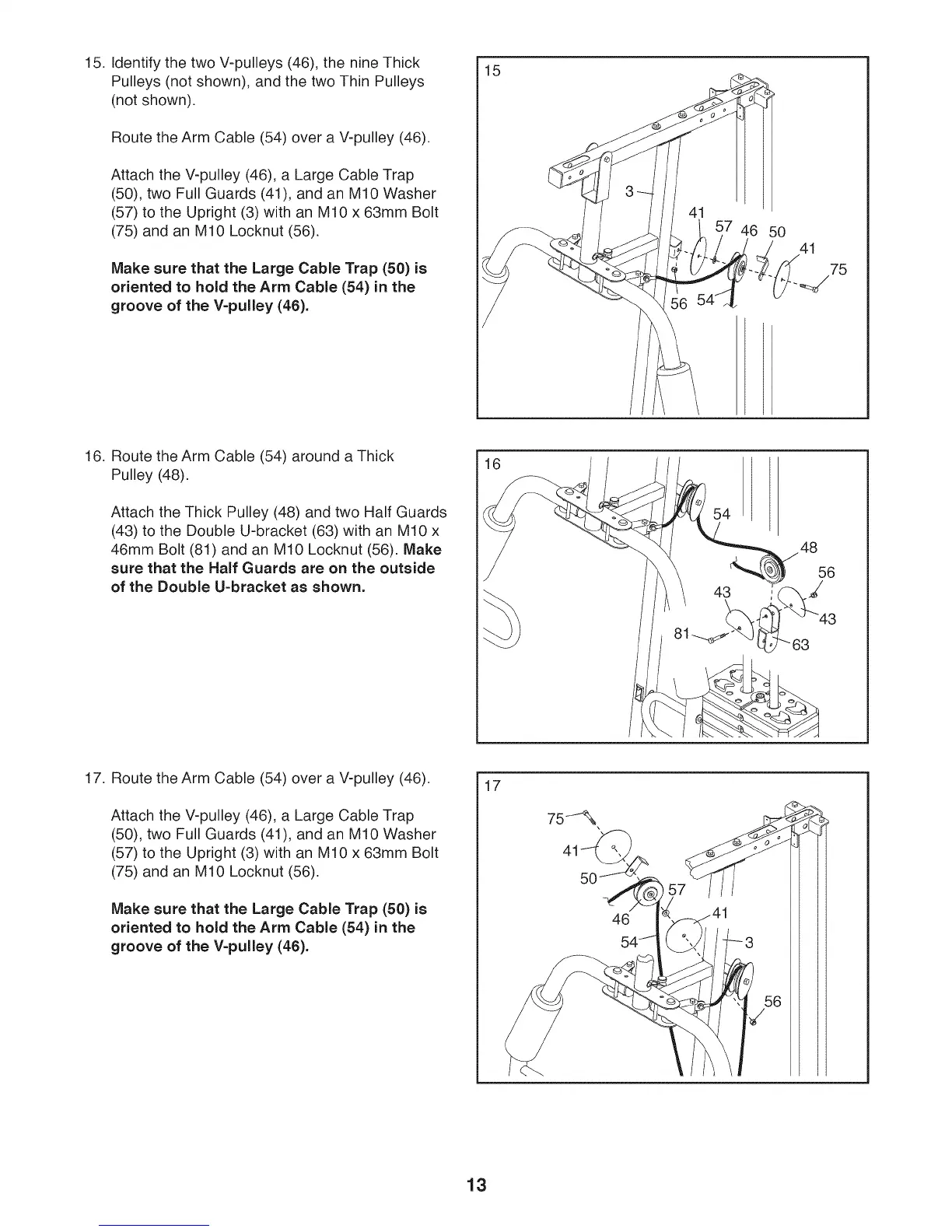
15. Identify the two V-pulleys (46), the nine Thick
Pulleys (not shown), and the two Thin Pulleys
(not shown).
Route the Arm Cable (54) over a V-pulley (46).
Attach the V-pulley (46), a Large Cable Trap
(50), two Full Guards (41), and an M10 Washer
(57) to the Upright (3) with an M10 x 63mm Bolt
(75) and an M10 Locknut (56).
Make sure that the Large Cable Trap (50) is
oriented to hold the Arm Cable (54) in the
groove of the V=pulley (46).
15
7 46
50
41
75
16. Route the Arm Cable (54) around a Thick
Pulley (48).
Attach the Thick Pulley (48) and two Half Guards
(43) to the Double U-bracket (63) with an M10 x
46mm Bolt (81) and an M10 Locknut (56). Make
sure that the Half Guards are on the outside
of the Double U=bracket as shown.
16
54
48
56
J
17. Route the Arm Cable (54) over a V-pulley (46).
Attach the V-pulley (46), a Large Cable Trap
(50), two Full Guards (41), and an M10 Washer
(57) to the Upright (3) with an M10 x 63mm Bolt
(75) and an M10 Locknut (56).
Make sure that the Large Cable Trap (50) is
oriented to hold the Arm Cable (54) in the
groove of the V=pulley (46).
17
46
i7
13








 To Next Page