27,
!i!!!_i!ii_I_!_
!ii_ _
_ii_iii!i i_
i!i_i!!iiiiiiiiiii_!iiii!iiill
ii!iiiiii_iii!_i_i!i!ii!iii_il
30
!ii_ii_i_ _ill_
_iii!i! _ i
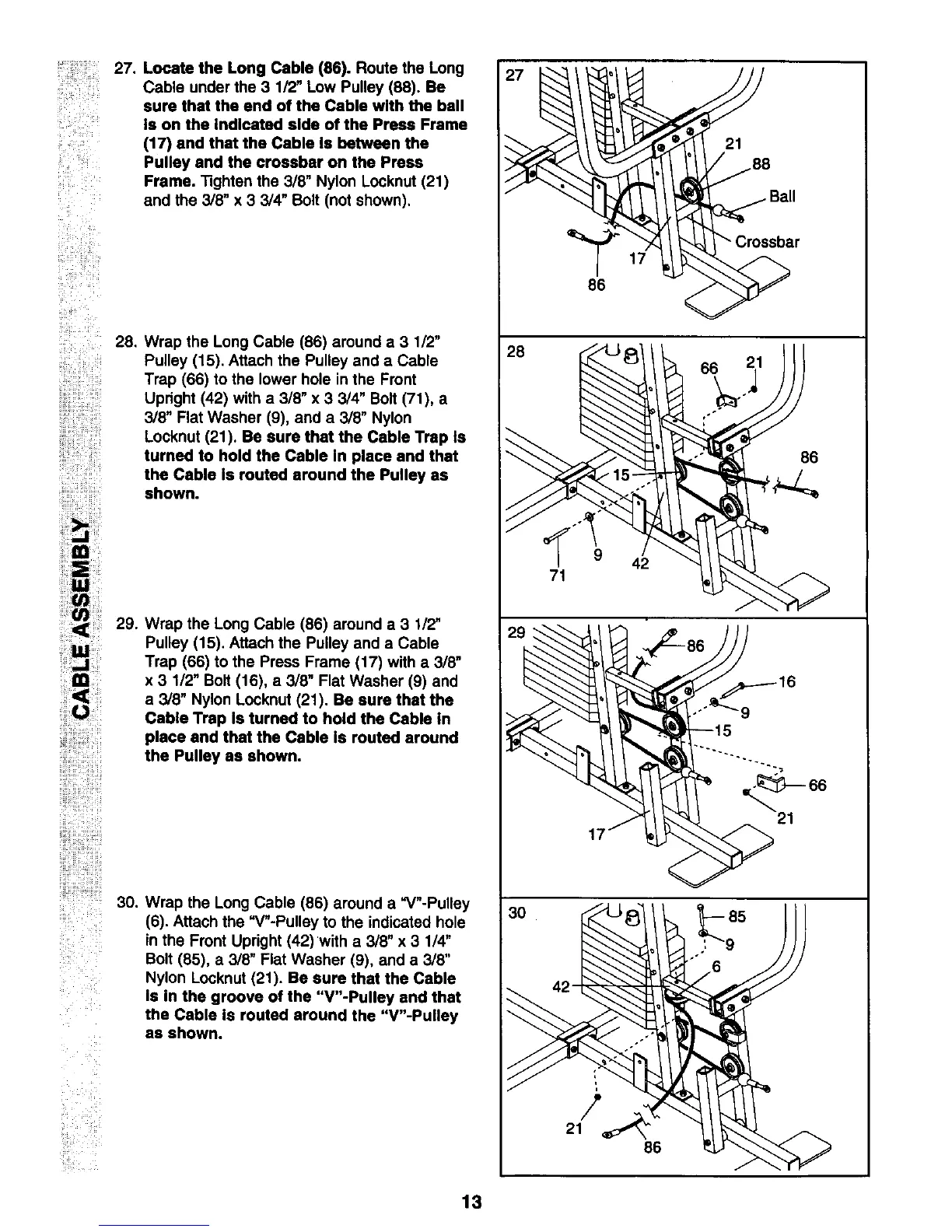
Locate the Long Cable (86). Route the Long
Cable under the 3 1/2" Low Pulley (88). Be
sure that the end of the Cable with the ball
Is on the Indicated side of the Press Frame
(17) and that the Cable Is between the
Pulley and the crossbar on the Press
Frame. Tighten the 3/8" Nylon Locknut (21)
and the 3/8" x 3 3/4" Bolt (not shown),
Wrap the Long Cable (86) around a 3 1/2"
Pulley (15). Attach the Pulley and a Cable
Trap (66) to the lower hole in the Front
Upright (42) with a 3/8" x 3 3/4" Bolt (71), a
3/8" Flat Washer (9), and a 3/8" Nylon
Locknut (21). Be sure that the Cable Trap Is
turned to hold the Cable In place and that
the Cable Is routed around the Pulley as
shown.
29. Wrap the Long Cable (86) around a 3 1/2"
Pulley (15). Attach the Pulley and a Cable
Trap (66) to the Press Frame (17) with a 3/8"
x 3 1/2" Bolt (16), a 3/8" Flat Washer (9) and
a 3/8" Nylon Locknut (21). Be sure that the
Cable Trap Is turned to hold the Cable In
place and that the Cable Is routed around
the Pulley as shown.
Wrap the Long Cable (86) around a "V"-Pulley
(6). Attach the "V"-Pulley to the indicated hole
in the Front Upright (42)with a 3/8" x 3 1/4"
Bolt (85), a 3/8" Flat Washer (9), and a 3/8"
Nylon Locknut (21). Be sure that the Cable
Is in the groove of the "V"-Pulley and that
the Cable Is routed around the "V"-Pultey
as shown.
27
28
86
71
42
/
21
42
86
21
86
13



 To Next Page