76
January, 2017
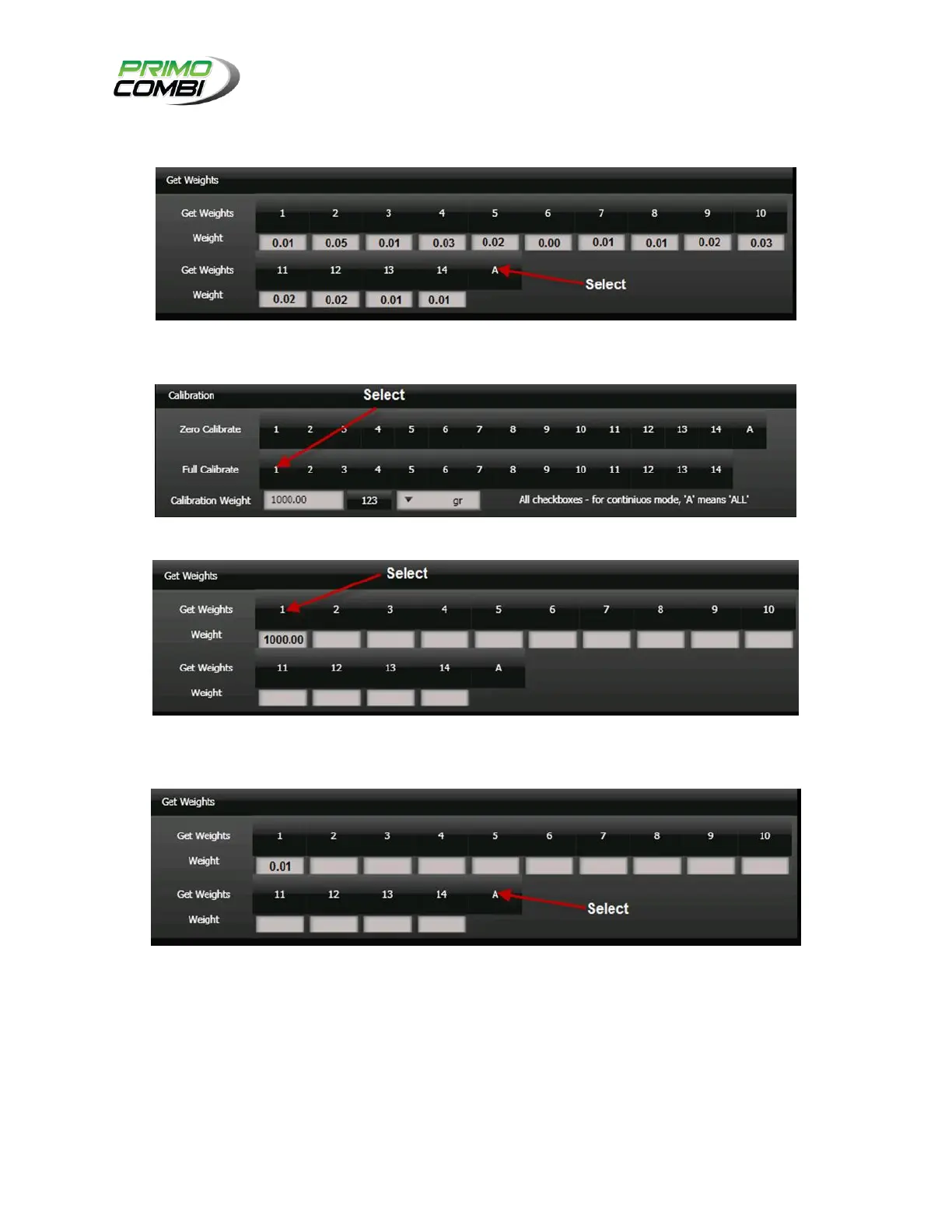
Preform a GET WEIGHT from the diagnostic screen to ensure all reading are 0.00 grams +/- 1
gram.
Have someone place a 1KG weight in weigh bucket number 1 and preform a full calibration on
lane 1.
Go get the reading by preforming a get weigh on lane 1 and ensure it reads 1000.00 +/- 1 gram.
Remove the weight from the weigh bucket
Go get the reading by preforming a get weigh on lane 1 and ensure it reads 0.00 +/- 1 gram.
If it is not, redo calibration (zero and full calibration) for the specific lane.
Continue to the next lane and repeat process till all lanes have been successfully calibrated.
Once finished, cycle all the weigh buckets under the diagnostic menu for 30 seconds.
Preform a GET WEIGHT from the diagnostic screen to ensure all reading are 0.00 grams +/- 1
gram.
If any lane is out of tolerance, redo the calibration for that lane.



 To Next Page