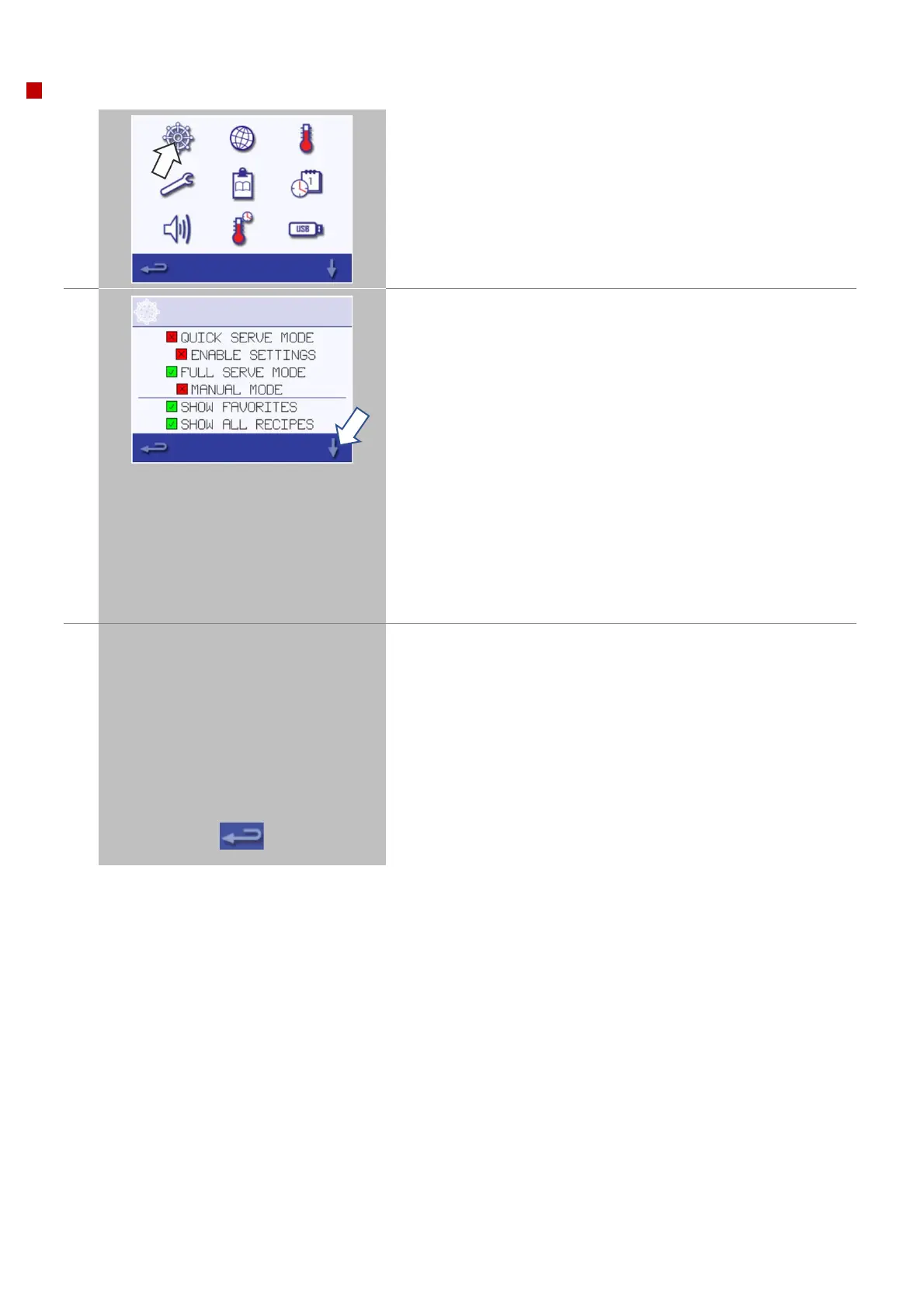
Select 'QUICK SERVE MODE' for cooking only.
Select 'ENABLE SETTINGS' to display an 'unlock' symbol on the
'Quick Serve Mode' screen to allow access to the 'settings' menu.
Select 'FULL SERVE MODE' to display the main menu screen. The
‘chef’s hat’ is then used for creating cooking profiles.
Select 'MANUAL MODE' to manually cook only via the 'chef's hat'
symbol on the main menu screen, cooking profiles cannot be
created in manual mode.
Select ‘SHOW FAVORITES’ to display the favourites icon at the top of
the cookbook screens.
Select ‘SHOW ALL RECIPE’ to display the ‘all recipes’ icon at the top of
the cookbook screens.
Use the up/down scroll arrows at the bottom of the screen to display
all functions of the 'operating mode / navigation' menu.
Select 'MAGNETRON ENERGY DELAY' to enable a magnetron warm up
period for all cooking profiles.
Select 'ENERGY SAVING' to enable the hibernation mode when the
oven is inactive.
NOTE:
If a green check mark is displayed the corresponding function is
active.



 To Next Page