_______________________________________________________________________________________________________________________________
Merrychef eikon
®
e2s Installation and User Manual
_______________________________________________________________________________________________________________________________
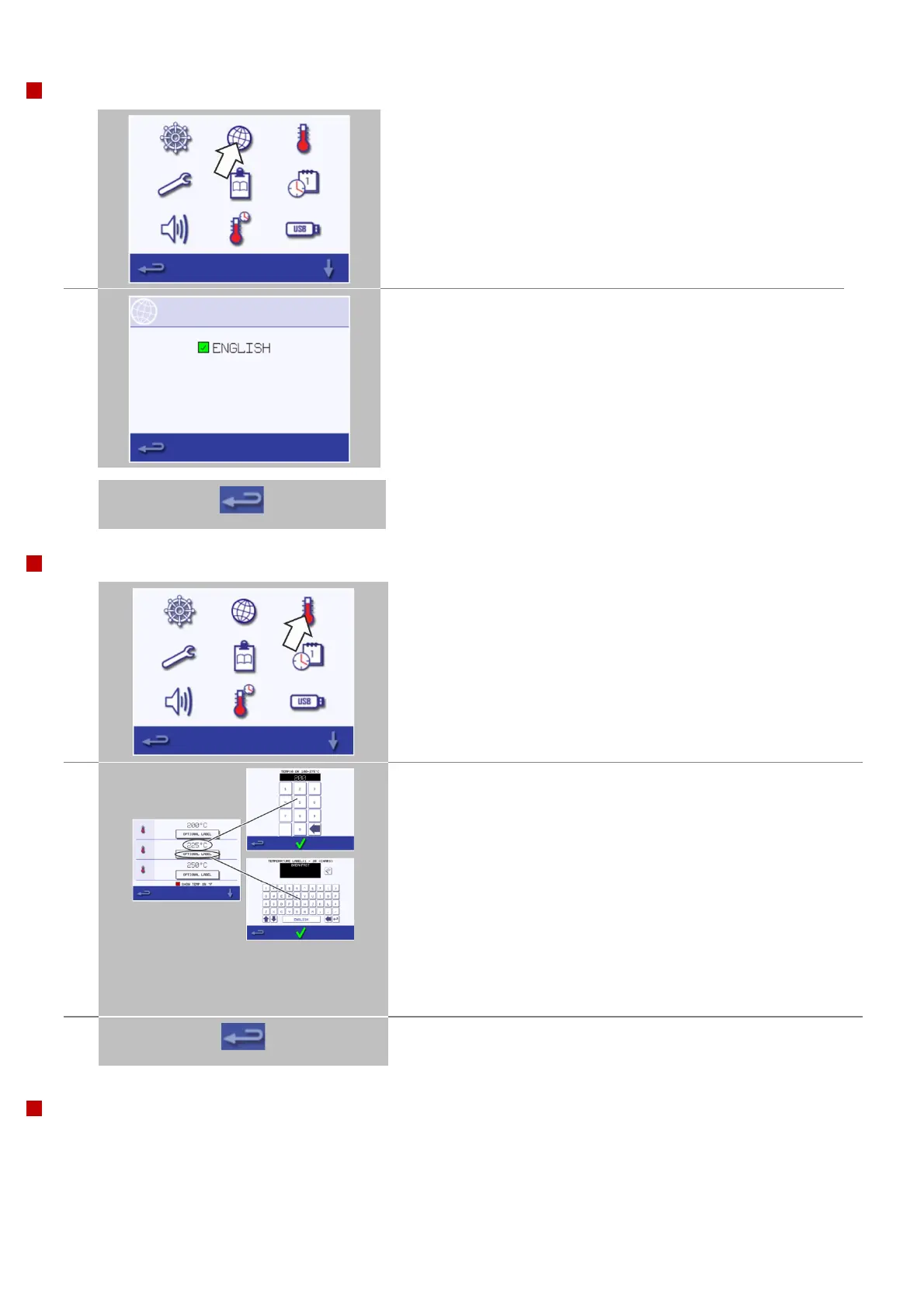
Select the 'globe' symbol.
Select the checkbox(es) of the required language(s) from the list
shown.
Note: the number of languages available for selection is determined
by the menu file (.cbr) loaded on to the oven
When finished, select backspace to return to the main settings menu.
Cavity temperature settings and labels
Select the 'temperature' symbol.
Up to six pre-heat temperatures can be set.
Note: The temperature options screen is only displayed at start up
when two or more cavity temperatures are set above minimum.
Select a ‘temperature’ symbol to add or change the cavity preheat
temperature.
Enter the required temperature on the appearing keypad and select
OK.
Zero ‘0’ can be selected for a microwave only selection.
Selecting removes the temperature selection from the pre-heat
options.
To change or set a temperature label to be displayed under a pre-heat
temperature option, select the label.
Enter the required label name on the appearing keypad and select
OK.
When finished, select backspace to return to the main settings menu.
Service information and error logs
For service information and error logs refer to 'Rectifying faults' on page 84.



 To Next Page