_______________________________________________________________________________________________________________________________
Merrychef eikon
®
e2s Installation and User Manual
_______________________________________________________________________________________________________________________________
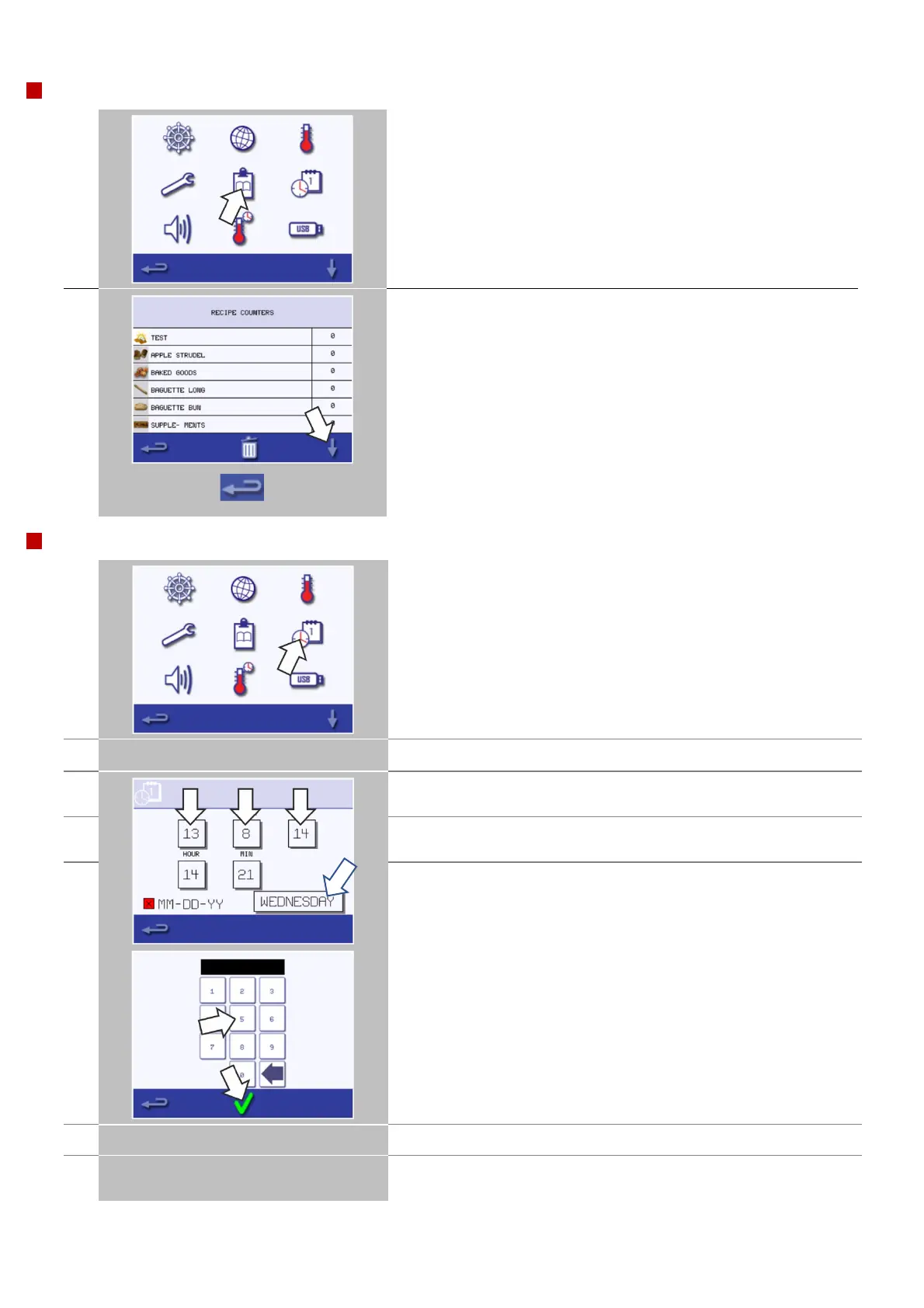
Select the 'clipboard' symbol to display a listing of cooking profile
counters.
If the list of cooking profile counters is shown, use the up/down
arrows at the bottom of the screen to scroll it.
The recipe count can be copied on to USB key, from the main menu
screen, if required.
Recipe counts can be put back to zero by selecting the individual
recipe followed by the trash can.
When finished, select backspace to return to the main settings menu.
Select the 'clock/date' symbol to display the setting options.
Select 'MONTH', enter the correct month on the keypad and select
OK.
Select 'DAY', enter the correct day on the keypad and select OK.
Select 'YEAR', enter the correct last two digits of the year on the
keypad and select OK.
To display the month first, followed by the day and year, select the
'MM-DD-YY' checkbox.
Select the day name shown to cycle through to display the correct
weekday.
Select 'HOUR', enter the correct hour on the keypad and select OK.



 To Next Page