OPERATOR’S)MANUAL))
Page!10!)
1. Release the activation lever.
When you unplug the machine, the screen will stay lit for a few seconds as the
VFD drains the power from its internal capacitors. This is normal.
!
)
)
)
NEVER open the VFD panel while plugged in or immediately after
unplugging the power cord. Severe injury or death may result.)
)
!
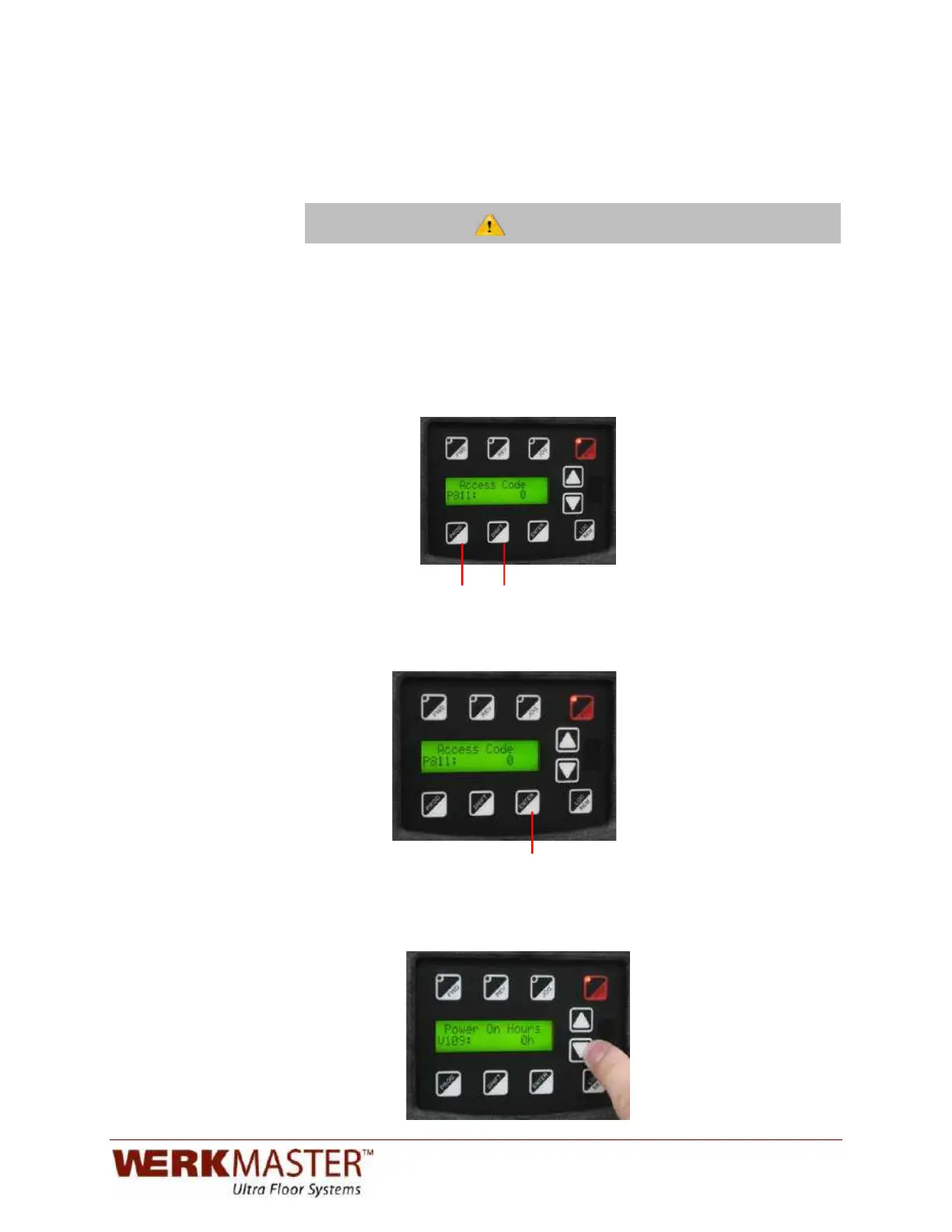
To view these screens:
1. Access the programming menu by pressing and holding the
SHIFT key and pressing the program (PROG) key once.
!
!
!
!
!
!
!
! ! ! ! ! ! ! ! ! ! ! ! !
!
!!!!!!!!!!!!!!!!!!!!!!!!!!!!!Program!Key!!!!!Shift!Key!!!!!!
2. Press ENTER to bypass the access code screen and enter the programming
menu.
!
!
!
!
!
! ! ! ! ! ! ! ! ! ! ! ! ! ! !
!
!
! ! ! ! ! !
! ! ! ! ! ! ! ! ! Enter!Key!
3. Using the up and down arrow keys, scroll down until you reach parameter
V109. This parameter displays the total time the machine has been in plugged
in.


 To Next Page