OPERATOR’S)MANUAL))
Page!11!)
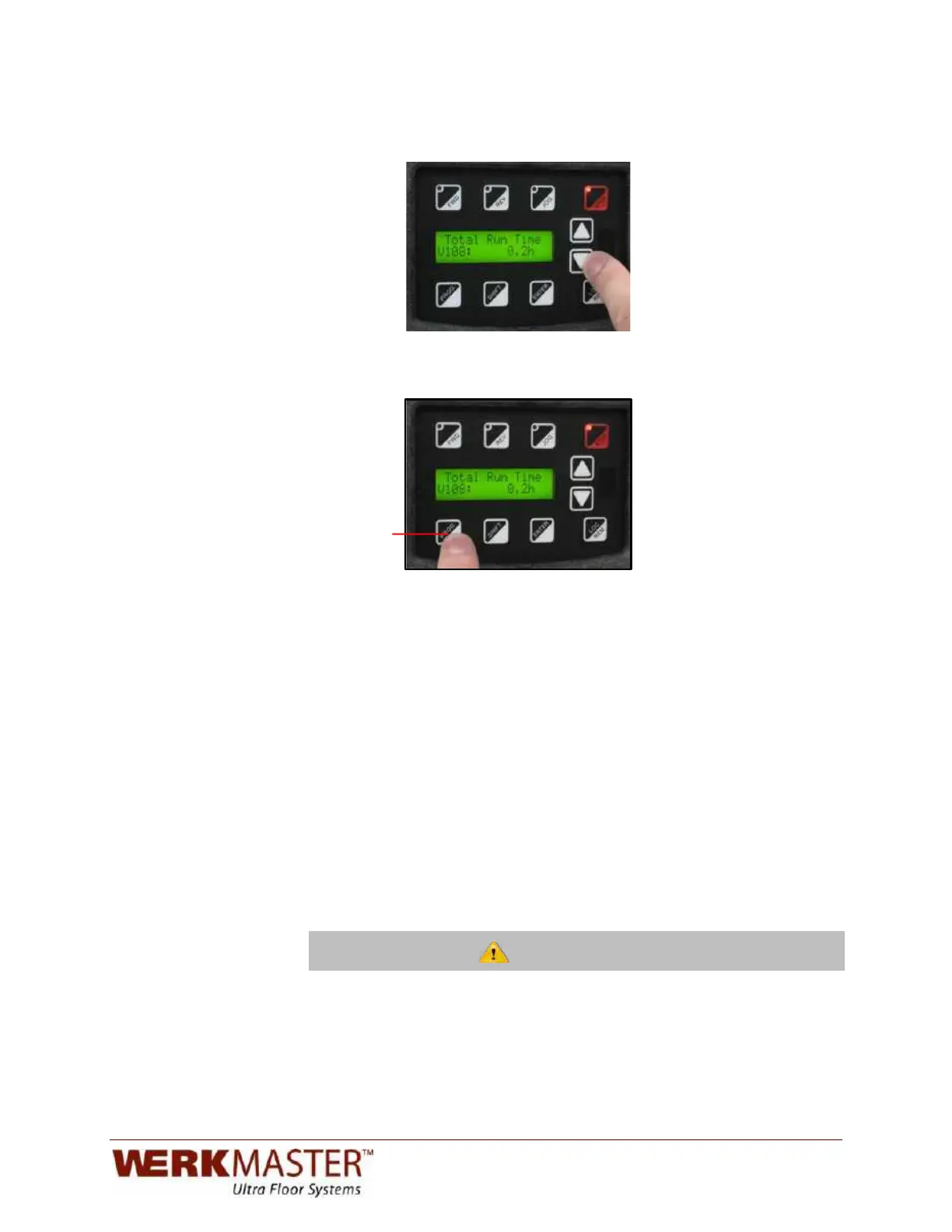
4. Using the arrow key, scroll to parameter V108. This parameter displays the
total time that the machine has actually been running.
5. To exit the programming menu, simply press the program (PROG) button.
This should bring you back to the main operation screen.
Program!Key!
!
!
!
To install and remove the pad driver on the bottom of the machine, you will need
a 17 mm socket wrench, a soft face mallet, and some medium-strength thread
locker (blue Loctite 243 or equivalent).
To remove the pad driver:
1. Slip the 17 mm socket wrench over the pad driver bolt and strike the wrench
with the soft face mallet in a counter-clockwise direction to loosen, then
remove the bolt (O).
2. When installing a new pad driver or re-installing an existing one, apply a
generous amount of thread locker compound to the bolt and threaded drive
shaft. Insert bolt through the hole in the pad driver.
NOTE: Reapply thread locking compound every time a pad driver is removed.
3. Line up the bolt to the threaded end of the shaft and start the first couple of
threads.
4. Once the bolt is engaged, make sure the drive shaft is properly seated within
the pad driver slot before tightening the bolt all the way.
!
!
Failure to seat the pad driver could result in the pad driver slot being stripped out,
the threads in the shaft being stripped, the machine leaving heavy tool marks,
and the tooling overheating.


 To Next Page