OPERATOR’S!MANUAL!!
+,-.!YY!!
!
!
!
!
!
!
!
!
!
!
!
!
!
!
!
!
!
!
!
!
!
!
!
!
!
!
!
!
!
!
!
!
!
!
!
!
!
!
!
!
!
!
!
!
!
!
!
!
!
!
!
!
!
!
!
Operation and Safety Guide
TITAN XT
Vendor Website: www.werkmaster.com Technical Support: 866.373.9375
Tool Application: The TITAN XT
TM
can be used to grind and/or polish
various floor surfaces.
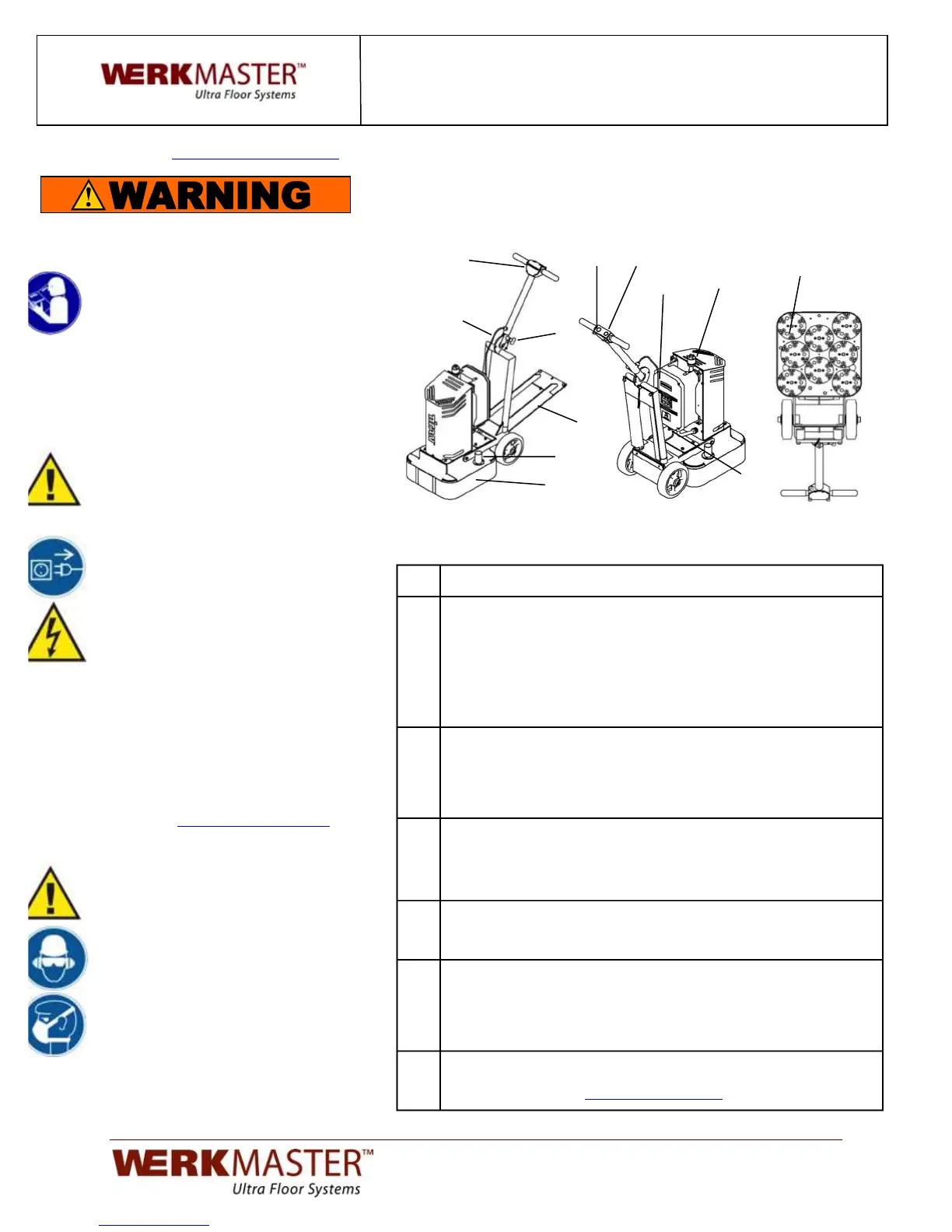
Fig 1 Fig 2 Fig 3
Tool Operation:
Unplug the power cord from the twist lock plug (A). Ensure the handle
is in its full upright position (Fig 1). Tilt the machine back (Fig 3) by
releasing and stepping on the step down plate (J) and pulling down on
the handle. Choose the appropriate tooling holder attachment – 6 3/4”
magnetic Plug ‘N Go plate (B) for Metal Bond tools or 6 3/4”
Foam/Velcro Adapter plate for polishing resins. Insert the 2 shear pins
into the rubber grommets. Attach the corresponding tooling to the
plates.
Slowly lift the equipment back to the upright position using the step
down plate (J) to prevent the TITAN XT from hitting the floor. Loosen
and lower the dust skirts (C) so that it is just above the working
surface. Ensure the 8 pin connector cord (K) is securely fastened to
the mating receptacle (L).
Adjust the handle to a comfortable operating position by pulling and
releasing the pop pin at the swivel joint (E). Connect the vacuum
hose(s) to the vacuum pipes (G) located on either side. Plug the power
cord into the twist lock plug (A). The display/keypad (H) will light up.
Turn the speed control knob (D) till the display/keypad reads 450 RPM.
Grasp the handle bars. To start the equipment press the green START
button (I). Adjust the speed (D) as required. To stop the equipment
press the red STOP button (F).
When the equipment is in operation it should move smoothly and
without chattering. If chattering or excessive vibration occurs stop the
machine equipment, unplug the power cord, tilt the machine back and
check at all the Plug ‘N Go/Adapter plates are installed correctly and
the tooling is seated properly.
Move the equipment continuously in any direction using a circular
motion. Be sure keep it moving at all times to prevent unwanted marks.
View training videos at
SAFETY TOPICS:
Read the Operator’s Manual or the
Operation and Safety Guide and all
safety precautions before attempting to
operate WerkMaster machines. Failure
to follow the safety precautions could
result in severe personal injury or
death.
SAFETY CHECKLIST:
WARNING: ALWAYS turn off the
equipment and unplug the power cord
when changing discs/tooling, before
servicing, and when not in use.
1. Before connecting the equipment to a
power source make sure that it is the
correct voltage.
2. Ensure all cords on the equipment
are securely fastened and in good
repair.
3. Ensure all extension cords and power
outlets are rated for the intended use,
are in good repair, and are properly
grounded (3 prong configuration).
4. Never operate the equipment under
the influence of drugs or alcohol or
when extremely fatigued.
5. If the equipment doesn’t start or stops
unexpectedly, first check power
source and all electrical connections
then go to
or
call Technical Support:
WARNING: Never turn on the
equipment while it is tilted back.
Discs/tooling attached to the bottom
could eject and become a lethal
projectile.
Wear appropriate personal safety
equipment such as hearing and eye
protection and a dust mask or respirator.


 To Next Page