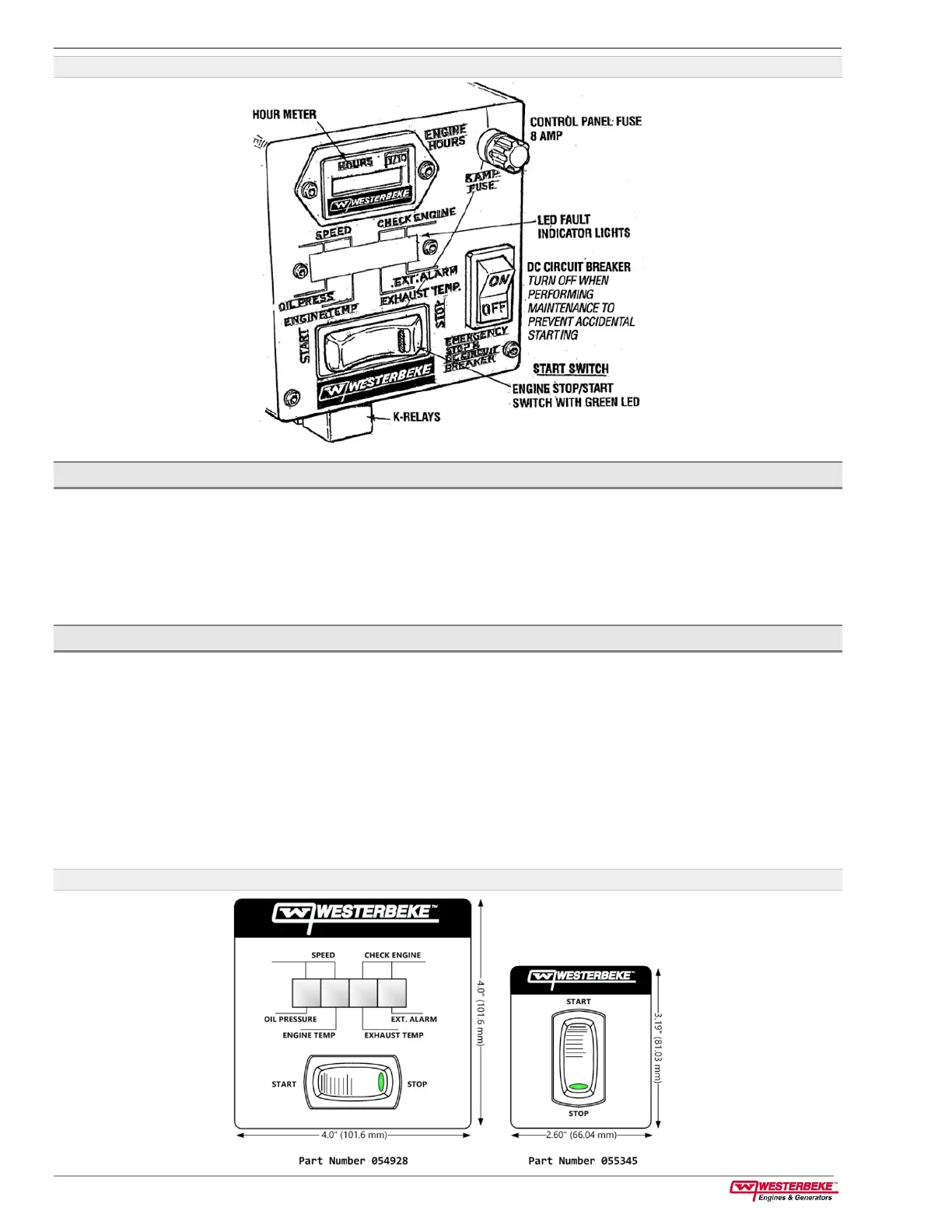
4 Startup and Basic Operation Operator Manual for Gasoline Generators
page 16
Figure 11: Control Panel DC Circuit Breaker and Start/Stop Switch
4.7.2 How to Start and Stop the Generator (Remote Control Panel)
You can also perform the same steps using an optional remote control panel. Two remote start/stop panels are
available that allow for the engine/generator to be controlled from any location on the boat.
The remote panels connect to the main panel using a 15-foot or 30-foot wiring harness. You can combine
them to form a 45-foot length. To connect a remote panel, refer to the Wiring Diagram section of this manual.
Once installed, the engine/generator can be started and stopped from either the remote or the main panel.
4.7.3 Remote Start/Stop Panel (With LED Fault Display)
The components on this panel include:
■
A three-position start/stop rocker switch.
■
A green LED run indicator light on the rocker switch.
■
A four-position LED fault shutdown display.
The start/stop rocker switch functions the same as the start/stop rocker switch on the generator control panel
as previously explained.
The green LED run indicator light on the rocker switch is illuminated whenever DC power is ON. It will go dim
as the engine cranks and will brighten as the engine starts, indicating the generator is running.
Figure 12: Remote Start/Stop Panels



 To Next Page