English
|
9
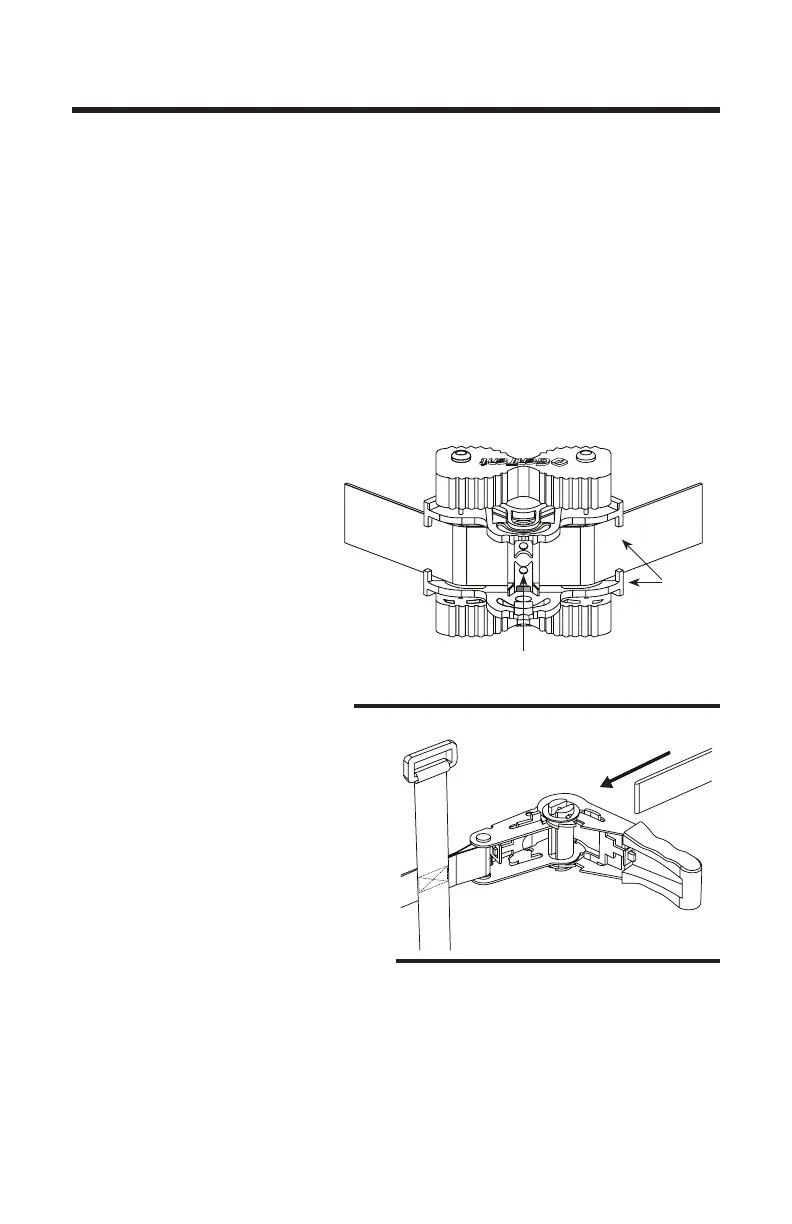
generator. It is threaded through and behind the Angle Brace center (Fig.
1.11) circling around the generator to feed into Ratchet Buckle for tightening.
h. Unwind your Kevlar
®
Strap, take the loose end and feed it through each
Angle Brace, ensuring to stay under the strap guides (Fig. 1.11) and
behind the center section (Fig. 1.11). While feeding the strap through
each of the Angle Braces avoid twisting the strap and be sure the
grommets are facing toward the case.
Strap the Assembly to the Case
With the Kevlar
®
Strap fed through the four Angle Braces you are now going
to tighten the strap to hold them in place.
i. Loosely place the four Angle Braces next to the four corners of the gen-
erator with the strap running
through them and the Gator
Grommet™ facing the case.
NOTE: Make sure the back of
the ratchet is facing the case,
this ensures you can open
and close the ratchet handle
without issue.
j. With the Ratchet open, feed
the loose end of the strap
through the center slot so
that the strap is coming
towards the top of the ratchet
handle (Fig. 1.12). Do this until
all the excess strap is through
the ratchet center. Make sure
that the strap has not twisted.
k. Pull the Kevlar® Strap slack tight
through the Ratchet Buckle cen-
ter. Maintaining tension on the
Kevlar® Strap, position the Angle
Braces into the desired positions
on the corners of the generator. (Fig. 1.13).
Strap
Guides
IMPORTANT: Install strap behind
this center section
Fig. 1.11
Fig. 1.12
ASSEMBLY


 To Next Page