Glasstilt Rev. 2.0 (202202)
Operating instructions
43
4.3.2 Draining and internal cleaning, WD-6 and WD-7
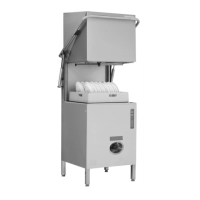
Position of cleaned components after washing
Machines without a drain pump
When the machine is switched off, the number of baskets washed is displayed for
around 5 seconds.
Two horizontal dashes "--” are then shown in the display for 3 minutes. The
machine is still live at this point. Emptying and internal cleaning must be done
within this time. The machine then switches off automatically.
• Open the hood. Take out the filters (13). Drain the washing tank by
removing the level pipe (12). Press button 0/1 (9).
• Close the hood. Press the button “Wine glasses” (P3) (8). The display (2)
shows "SC" and the internal cleaning process starts. The display (4) shows
the remaining cleaning time. When the cleaning process is finished, both
the displays show two horizontal dashes "--".
• Open the hood. Check that the washing and rinsing nozzles (15, 17) are
clean and that no objects have fallen and lodged in the machine.
• Clean the filters (10, 13) and the level pipe (12).
• Store the cleaned parts in a washing basket. Make sure that the rubber
sleeve (11) on the level pipe does not become deformed, by allowing it to
hang free.
• Leave the machine with the hood open.


 To Next Page