Issue 2.0
4850 / 4860 Master Clock
Operating and Installation Instructions
4 - Location Setup
The 4850 / 4860 Master Clock provides advanced time zone
functionality. Regardless of time synchronisation source, the
4850 / 4860 can be used to provide time and date information
referenced to UTC, user ‘local’ time or other custom time zone.
Incorporating ‘Set Once’ technology, the 4850 / 4860 will
automatically calculate future seasonal time changes for all 64
of the preset time location code settings.
Setting the location
For installations where the output of the 4850 / 4860 is to be
referenced to UTC / GMT, the location code should be set to 00.
For installations where the output of the 4850 / 4860 is to be
referenced to the ‘local’ time zone, select the appropriate
location code from the table opposite. (eg. For a unit installed
in Birmingham, England, where ‘local’ time output is required,
location code 01 should be used.)
User Programmable Time Zone
For time-offsets and daylight saving time change dates not
covered by the location codes on page 4-2, a user
programmable time zone is provided. Information regarding
the time offset from UTC and any daylight saving change rules
may be input via a 12 digit code.
Please contact our technical department for further information
regarding this function.
4-1
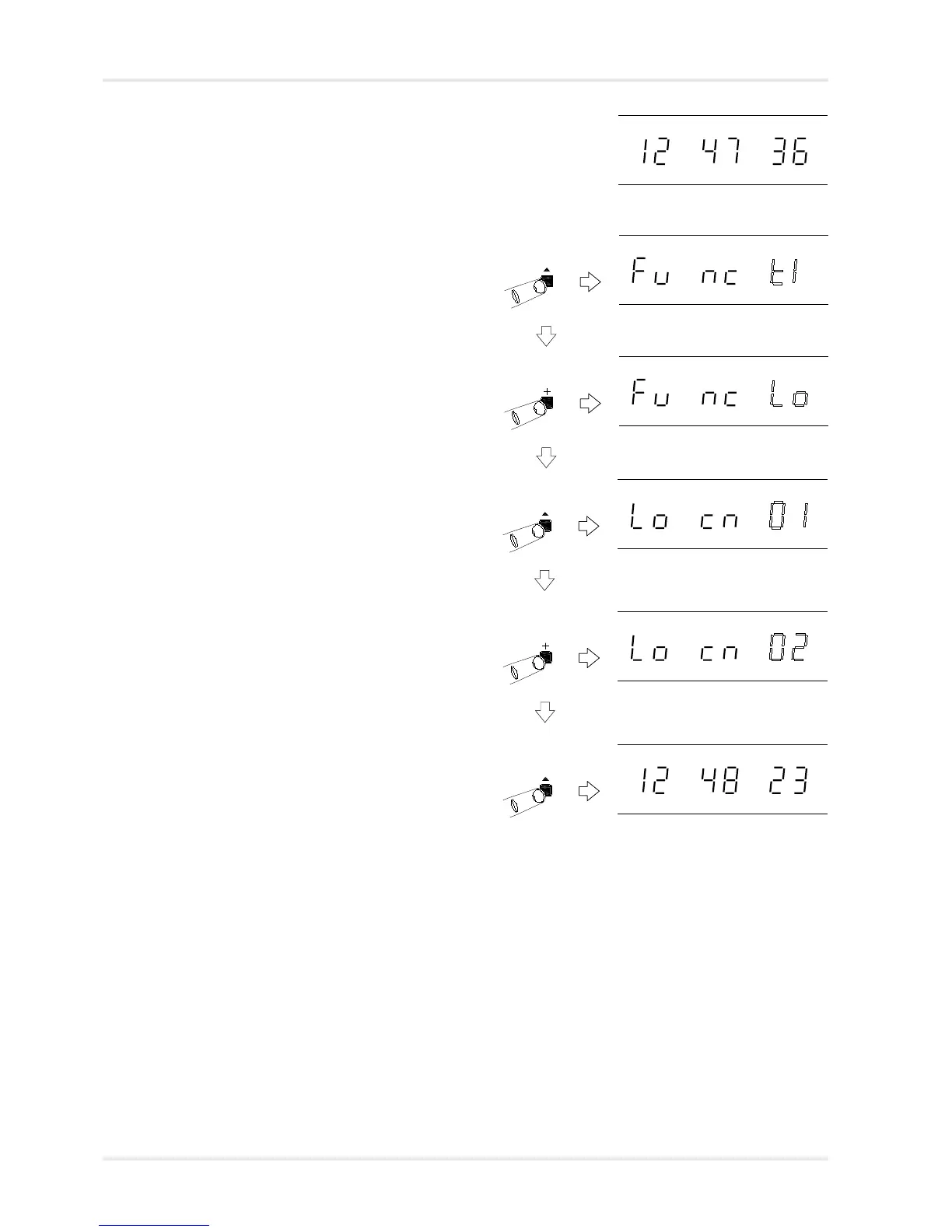
Normal time display
Function ‘Time Setting Mode’. Press ‘+’
to move to ‘Location Setting Mode’.
Function ‘Location Setting Mode’. Press
‘^’ to select.
‘Location Setting Mode’ selected, with
current location flashing. Use ‘+’ and
‘-’ to select the required location from
the table on page 4-2.
Press ‘^’ to store the new location
setting and return to normal time
display.
Normal time display.



 To Next Page