Issue 2.0
4850 / 4860 Master Clock
Operating and Installation Instructions
2-6
Setting the Time
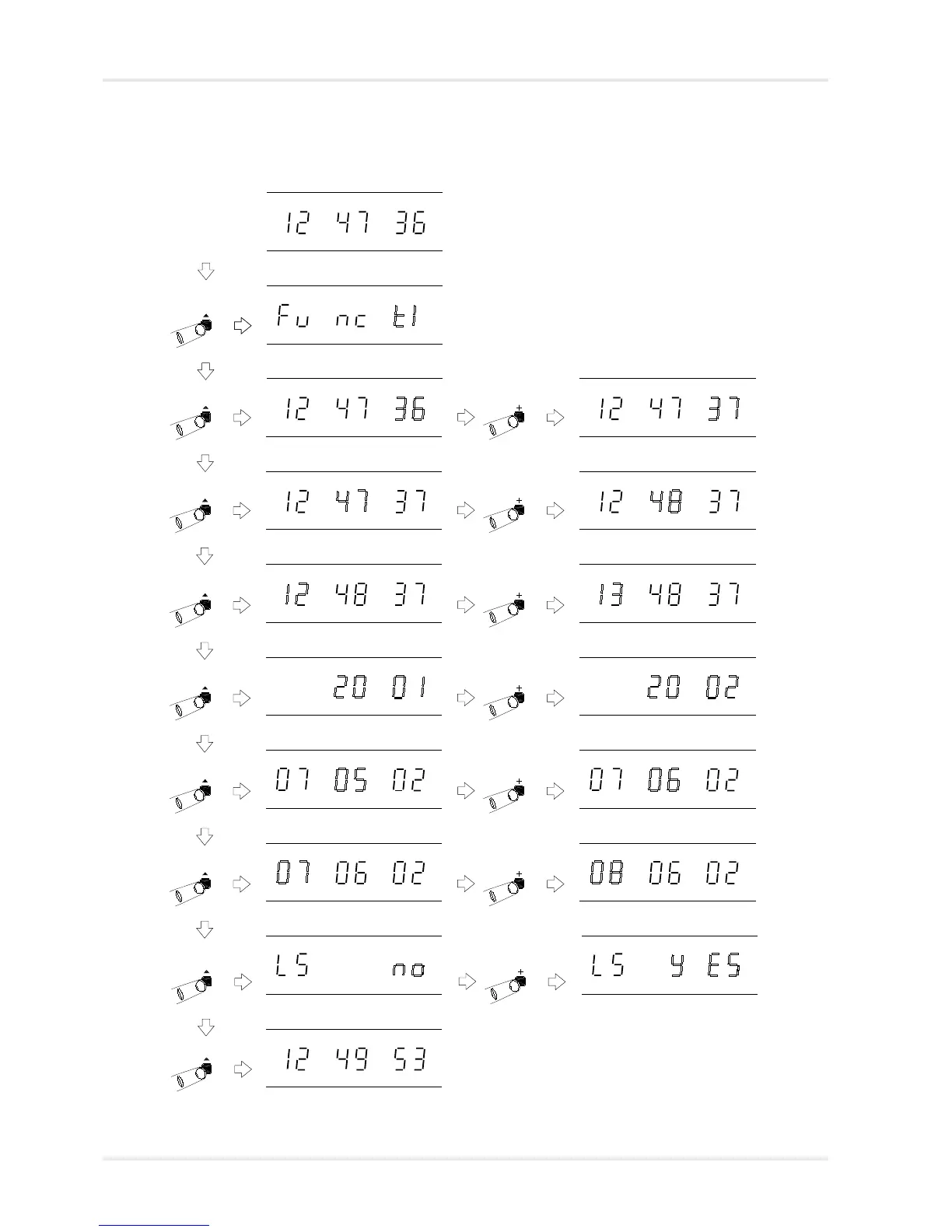
A detailed diagram with full instructions on manually setting
the time and date is shown below.
Normal time display
Time setting mode selected, with
seconds flashing.
Time setting mode selected, with
minutes flashing.
Time setting mode selected, with
hours flashing.
Time setting mode selected, with
year flashing.
Time setting mode selected, with
month flashing.
Time setting mode selected, with
day flashing.
Time setting mode selected, with
leap second flashing.
Normal time display
Function ‘Time Setting Mode’.
Press ‘^’ to select.
‘+’ increments the seconds count, ‘-’ holds
the seconds count at the current value.
‘+’ and ‘-’ change the minutes
value.
‘+’ and ‘-’ change the hours value.
‘+’ and ‘-’ change the years value.
‘+’ and ‘-’ changes the month
value.
‘+’ and ‘-’ changes the day value.
‘+’ and ‘-’ changes the leap
second value. Please refer to
page 2-7 for further information.



 To Next Page