WHEATON UniSpense
®
PRO Peristaltic Pump
WHEATON | 800.225.1437 (U.S. & Canada Only) | 856.825.1100 | www.wheatonsci.com| P/N 50099073 Rev. 2/2/10 Lit. No.8734
14
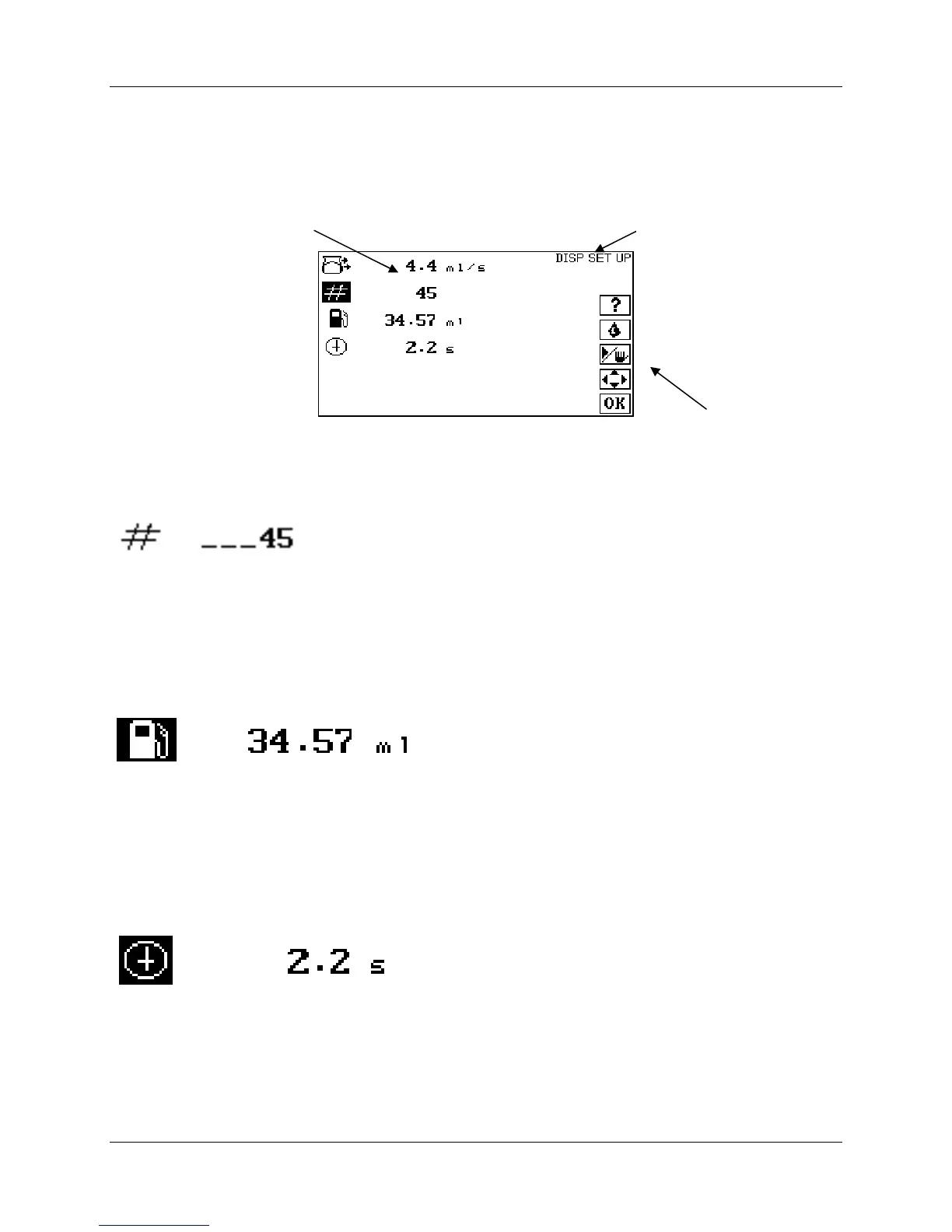
11.0 Making Batch and Single Dose Dispenses
From the HOME screen, press OK to navigate to the DISPENSE SETUP screen:
11.1 Batch Count
Use the UP and DOWN keys to navigate to the batch count. The allowable range is 1 – 99999:
Use the UP and DOWN and the LEFT and RIGHT keys to enter the batch count. Press OK when done.
Entering 1 will provide a single dispense.
11.2 Volume per Dispense
Use the UP and DOWN keys to navigate to the Volume per Dispense icon:
Use the UP and DOWN and the LEFT and RIGHT keys to enter volume per dispense. Press OK when
done.
11.3 Delay Between Dispenses
Use the UP and DOWN keys to navigate to the Delay icon. The available range is 0.5 – 9.99 seconds:
Use the UP and DOWN and the LEFT and RIGHT keys to enter the delay in seconds between dispenses.
Press OK when done.
Flow rate
Active Keys
Mode


 To Next Page