WHEATON UniSpense
®
PRO Peristaltic Pump
WHEATON | 800.225.1437 (U.S. & Canada Only) | 856.825.1100 | www.wheatonsci.com| P/N 50099073 Rev. 2/2/10 Lit. No.8734
16
12.1 To Store a Parameter
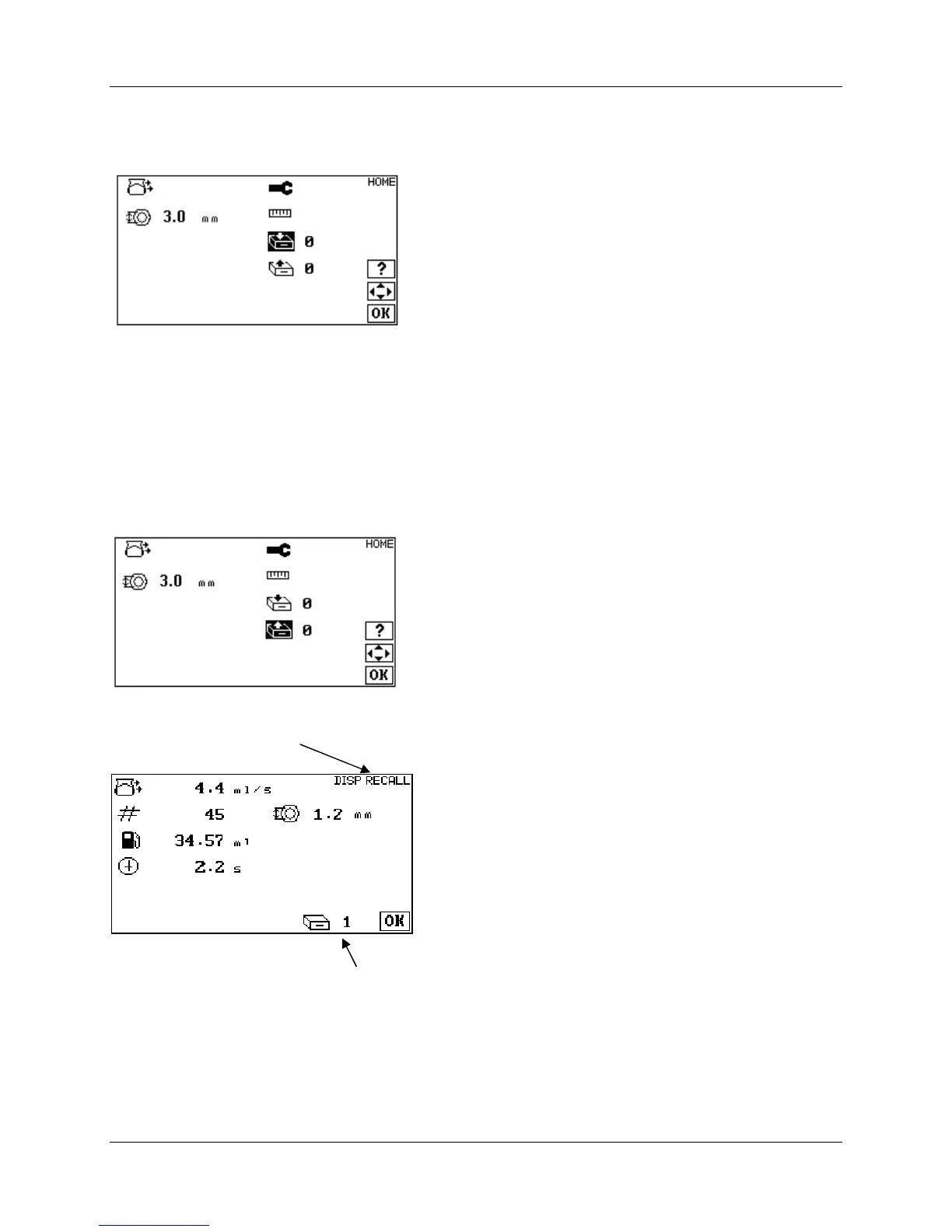
Set all pump parameters to desired settings. Navigate to the HOME screen and select the storage icon:
Use the UP and DOWN and the LEFT and RIGHT to select a storage register (1-9). Press the OK key to
store parameters in non-volatile memory. A special tone will sound to confirm storage of parameters. If
parameters are stored in a register already containing data, the old data will be overwritten with the new
parameters.
12.2 To Recall a Parameter
Press the UP and DOWN and the LEFT and RIGHT keys to recall a storage register (1-9), and then press
OK. A special tone will sound to confirm recall of parameters. If the unit appears to skip over certain
registers when recalling a parameter, it means that the register skipped is empty. An empty storage
register will not be accessible.
The contents of a RECALL register can be previewed by pressing the ? (info) key and pressing OK when
done.
Previewing Memory Register #1


 To Next Page