For Service Technician Use Only
DIAGNOSTICS
1-20
n
French-Door Boom Mount Refrigerator
Diagnostics
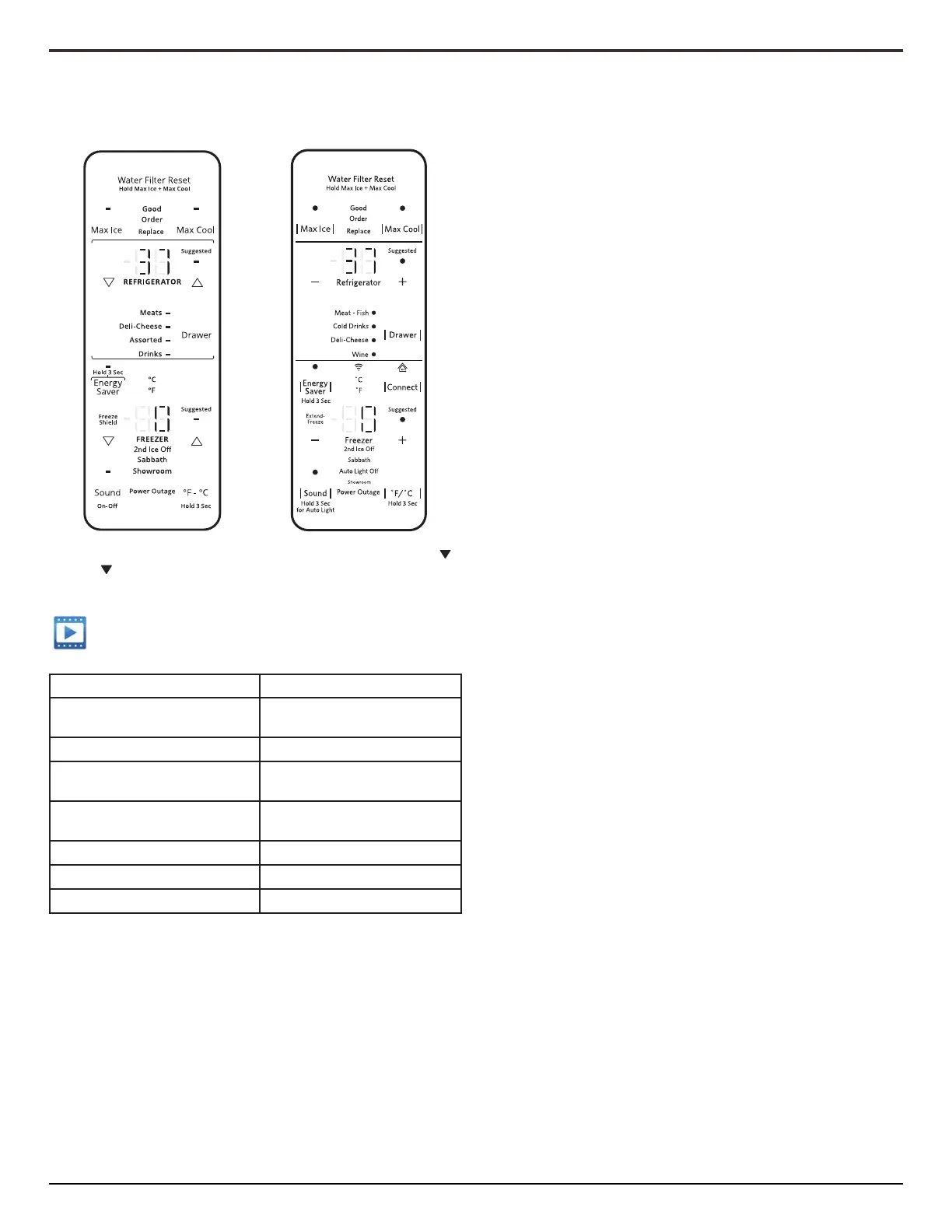
• Keep both “—” and “—” buons pressed for 3 seconds or [ ]
and [ ] buons.
• Countdown will display and a chime will play upon entry into
Service mode.
Service mode requirement Button on Main UI
Enter Service Key Combinaon “—” and “—” temperature
buons pressed for 3 seconds
Enter Key for Navigaon “Drawer” buon
Increment Key for Navigaon “+” buon on the upper
7 segment display
Decrement Key for Navigaon “-“ buon on the upper
7 segment display
Back Key for Navigaon “Max Cool” buon
Degree C LED Indicator “°C” indicator
Degree F LED Indicator “°F” indicator
To Exit Service diagnoscs, use “Max Cool” Key to back out of
funconal test. Press and hold “-” and “-” temperature buons
simultaneously for 3 seconds.
NOTE: If a test or mode runs over “99” on the display, the User
Interface will ash digit 1 for one second, and then display digit 2.
The number will display. i.e. “100” will display “1” rst for one
second, then display “00”. “101” will display “1” rst for one
second, and then display “01”, etc.
Service Test - 00 Exit Service Mode:
• This step is an alternave method to exit service mode and
return to Normal Operaon.
Service Test - 01 RC Thermistor
• Read RC compartment Temperature. SH indicates “shorted”
thermistor, OP indicated “open” thermistor.
Service Test - 02 FC Thermistor
• Read FC compartment Temperature. SH indicates “shorted”
thermistor, OP indicates “open” thermistor.
Service Test - 03 RC Evaporator Thermistor
• Read Refrigerator Evaporator Temperature. SH indicates
“shorted” thermistor, OP indicates “open” thermistor.
Service Test - 04 First FC Evaporator Thermistor
• Read Freezer Evaporator Temperature. SH indicates “shorted”
thermistor, OP indicates “open” thermistor.
Service Test - 05 Pantry Thermistor
• Read Pantry compartment Temperature. SH indicates
“shorted” thermistor, OP indicates “open” thermistor.
Service Test - 14 Door Ice Box Thermistor
• Read RC compartment Temperature. SH indicates “shorted”
thermistor, OP indicates “open” thermistor.
Service Test - 16 Door Ice Maker Tray Thermistor
• Read Icemaker Tray C Temperature. SH indicates “shorted”
thermistor, OP indicates “open” thermistor.
Service Test - 17 Freezer Ice Maker Tray Thermistor
• Read Freezer Icemaker Tray Temperature. SH indicates
“shorted” thermistor, OP indicates “open” thermistor.
Service Test - 18 Second FC Evaporator Thermistor
• Read Freezer Evaporator Temperature. SH indicates “shorted”
thermistor, OP indicates “open” thermistor.
Service Test - 23 RC Maximum Temperature; Service
Test - 24 FC Maximum Temperature; Service Test - 25
Pantry Maximum Temperature; Service Test - 26 Ice
Box Maximum Temperature
• Maximum temperature reached during the last 6 hours of
operaon. Temperature is saved every hour, keeping the last 6
hours for analysis. The maximum is displayed on the UI screen
from the last six saved values.
Service Test - 28 RC Average Temperature; Service
Test- 29 FC Average Temperature; Service Test - 30
Pantry Average Temperature; Service Test - 31 Ice Box
Average Temperature
• Average temperature during the last 6 hours of operaon.
Average is calculated using a running average lter.
Service Test - 33 RC Minimum Temperature; Service
Test - 34 FC Minimum Temperature; Service Test - 35
Pantry Minimum Temperature; Service Test - 36 Ice Box
Minimum Temperature
• Minimum temperature reached during the last 6 hours of
operaon. Temperature is saved every hour, keeping the last 6
hours for analysis. The minimum is displayed on the UI screen
from the last 6 saved values.
Service Test - 38 Compressor Speed Change without
Ramp
• Control the compressor speed. When entering service test,
the compressor goes o if it was previously on.
• Change the compressor duty cycle between 0 and the
maximum compressor speed by pressing “+” to increment
and “-” to decrease the speed.
• For Linear Compressors there is a compressor protecon
against shung the compressor o for 2½ minutes aer
changing to the ON state. Therefore the compressor will run
for 2½ minutes aer changing the speed.




 To Next Page