30
Home Screen
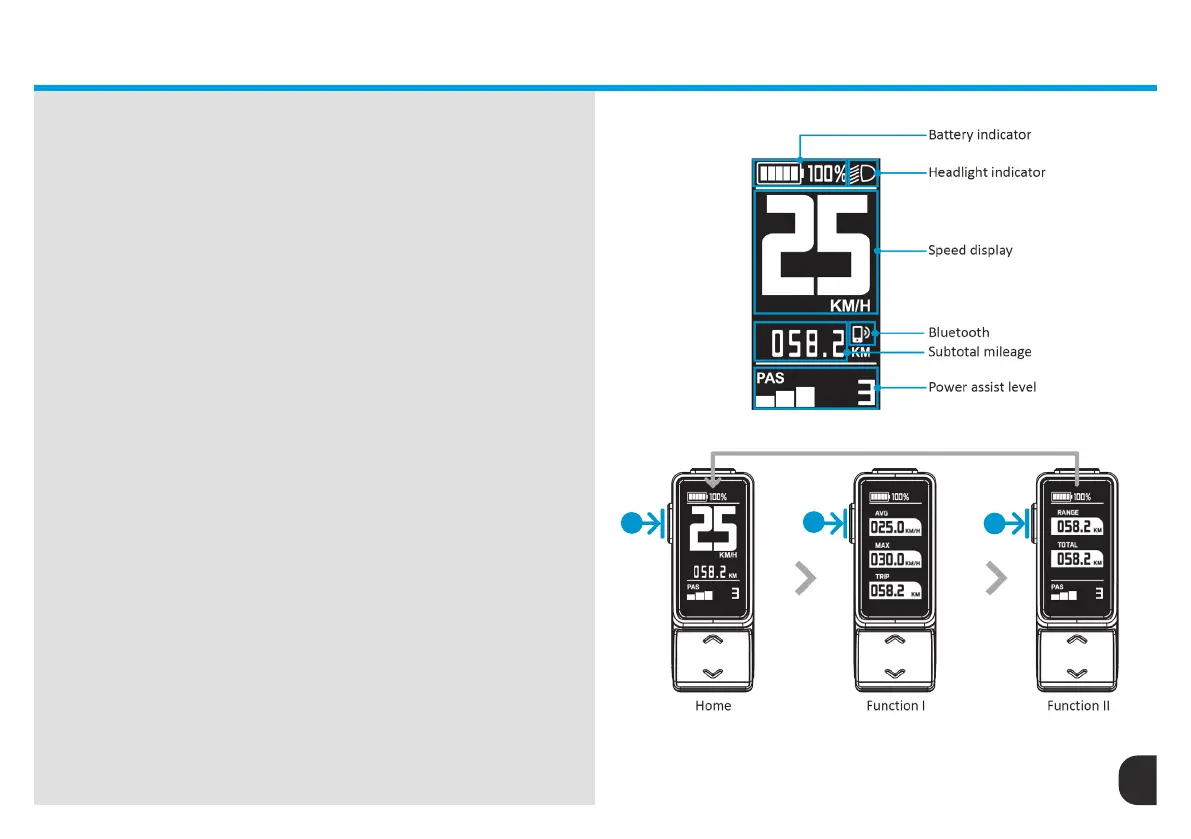
Please study the ‘Home Screen’ illustration to the right to fully
understand the data being displayed. It is very important that these
instructions are followed and understood to operate your eBike safely.
Failure to operate the eBike in a safe and controlled manor can lead to
accidents putting the rider and others at risk.
HOME SCREEN
Mode Switch
To navigate from the home screen, press the mode button (2) to switch
the screen from Home to Function I and Function II.
Whilst riding, if the no commands are given, the screen will
automatically return to Home Screen after 5 seconds.
With one click of the mode button (2) Function I displays the average
speed (AVG), maximum speed (MAX) and subtotal mileage (TRIP). With
two clicks of the mode button (2) Function II displays the available
range (RANGE) and Total mileage (TOTAL). Please see illustration
showing Home, Function I, and Function II screens.
2
2
2
HOME SCREEN


 To Next Page