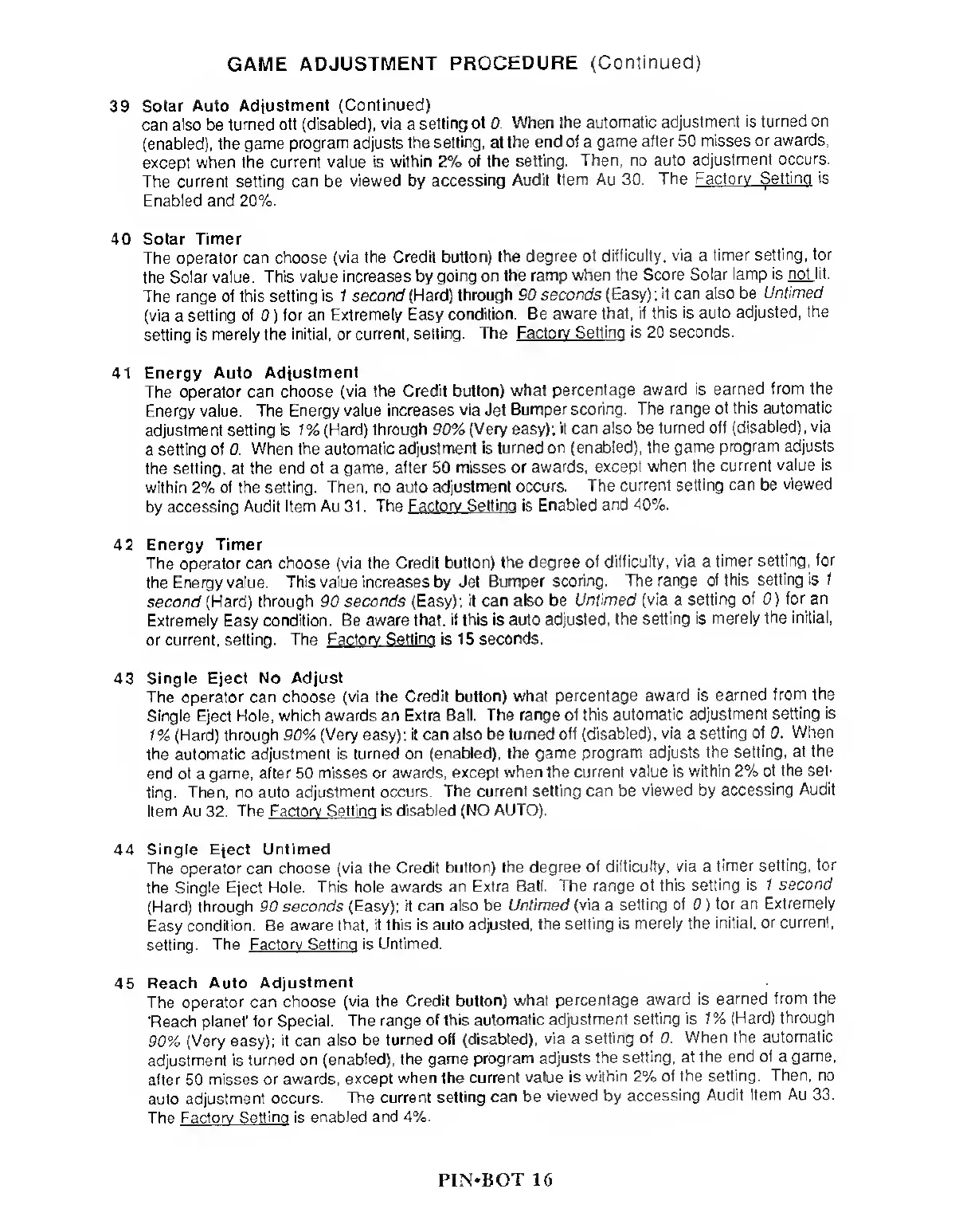
GAME ADJUSTMENT
PROCEDURE
(Continued)
39
Solar
Auto Adjustment
(Continued)
can
also
be
turned
oft (disabled), via
a
setting
of 0. When the
automatic
adjustment is turned
on
(enabled), the game
program
adjusts
the setting,
at
the end
of
a
game
after
50
misses or
awards,
except when
the current value
is within
2%
of the
setting. Then, no auto
adjustment
occurs.
The current
setting can
be
viewed
by
accessing
Audit Item Au 30.
The
Factory Setting is
Enabled
and 20%.
40 Solar Timer
The
operator can choose (via the
Credit button)
the degree of difficulty,
via
a
timer
setting, for
the Solar value.
This value increases by
going on the
ramp when the
Score Solar lamp
is not lit.
The range of this
setting is 1 second
(Hard) through 90
seconds (Easy);
it can also be
Untimed
(via
a
selling
of
0
)
for an Extremely Easy
condition. Be
aware that, if
this is auto adjusted,
the
setting is
merely the initial, or current,
setting. The
Factory Setting is 20
seconds.
41 Energy
Auto Adjustment
The
operator can choose (via the
Credit button) what
percentage
award is earned
from the
Energy value.
The Energy value
increases via
Jet
Bumper scoring. The
range of this
automatic
adjustment
setting is 1% (Hard)
through
90%
(Very easy);
it can also be
turned off
(disabled), via
a
setting of 0.
When the automatic
adjustment is turned
on (enabled), the
game program adjusts
the setting, at
the end of
a
game,
after
50
misses or
awards, except
when the current
value is
within 2% of the
setting. Then, no auto
adjustment
occurs. The current
setting can be
viewed
by accessing
Audit Item Au 31 . The
Factory Setting is
Enabled and
40%.
42
Energy Timer
The operator can
choose (via the Credit
button) the degree
of difficulty, via a
timer setting,
for
the Energy value.
This value increases by Jet
Bumper
scoring. The
range of this
setting is 1
second (Hard)
through
90
seconds (Easy);
it can also be
Untimed (via a
setting of
0)
for an
Extremely
Easy
condition. Be aware that,
if this is auto adjusted,
the
setting is merely the
initial,
or current,
setting. The Factory Setting is
15 seconds.
43 Single Eject No
Adjust
The
operator can choose (via the
Credit button) what
percentage award
is earned
from the
Single Eject Hole, which awards an
Extra Ball. The range
of this automatic
adjustment
setting is
1% (Hard) through 90% (Very easy);
it can also be turned
off (disabled),
via
a
setting of 0.
When
the automatic adjustment is
turned on (enabled),
the game program adjusts
the
setting, at the
end of
a
game, after 50 misses
or awards, except
when the current
value is within 2%
of the set-
ting. Then, no auto
adjustment occurs. The
current setting
can
be
viewed by
accessing
Audit
Item Au 32.
The Factory Setting is
disabled (NO AUTO).
44
Single Eject Untimed
The
operator can choose (via
the Credit button)
the degree of
difficulty, via a
timer setting,
for
the Single Eject
Hole. This hole
awards an Extra
Ball. The range
of this
setting is 1 second
(Hard) through 90 seconds (Easy);
it can also be
Untimed
(via
a
setting of
0
)
for an
Extremely
Easy
condition. Be
aware
that,
if this is auto adjusted,
the
setting is
merely the initial,
or current,
setting. The
Factory Setting is Untimed.
45
Reach Auto
Adjustment
The
operator can choose
(via the Credit
button) what
percentage
award is
earned from the
'Reach
planet' for Special.
The range of this
automatic adjustment
setting is 1% (Hard)
through
90%
(Very
easy);
it
can also be turned
off (disabled),
via
a
setting of 0.
When the
automatic
adjustment is
turned
on (enabled), the game
program adjusts
the setting, at
the end ot
a
game,
after 50
misses or
awards,
except
when the current value
is within 2%
of the
setting.
Then, no
auto
adjustment
occurs.
The current
setting can
be
viewed by
accessing
Audit Item Au
33.
The
Factory Setting is
enabled and 4%.
PIN-BOT 16



 To Next Page