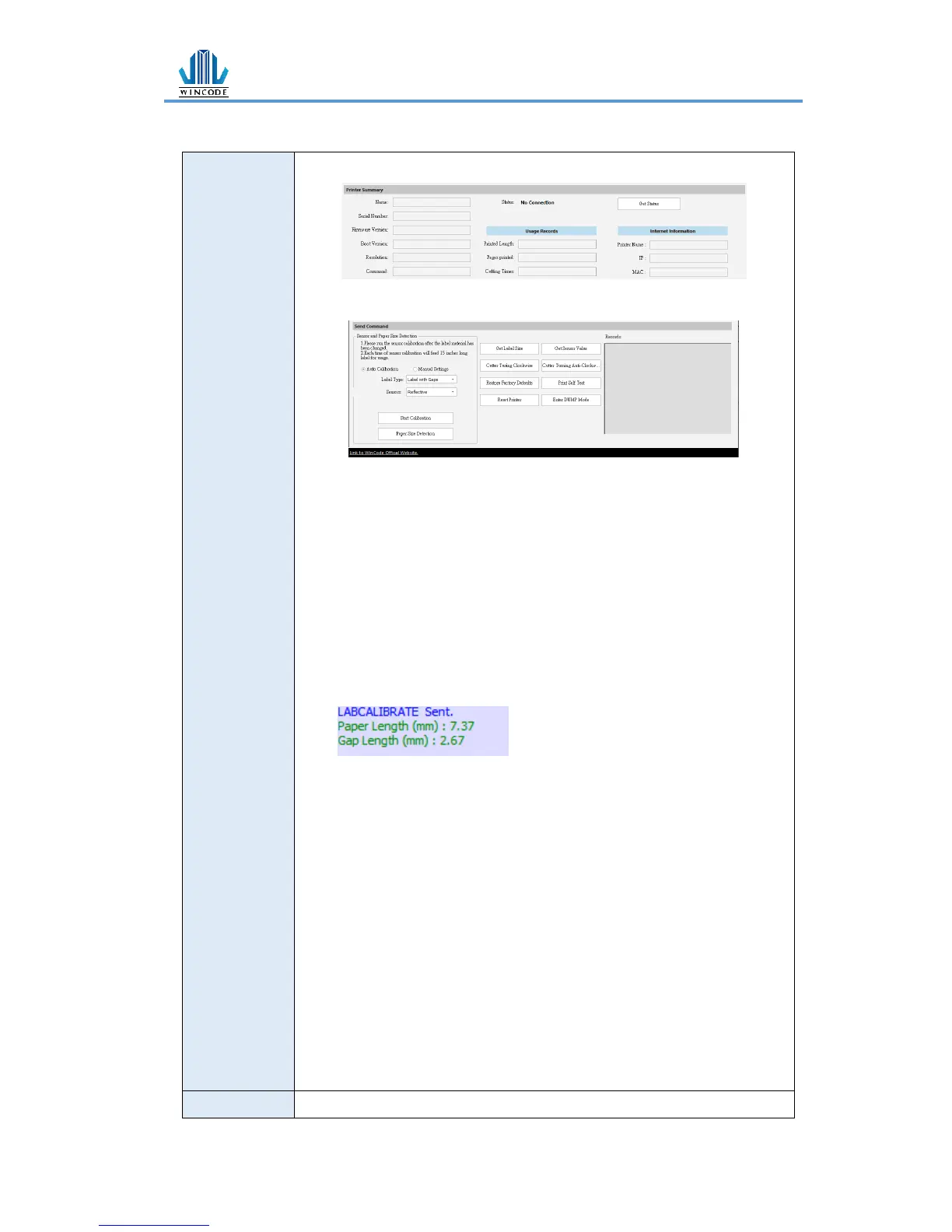
➢ Listing printer information
Send Command window
➢ Start Calibration
Please run the sensor calibration after the label material has
been changed, if it is the same material but different size and
then only need to adjust the page setup of WinLabel. It is
recommended to use the auto detection, if there are specific
materials that the sensor cannot detect, and then switch to
manual setup, select the sensor strength and set the numeral
of the sensor (The value range of sensor is from 5 to 100, less
value is more sensitive)
➢ Paper Size Detection
Printer will detect the paper size and get detecting result in
the right table as below Figure
➢ Get Label Size: The detecting value of label size will be showed
in the right table
➢ Get sensor value: The detecting value of sensors will be
showed in the right table
➢ Cutter Turning Clockwise: Cutter cuts label from up to down
(Fully cut)
➢ Cutter Turning Anti-Clockwise:Cutter cuts from down to up
(Not completely cut-off)
➢ Restore Factory Defaults: The parameters of printer will be
factory default setting.
➢ Printer Self Test: Printer will print the inside settings on the
label
➢ Reset Printer:Restart the printer
➢ Enter DUMP Mode: Entering to the DUMP mode (Press
“menu” to return the original mode)


 To Next Page