C34 USER MANUAL
- 58 -
5.2 Settings
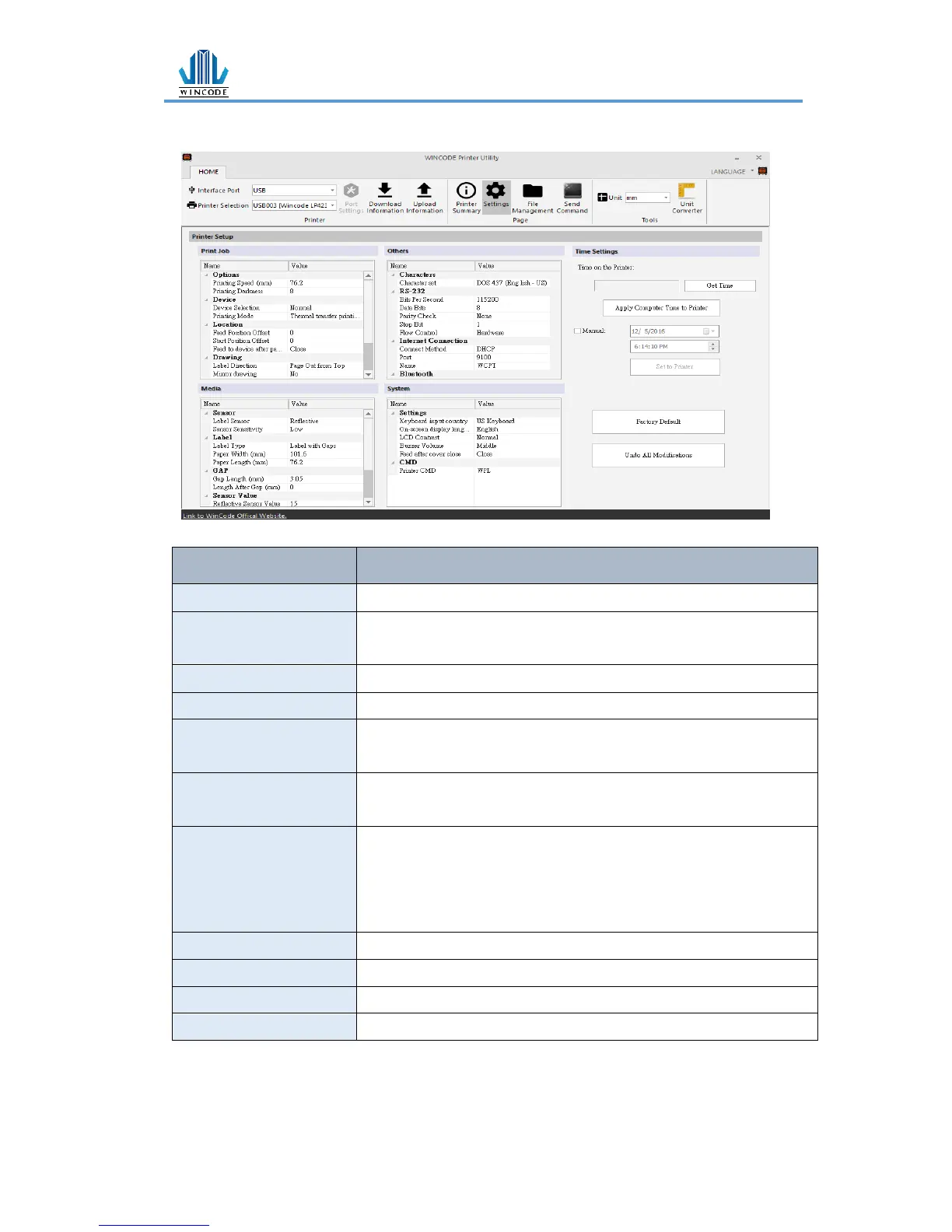
1) Print Job
Select required parameters from 0 to 15; adjust the printer head
temperature (8 is recommended for wax ribbon)
Normal, tear-off, peel-off and cutter modes are selectable.
Direct Thermal and Thermal Transfer modes are selectable
Feed Position Offset (After
printing)
Input required parameters. (If printer is connected cutter/peeler, user may
use this offset settings. Otherwise, the default is 0)
Start Position Offset (Before
printing)
Input the required parameters (plus value is feeding more distance; minus
value is back feeding more distance)
Feed to device after pause
Close:When user presses pause button, printer will stop printing
immediately.
Open:When press pause button, printer will stop printing after
completing the current label.
Label-out from top or Label-out from bottom
No effect or mirror reflection (Not available now)
Drawing origin X axis offset
Input the required parameters (Not available now)
Drawing origin Y axis offset
Input the required parameters (Not available now)
* 203 dpi:8dot=1mm, 300 dpi:12dot=1mm


 To Next Page