English ZERO Pro
FILTER CARE
3. Filter Assembly and Replacement
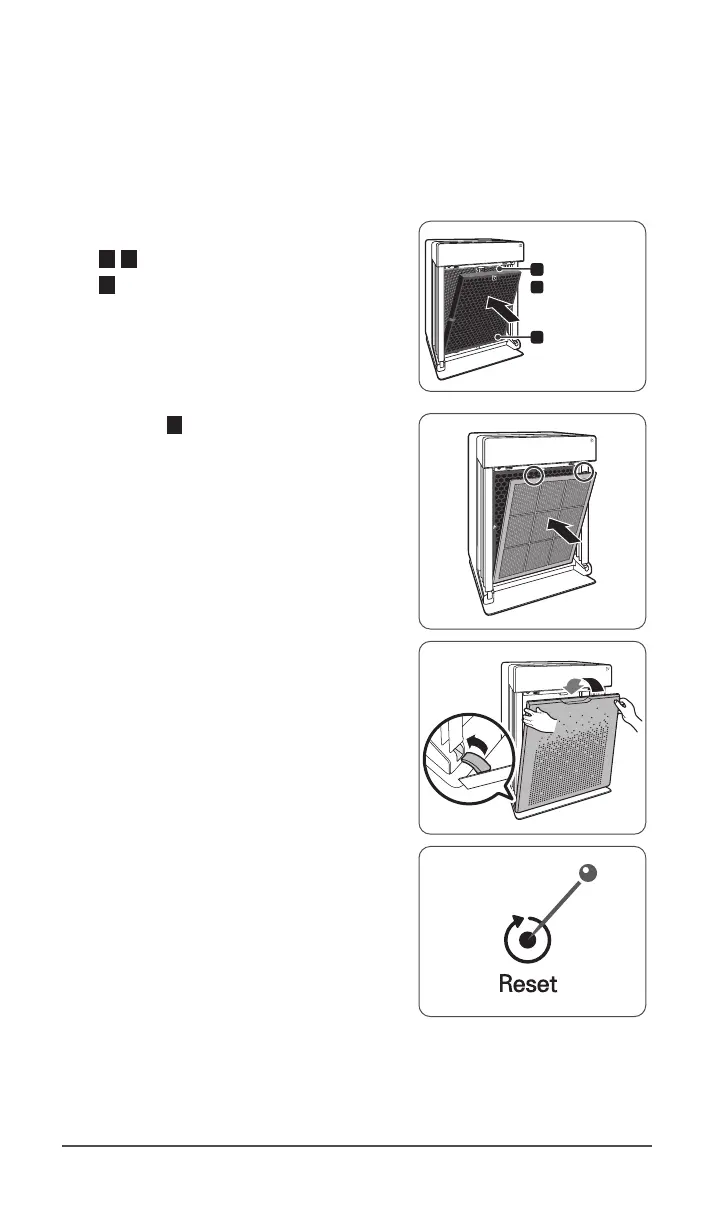
Filters should be re-installed in the reverse order of their removal.
①
Insert the replacement
3 , 4 True HEPA filter with Cleancel™ (rear)
2 AOC™ Carbon Filter (middle)
ˍ
Remove the protective plastic wrap from
new filters. Operating the unit without
removing the protective plastic wrap
may cause abnormal noise, deformation,
or fire as a result of overheating.
True HEPA
lter with
Cleancel™
AOC
TM
Carbon Filter
3
4
2
②
Insert the 1 Pre-filter (front)
ˍ
To install the pre-filter, insert bottom
tabs into the slots on either side of
the lower part of the unit, then rotate
upward to insert the upper tabs into
the slots at the top part of the unit until
both sides audibly click into place.
③
Replace the front panel by first inserting
the latch at the bottom edge into the
base of the unit, then rotate the panel
upward toward the top of the unit until it
magnetically snaps closed.
④
After replacing the filters, turn the power
back on and then use a thin object, such as
a paper clip, to press the RESET switch for
5seconds.


 To Next Page