Pergola SO! | User manual
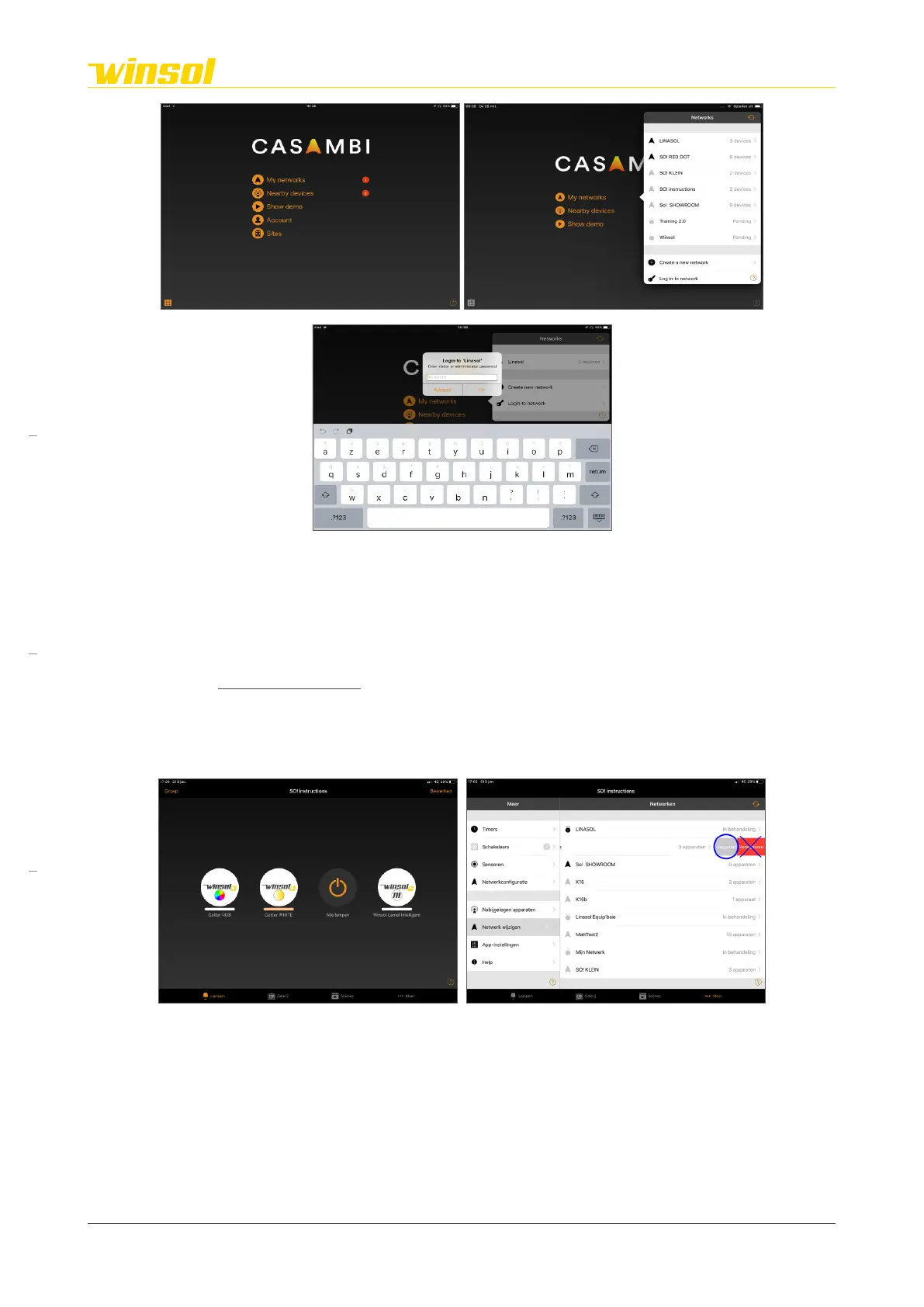
5. Select “My Networks” on the App homepage.
6. A list of Casambi networks will appear.
– Networks within Bluetooth range of your smartphone/tablet are shown in black.
– Networks that can be accessed that are not within Bluetooth range of your smartphone/tablet
are light grey.
7. Select the network “SO!”.
8. Enter the guest password (6 digits). This is only necessary if you log in for the first time, or if you have
chosen to “forget” the network when you last logged in.
Note: The “administrator password” (12 digits) is exclusively for your Casambi-certified awning expert!
Without thorough knowledge of the SO! network, you can deactivate security settings and completely
disable the controls!.
2.4. Forget network
Steps:
This procedure removes the access to the network from your smartphone/tablet.
1. Select “More” in the bottom menu bar.
2. Go to “change network”.
3. Select your network from the list of known networks.
4. Based on your device:
– iOS: Swipe left on your network.
– Android: Select & hold.
5. Select “Forget”. If you have accidentally logged in using the Administrator password, you will also
be shown the “Delete” option. Never use this option, it dissolves the network and any functionality of
your pergola!)
Rev. 16:24 18/03/2023
Page 6/27
Winsol | Sun protection
EN
2023



 To Next Page