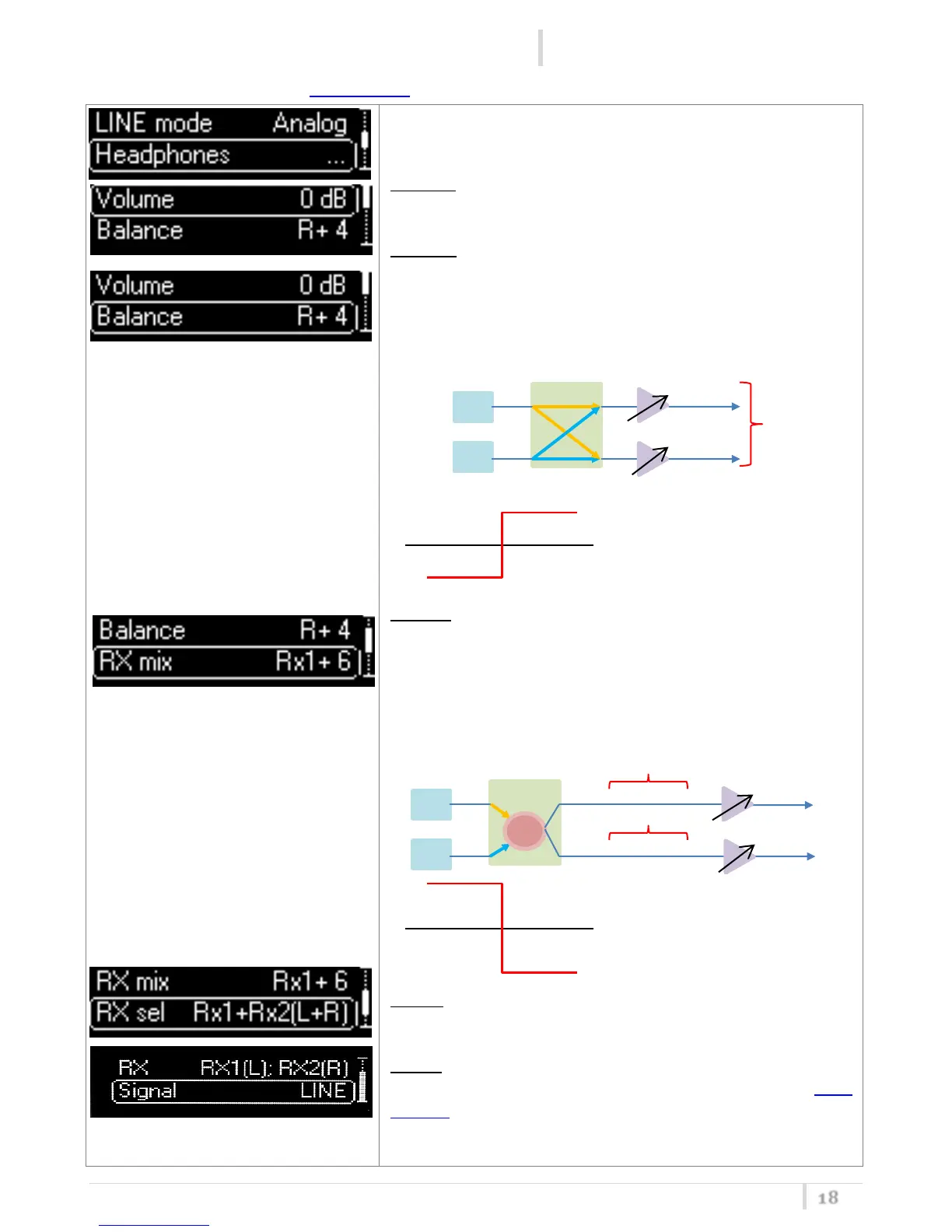
Cycle through menu’s with up/down arrow to get your
desired configuration then confirm with SEL.
Volume: It is possible to set the desired output level from
Max (+6 dB) to min (-24 dB) in 1 dB step.
Balance: with this parameter it’s possible to balance the
delta of the volume between Left and Right on the
headphones (it’s possible to set up to 12dB between L/R).
For example: if volume is set to 0dB and Balance to R+4, in
the HP output, L will be -2dB and R will be 2dB.
RX mix: if the parameter RX sel is set to Rx1+Rx2(L+R), it’s
possible to balance the delta of the volume between RX1
and RX2 (it’s possible to set up to 12dB between RX1/RX2).
For example: if volume is set to 0dB, Rx signal to
Rx1+Rx2(L+R) and RX mix to Rx1+6, in the HP output, RX1
will be at 3dB and RX2 will be at -3dB.
RX sel: Left and right channel of stereo jack can be mapped
respectively on RX1, RX2 or on RX1+RX2.
Signal: If set to LINE, on the headphones there is the same
signal of the output LINE. If set to TSQ>LINE and the Tone
Squelch is enable (Tone Squelch ON or ADV), on the
headphones it is possible to hear the signal even when the
Tone Squelch is not detected.



 To Next Page