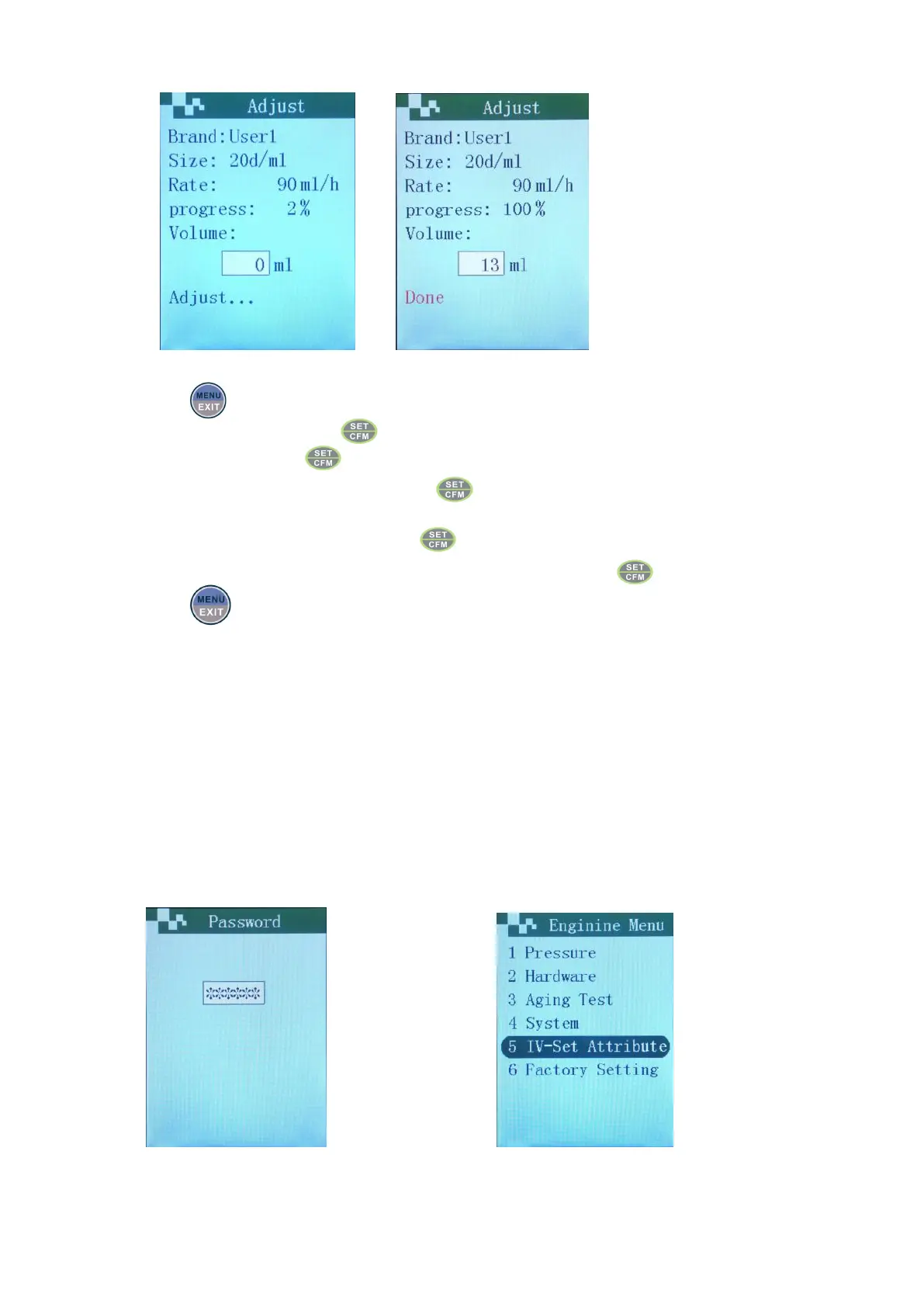
Interface of calibration proceeds Input real output Press confirm key
Choose “IV Set” menu, press .
Choose “Adjust” , press .
Choose “Current IV Set” or “Other”, press . (if choose other tube types, complete tube type selection
according to the demands)
Set frequently-used infusion rate or press directly to take default rate to calibrate.
Input the value on the measuring cup or on the electronic balance, press .
Press to exit to main interface.
Notes
:
1 、 when the deviation of tube type is larger, machine would judge whether should calibrate again
according to the actual value inputted. Normally after 1-2 times calibration, the accuracy would
meet the requirement of deviation within ±5%.
2、 If alarm prompts in process of calibration, need to re-calibrate according to the steps.
3、 If the brand of infusion set used is not in the brand list of machine, should calibrate to normally use.
Rapid input calibration
When a batch of machine use the same infusion set to infuse, can calibrate 2-3 machines by using the same
rate, after the calibration, can get the median used to be characteristic value input, and complete calibration
rapidly. The operation as follows:
Long press the up key and input the code Choose the item


 To Next Page