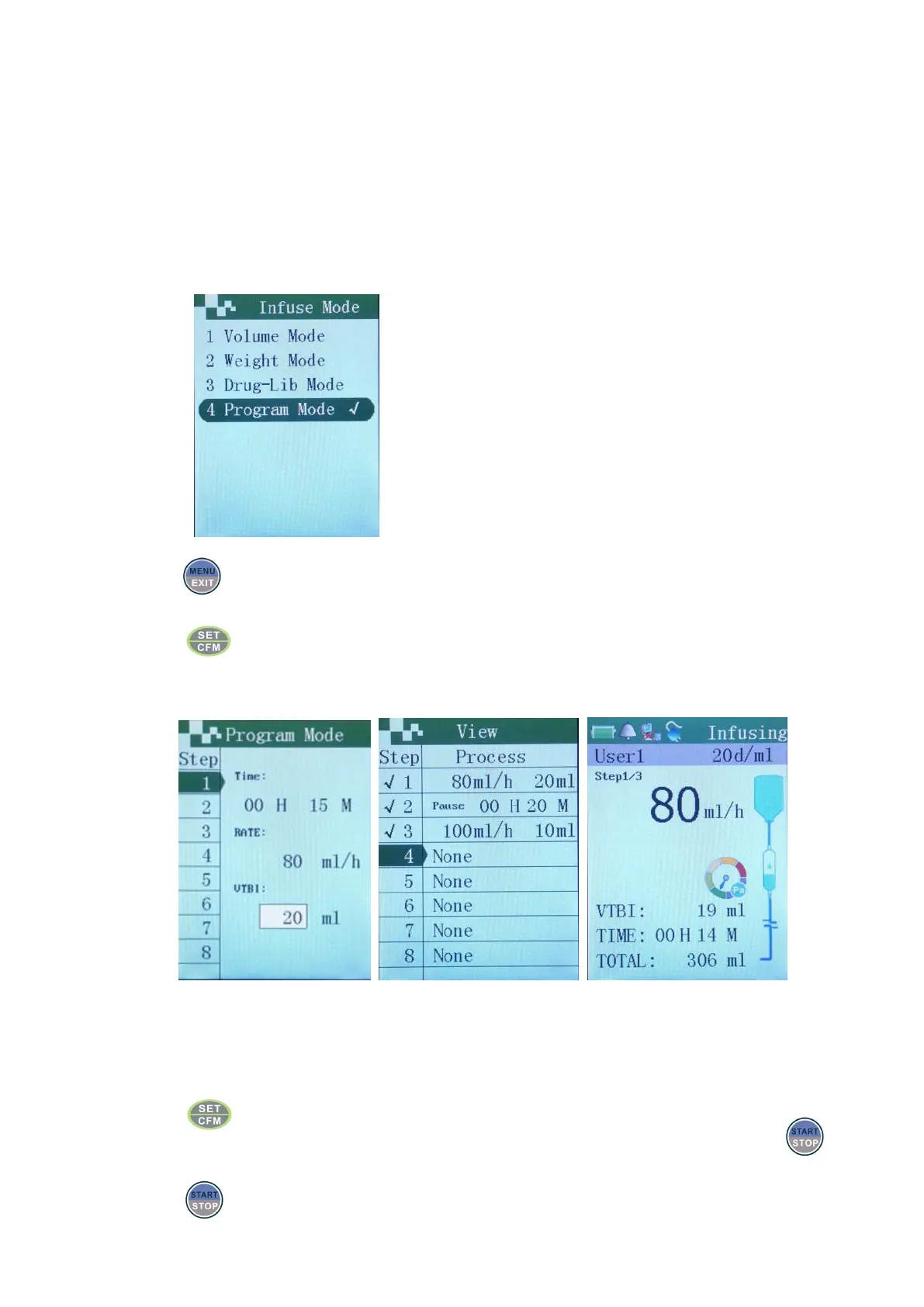
Program mode
Custom can himself define 8 stages of program mode to infuse automatically. Allow to suspend
programming in process of infusion, but KVO would be launched during programming pause. If the rate of
previous program is less than 1ml/h, then the KVO begins according to the rate of previous program; if the
rate of previous program is greater than 1ml/h, then the KVO begins according to the rate of 1ml/h.
Infusion mode selection
Press in starting up status, display infusion mode interface.
Choose “program mode” with up or down keys.
Press to enter program mode interface.
Programming interface Preview interface Infusion interface
Move the cursor to corresponding input boxes of VTBI and rate with the up or down keys.
Press to save the programming stage.
Program another infusion stage by following the above method. If no need continue, then press , and
enter the overview interface, in order to check whether each programming stage is correct.
Press to begin program infusion.


 To Next Page