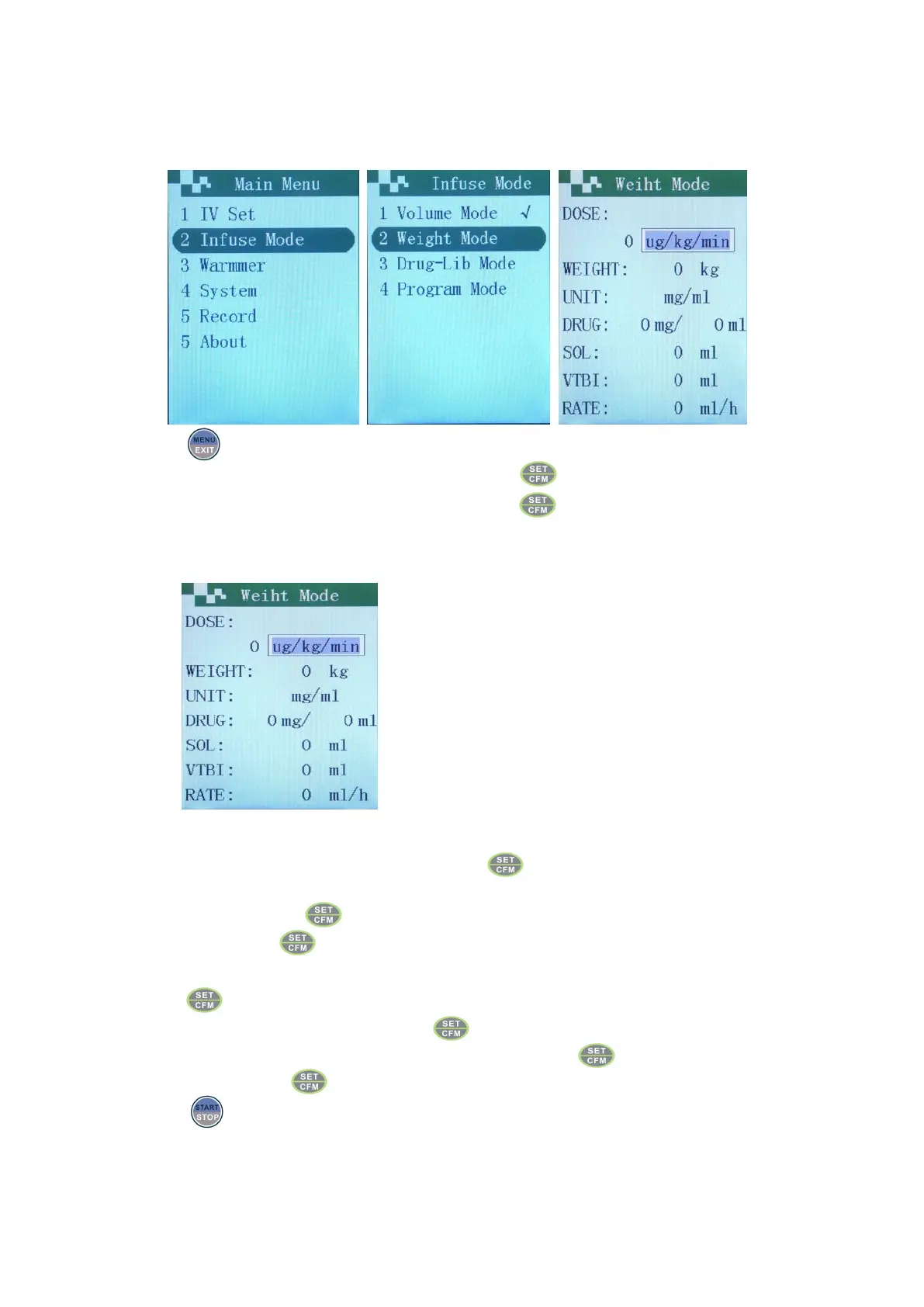
Dose/weight mode
Press in starting up status, display infusion mode interface.
Use the up and down keys to choose “weight mode”. Press key.
Notes:If the present interface is weight mode, can press directly to enter parameters input interface of
weight mode.
Parameters input in weight mode
Move the cursor to corresponding input boxes with the up or down keys.
Dose unit selection. When dose unit flashes, press to choose the dose needed with the up and down
key.
Input dose value, press or the down key.
Input weight. Press or the down key.
Chose drug unit. The box of drug unit flashes, use upward and downward keys to choose unit needed, then
press .
Input drug amount. First input value, press or down key.
Input drug concentration (if needed). First input value, then press or down key.
Input the VTBI. Press .
Press to begin weight mode infusion.
Notes:VTBI ≤ DRUG+SOL.VOL


 To Next Page