Induction Cooktop
Electronic Control
3-10
Timer Mode
The timer can be used in any mode except Lock Mode.
When the timer is not in use the display will be blank.
The timer sets minutes only. During countdown of minutes,
when the timer reaches 1 minute, timer will switch to
seconds and then display 59, 58, etc. until 00 seconds is
reached and the annunciator will continually beep every 5
seconds.
The timer is paused while entering the time and will start 3
seconds after the last change in value. Editing a running
timer causes the seconds to be reset so that the displayed
time is what will be counted down. As a result, if the minute
time is counting down seconds, the “-” key will stop the
timer without an alarm.
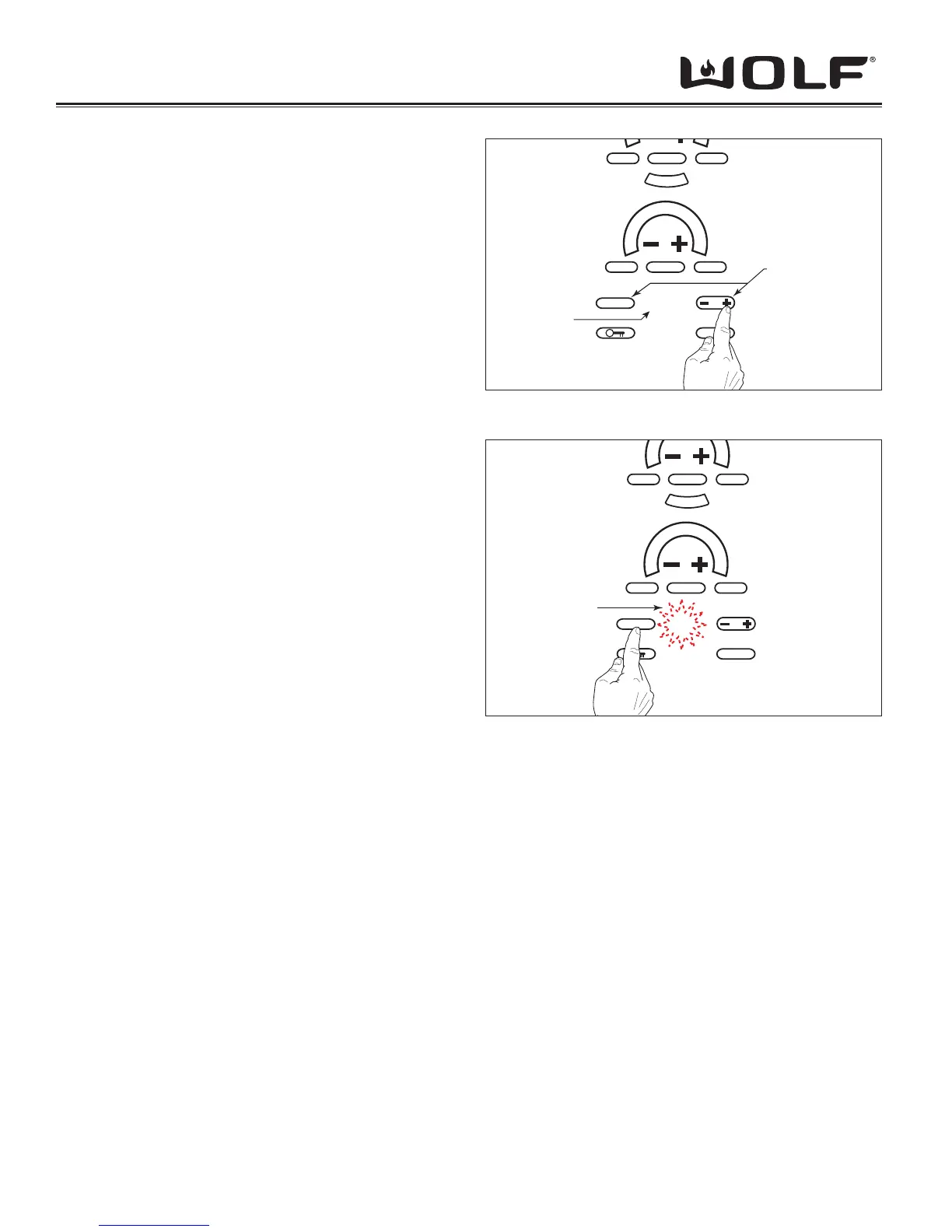
To initiate the timer, touch and release the “+” key.
Upon activation, the timer will display “1” (one minute).
The unit will increment/decrement with the touch of the “+“
pad, 1 count every .5 sec. (See Figure 3-15)
If the “+” key is held down for more the 3 intervals
continuously and the count is divisible by 5, the display
will increment/decrement at a rate of 5 count per every .5
seconds.
Likewise, if the “+” key is held down for more then 3
intervals and the count is divisible by 10, the rate of change
will become 10 counts per interval.
(i.e. 0,1,2,3,4,5,10,15,20,30,40,50,…)
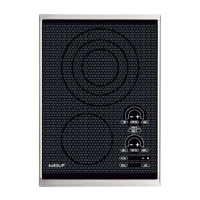
When the timer has run down to 0 seconds, the reminder
tone will sound and the display will fl ash “00” for the
duration of the reminder tone.
Touch the “CLEAR” button to stop the reminder tone and
clear the display. (See Figure 3-16)
MELT
OFF ON
CLEAR
OFF
HIGH
OFF ON HIGH
001
HOT
SIM
H
I
P
O
W
E
R
Timer Function
Touch Pads
Timer
Display
Figure 3-15 Press “+” To Start Timer
MELT
OFF ON
CLEAR
OFF
HIGH
OFF ON HIGH
00
HOT
SIM
H
I
P
O
W
E
R
Flashing
Figure 3-16 Press “CLEAR” To Stop Timer


 To Next Page