Induction Cooktop
Electronic Control
3-12
Annunciator
The Annunciator is volume adjustable. The volume is
adjusted through the timer controls as a User Option.
The cooktop must be in Idle Mode in order to adjust either
the volume or frequency.
To enter User Options from Idle Mode:
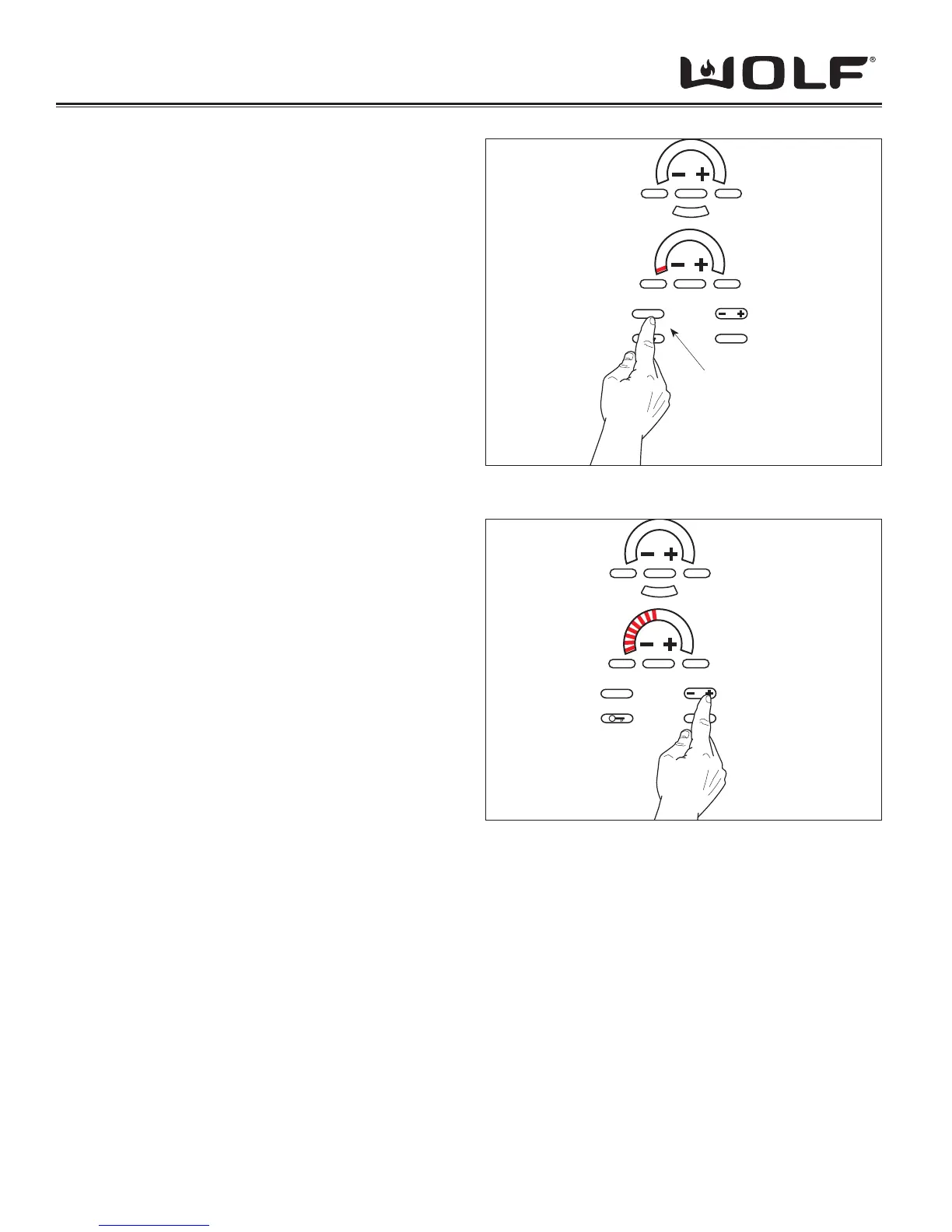
1. Touch and hold “CLEAR” pad for 3 seconds will activate
the Volume adjustment. The 3-digit display will show
“Uol”. (See Figure 3-19)
2. Touch and hold “CLEAR” pad for more than 5 seconds
will activate the Frequency adjustment. The 3-digit
display will show “FrE”.
3. Both the Volume and Frequency are adjusted using the
timer “-” and “+” keys. 1 touch equals 1 step up/down in
volume or frequency. Power Level Indicator - LEDs will
show the current status of the volume/frequency and
change with the user’s input. (1 LED = Low, 8 LEDs =
Med. and 16 LEDs = High). (See Figure 3-20)
As the volume/frequency is adjusted, the annunciator
will beep with each change. The beep will represent the
volume/frequency level that is currently displayed by
the Power Level Indicator - LEDs.
4. The change will be aceepted if you touch the clear key
for 3 seconds or if no keys are touched for more than
10 seconds.
NOTE: Holding the “CLEAR” pad for more than 7 seconds
or not pressing any keys for 10+ sec. will deactivate
User Options and return cooktop to idle mode.
MELT
OFF ON
CLEAR
OFF
HIGH
OFF ON HIGH
UOL
SIM
H
I
P
O
W
E
R
Touch and
Hold “CLEAR”
Key for 3 Sec.
Figure 3-19 Entering User Options - Volume
Figure 3-20 Annunciator Volume Being Raised
MELT
OFF ON
CLEAR
OFF
HIGH
OFF ON HIGH
UOL
SIM
H
I
P
O
W
E
R
Press “+” to Raise
or “-” to Lower
Annunciator
Volume


 To Next Page