SETUP & OPERATION
MP180 Multi-Planer Operation
EGdoc052521 3-5
3
3.2 MP180 Multi-Planer Operation
3.2.1 Control Panel
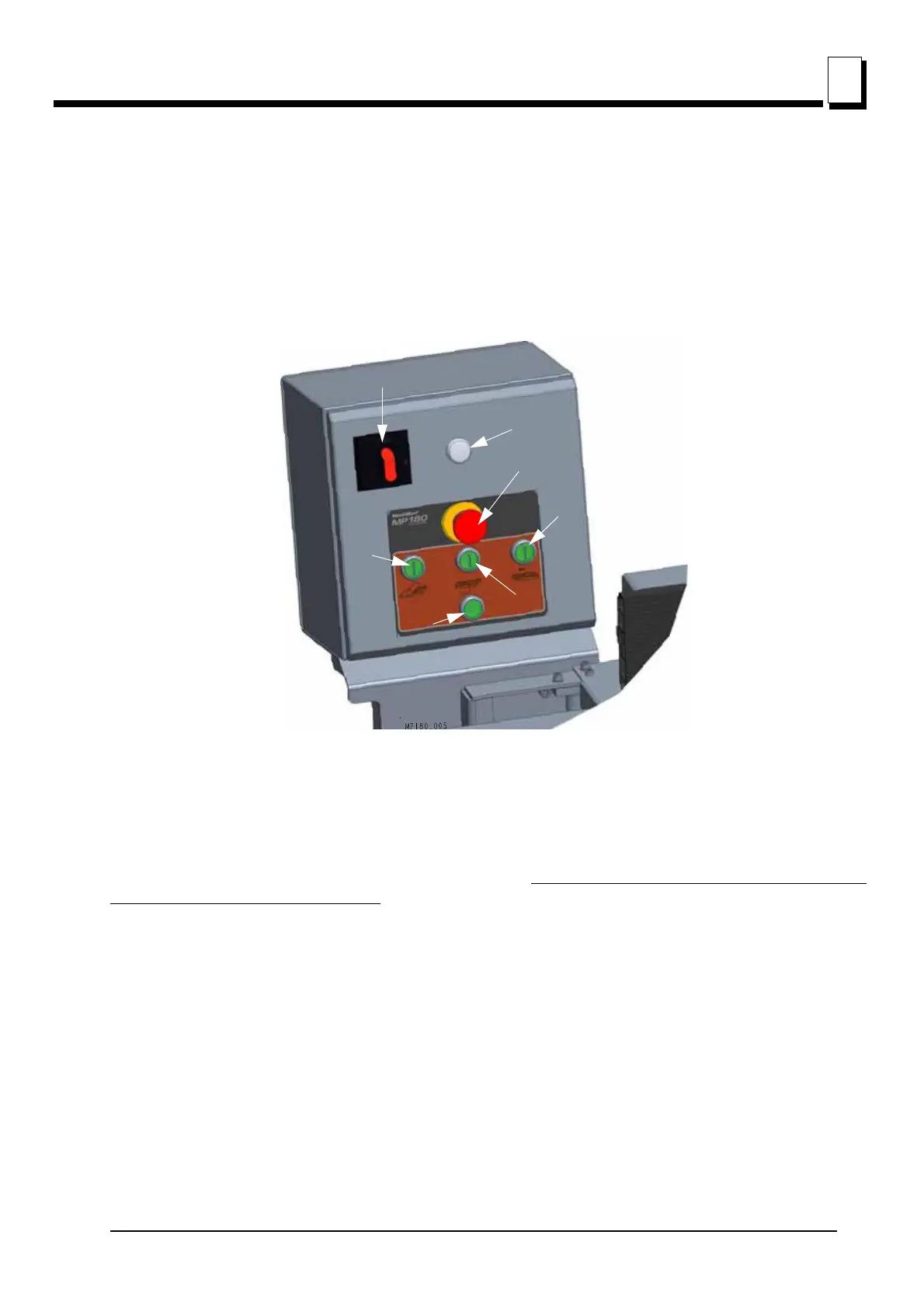
See figure 3-4. The MP180 Multi-Planer controls are shown below.
Top red button (A) - the emergency stop button which disconnects power to all functions. When it is
pressed, it must be released before restarting the Multi-Planer (turn right).
There is an indicator light (B) above the E-Stop which indicates that the power is on. When replacing
the knives and servicing, the power On/Off switch (C) must be in the OFF position and the power
supply cable must be disconnected. Check if the indicator light (B) is off.
The buttons (D, E, F) start the planer cutter and feed motors:
The button D starts the horizontal cutter motor.
The button E button starts the vertical (side) cutter motor.
The button F button starts the feed motor.
The button G stops all planer motors.
FIG. 3-4


 To Next Page