6
Controls
Greenstar FS CDi
ErP
– 6720919078 (2015/12)
3.1 Switching the boiler ON/OFF
3.1.1 Switching ON
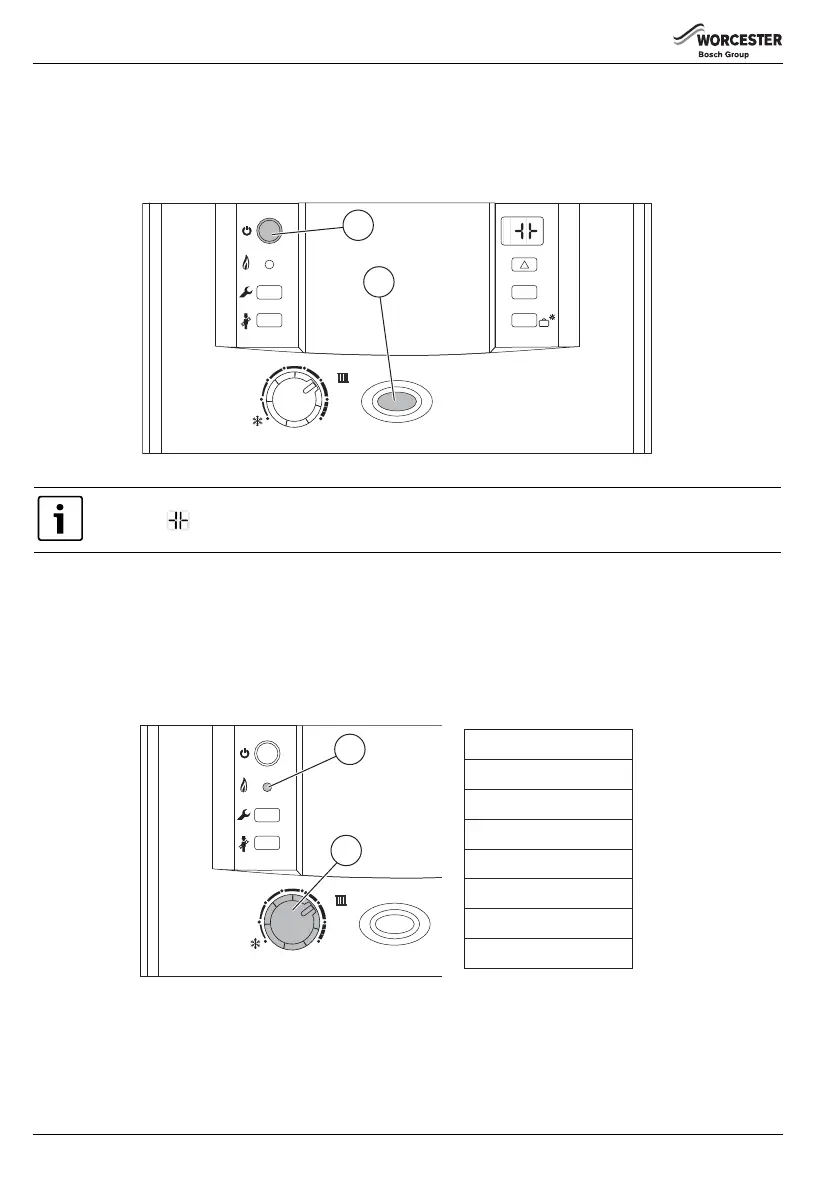
▶ Switch on the boiler by pressing the main power button [1].
The power indicator light shows blue[2].
Fig. 2 Power button
Switching off
▶ Switch off the boiler by pressing the main power button.
The blue power button light goes out.
3.2 Setting the central heating temperature
▶ Turn the central heating temperature control [7] to the desired level, between approximately 40 and 82°C.
When the burner is lit, the green indicator light underneath the on/off switch is illuminated [10].
Fig. 3 Settings for the central heating temperature (with approximate temperatures)
3.2.1 Controlling the central heating
Central heating systems must be controlled effectively using a programmer or timer and a room thermostat.
▶ For further information on how to control your central heating system please refer to the individual user guides for the
programmer or timer installed in your home.
6720808851-02.1Wo
1
2
3
4
5
6
max
reset
eco
2
1
The boiler runs for 15 minutes at minimum heating output to fill the condensate trap. The display alternates
between and the central heating flow temperature. This occurs every time the mains supply has been
interrupted.
1
2
3
4
5
6
max
reset
eco
10
Min
1
2
3
4
5
6
Max
---
---
---
---
---
---
---
---
40 °C
47 °C
53 °C
61 °C
68 °C
74 °C
80 °C
82 °C
6720808851-03.1Wo
7

 To Next Page
 Loading...