37
CONNECTINT TO A PERSONAL COMPUTERCONNECTINT TO A PERSONAL COMPUTER
Computer
(Sequencer software)
MIDI OUT
MIDI IN
W220
MIDI OUT
MIDI IN
Computer
(Sequencer software)
W220
MIDI Interface
RS-422
MIDI OUT
MIDI IN
Computer
(Sequencer software)
USB
Ux16 Interface
MIDI OUT
MIDI IN
W220
220ÐÍ220ÐÍ
8808A
8808A
8808A
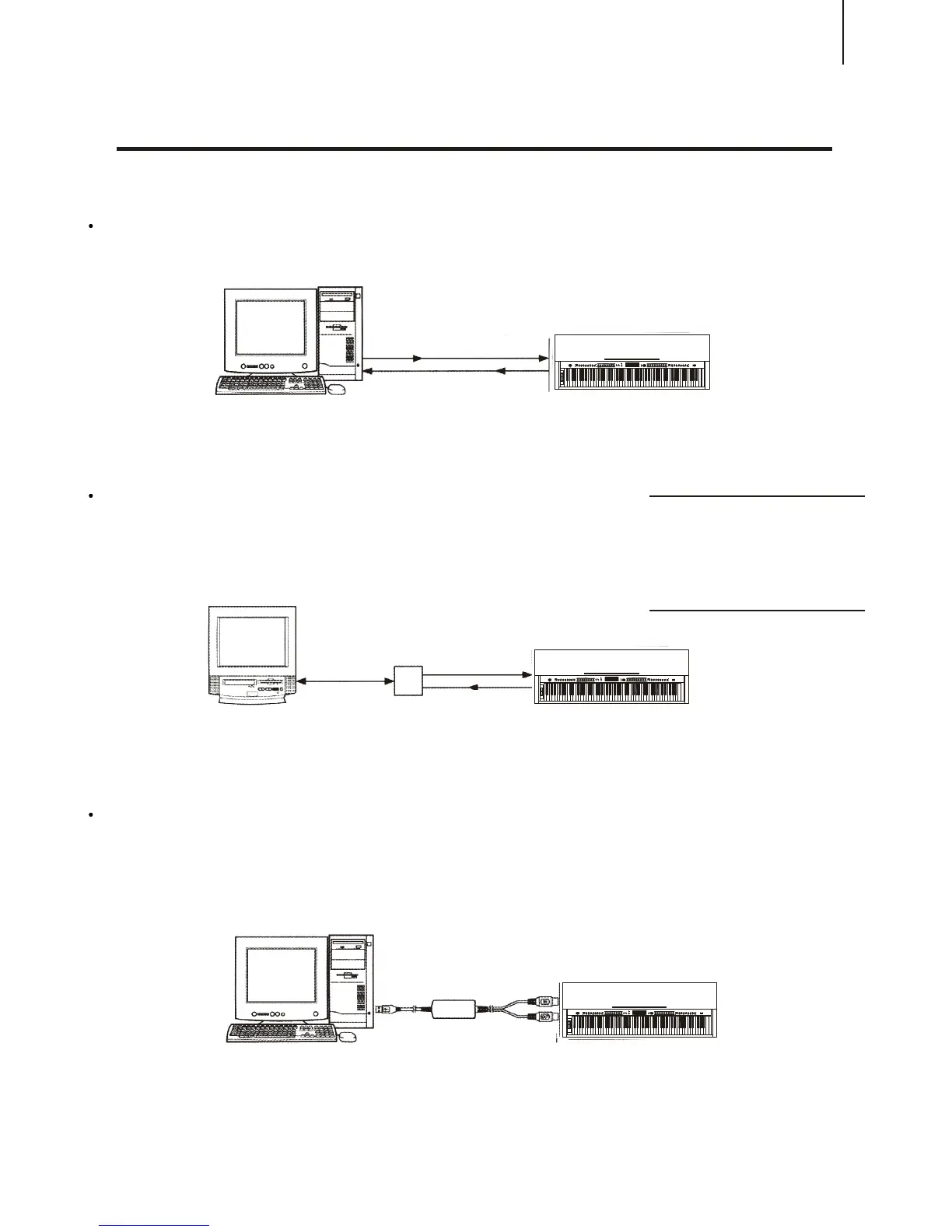
By connecting your W8808A's MIDI terminals to a personal computer, you can have
access to a wide variety of music software.
When using a MIDI interface device installed in the personal computer, connect the
MIDI terminals of the personal computer and the W8808A.
When using a MIDI interface with a Macintosh series
computer, please connect the RS-422 terminal of the
computer(Modem port or printer terminal) to the MIDI
interface, as shown in the diagram below.
When connecting to a computer with a USB interface, just use MIDI interface: first use
a standard USB cable to connect Ux16 interface to the computer, and then connect
W8808A to UX16 interface correctly.
NOTICE:
While using Macintosh computers,
you have to set the time setting of
MIDI interface in the Internet
applications the same as the setting
of the MIDI interface you are using.
Details please refer to the Internet
applications instructions.



 To Next Page