
 Need help?
Do you have a question about the XEMEX SCC-1 and is the answer not in the manual?
Specifies qualifications for technicians installing and operating the device.
Details the Smart Charge Controller's use as a current meter for EV charging stations.
Provides contact information for support and technical assistance.
Outlines Xemex NV's liability regarding the document's content and use.
States the copyright ownership of the publication by XEMEX.
Explains the meaning of symbols used for safety instructions and warnings.
Provides essential safety instructions to prevent electric shock, fire, and injury.
Instructions for verifying the received product and its components for completeness.
Details the information found on the device's identification label.
Explains the Smart Charge Controller's role in EV charging and load balancing.
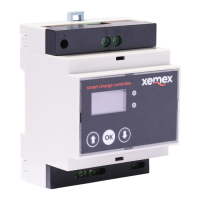
Illustrates the device's functions and identifies its various connection points.
Outlines the conditions necessary for the energy management function to work correctly.
Details the housing dimensions, weight, and operating/storage conditions.
Covers power supply, Modbus, and P1 interfaces, including connection specifics.
Explains the current transformer measurement interface and user interface elements.
Lists the standards and certifications the device complies with, including RED and EMC.
Provides safety guidelines and requirements for device installation and wiring.
Specifies the recommended installation location and lists tools needed for setup.
Instructions to completely disconnect the electrical system before starting installation.
Guide on mounting the device onto a DIN rail within a suitable meter cupboard.
Detailed instructions for making power and communication connections to the device.
Notes on correct AC connection polarity and phase for accurate current measurement.
Instructions on correct current transformer (CT) mounting and polarity for accurate readings.
Guidelines for connecting Modbus RTU wiring, including shielding requirements.
Procedure for safely switching on the main power after installation.
Explanation of the device's buttons and how to navigate its interface.
Details on selecting and changing charging modes for the device.
How to view real-time current measurements and software versions.
Covers accessing settings, commissioning, firmware updates, and factory resets.
Step-by-step guide to setting up the device via its Wi-Fi access point.
Information on the Wi-Fi SSID, password, and IP address for commissioning.
Settings for number of phases, max/min charge current, and metering method.
Configuration options for meter emulation and Modbus protocol settings.
Steps to connect the device to the home router for updates and remote control.
Explains available charging modes (ECO+, ECO, Capacity) and how to select them.
Step-by-step guide on how to choose and set the desired charging mode on the device.
Procedure to access and view real-time current readings for phases L1, L2, and L3.
Procedure to display the firmware versions for the main CPU and measurement system.
Settings for number of phases and charge current limits.
Settings for metering, CT ratio, Modbus, IP address, and Wi-Fi SSID.
Instructions to access the commissioning mode by holding the OK button.
Procedure to start a firmware update by holding the OK button for 5 seconds.
Steps to reset the device to factory default settings by holding the OK button.
Instructions to safely disconnect the device from the power supply.
Steps for safely removing the device after disconnecting power and checking for voltage.
A table listing potential faults, their causes, and recommended solutions.
Details product conformity with European directives and applied harmonisation legislation.
Information on obtaining warranty details and general terms and conditions.
Provides Xemex NV contact details for support and inquiries.
Instructions to scan a QR code for additional documents and resources.
 General
| Brand | XEMEX |
|---|---|
| Model | SCC-1 |
| Category | Controller |
| Language | English |

 To Next Page