16
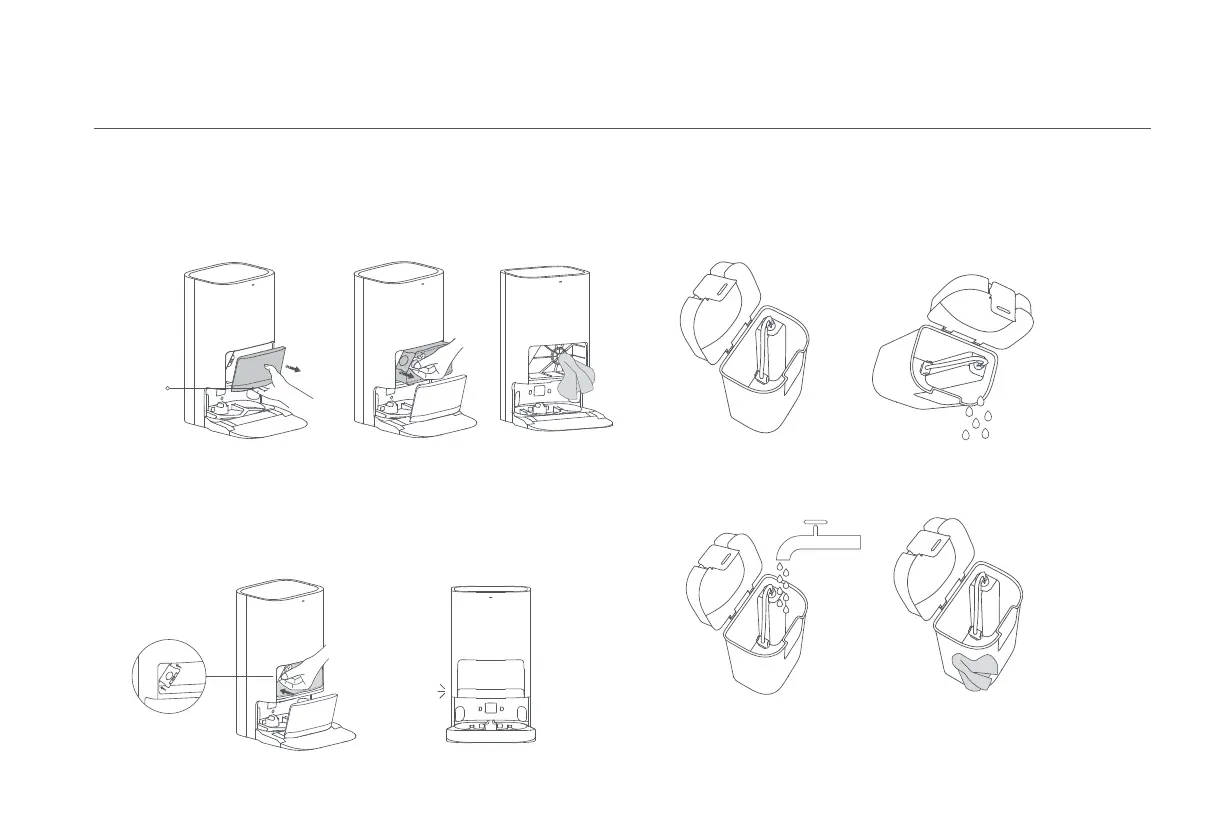
1. When the disposable bag is full, pull the cover out from the dust cabinet
opening. Remove the disposable bag using the handle, and discard it. Then use a
dry cloth to wipe away any dirt from the filter.
2. Install a new disposable bag as illustrated and insert the handle of the bag into
the slot. Then put the dust cabinet cover back, and it is properly installed when
you hear a "click".
Replacing the disposable bag
Note: Pulling the handle of the disposable bag will seal the bag to prevent the dust and debris
from accidentally falling out.
Dust Cabinet
Opening
Click
1. Remove both the clean and dirty water tanks, open their covers, and pour out
the water.
2. Use clean water to completely wash the tanks, then wipe the outside of the
tanks dry before reinserting them into the omni station.
Cleaning the clean and dirty water tanks
Note: Both the floater in the clean water tank and the float ball in the dirty water tank are
movable parts. Do not apply too much force when cleaning them to avoid damaging them.









 To Next Page