XT-50, XT-80, and XT-100 Amplifiers Installation 2-1
CHAPTER 2: INSTALLATION
Introduction
This chapter describes the procedures for unpacking, inspecting, and installing the XT-50, XT-80,
and XT-100 amplifiers.
Unpacking and Inspection
Upon receiving the amplifier, inspect both the inside and outside of the shipping container for signs
of damage. If any shipping damage is detected, call the shipping carrier and submit a damage
report.
Compare the packing list to the contents of the container to be certain that all material has been
received. Save all data sheets. They will be useful during any maintenance actions. Save the
packing material and use it if you need to reship the unit.
Inspect all items for any damage received during shipment. If shipping damage is detected, submit a
damage report to the shipping carrier. Failure to submit a report may invalidate any future claims.
Mechanical Installation
The power amplifier can be mounted any place that is convenient for the user, subject to the
conditions noted later in this section for unobstructed intake and exhaust air flow.
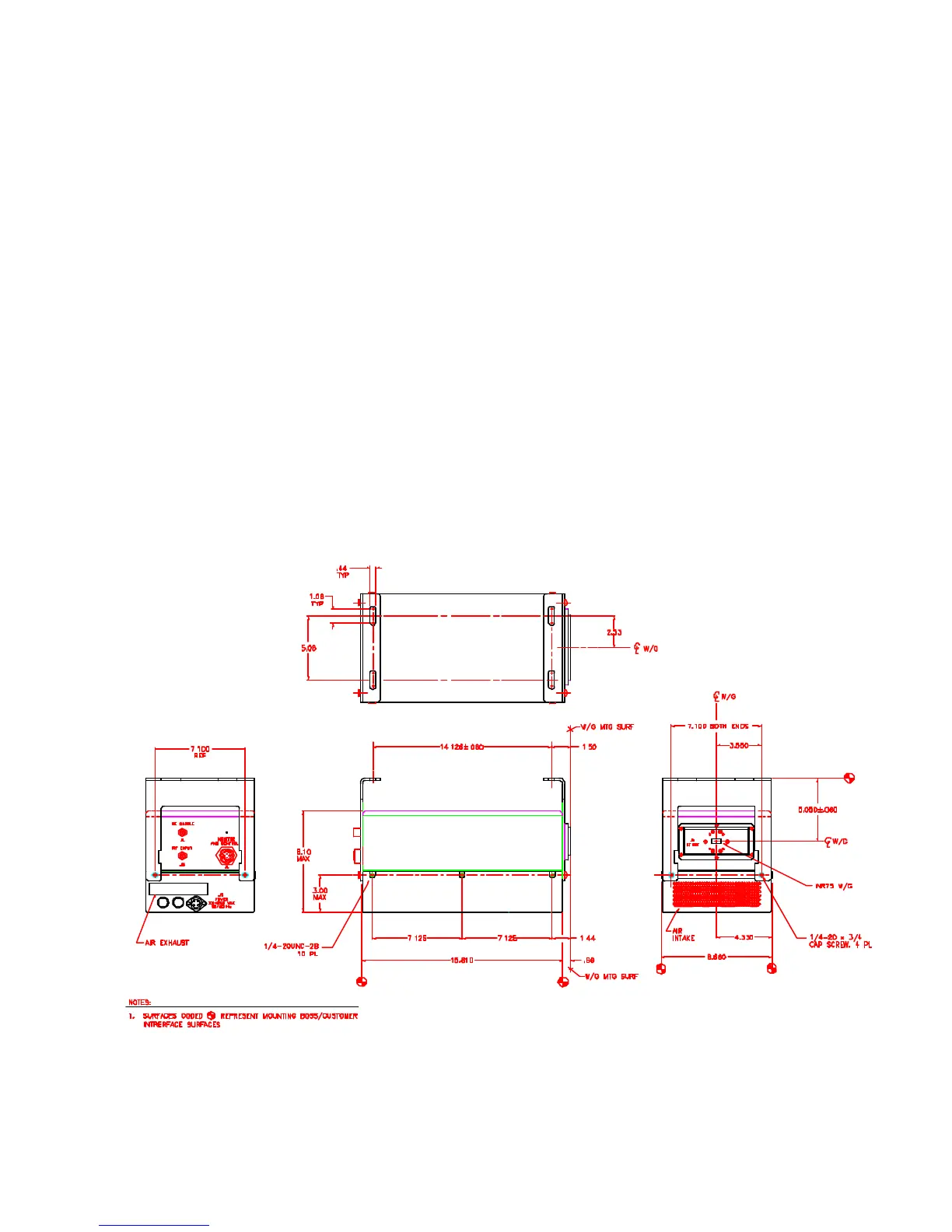
Standard mounting brackets come with the unit. Alternative mounting brackets can be designed
using the mounting dimensions shown in Figure 2-1.
Figure 2-1. Amplifier Outline Drawing



 To Next Page