Whether 'Fxxxx' or 'F ---' is displayed, you can continue to click [Inc] and [Dec] to find the resonance
frequency again. If the resonance frequency is found, you can long press [Enter] to set the resonance frequency
displayed on the interface to the notch filter in the driver.
Mechanical characteristic analysis
1. open XinJeServo software, click mechanical properties;
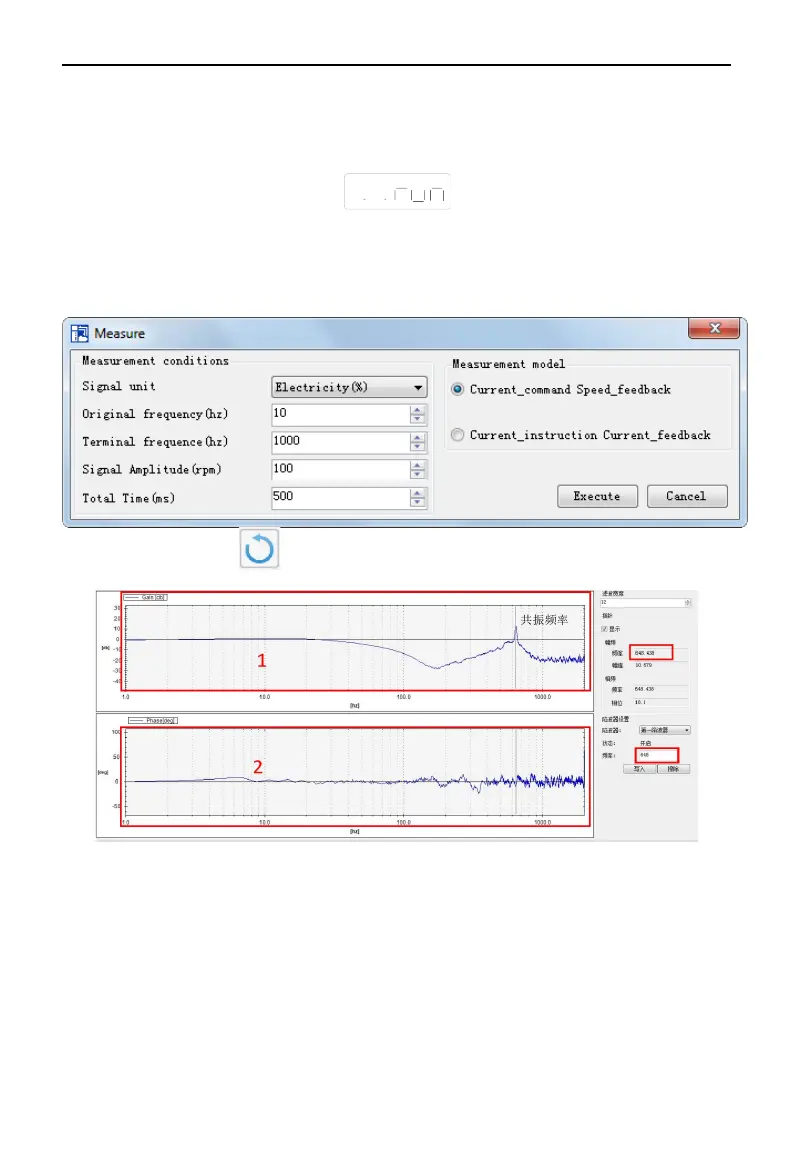
2. click measure;
Click 【enable】 then click . The servo motor will make a slight sound and wait for the completion of
data acquisition. After the data is read successfully, the following chart will appear:
Red box 1 is the amplitude frequency characteristic curve, which can be used to judge the resonance frequency.
The resonance frequency curve will have the following characteristics:
72



 To Next Page
 Loading...