70
Connecting by Wi-Fi
Handset supports Wi-Fi (wireless LAN). Access the Internet
via a household Wi-Fi connection environment.
Selecting a Network Connection
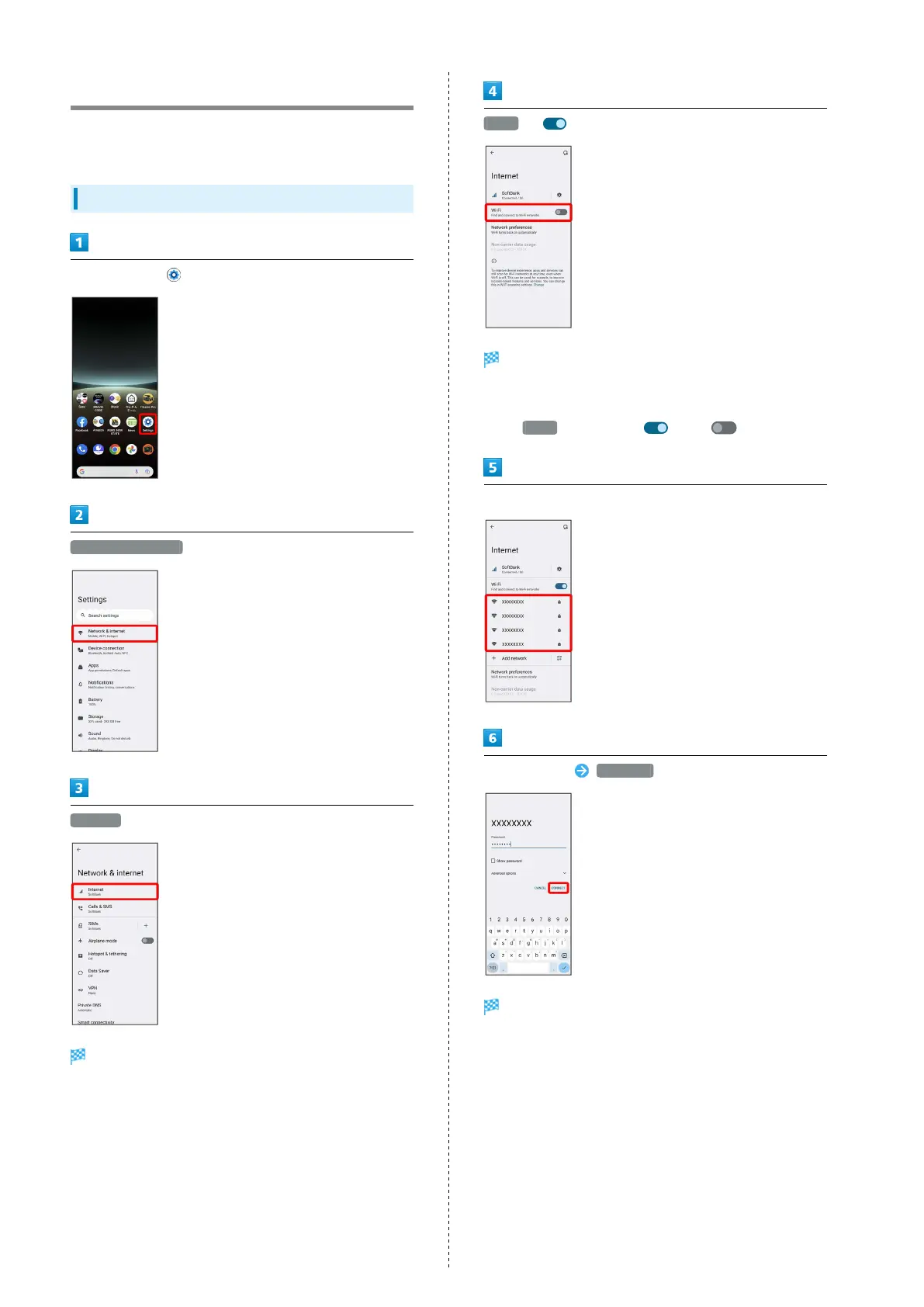
In Home Screen, (Settings)
Network & internet
Internet
Screen for Internet opens.
Wi-Fi ( )
Wi-Fi is enabled.
・Wi-Fi networks are scanned. Available networks appear
after scanning.
・
Tap Wi-Fi to toggle on ( )/off ( ).
Tap Wi-Fi network
Enter password CONNECT
Handset is connected.
・The password, for a household wireless LAN router, is
sometimes found on a sticker on the router (WEP, WPA, KEY,
etc.). Contact the router manufacturer for information.
For password for a public wireless LAN, check with user's
service provider.
・Entering a password is not required if an access point is not
security protected.



 To Next Page