7
Getting Started
Xperia 5 IV
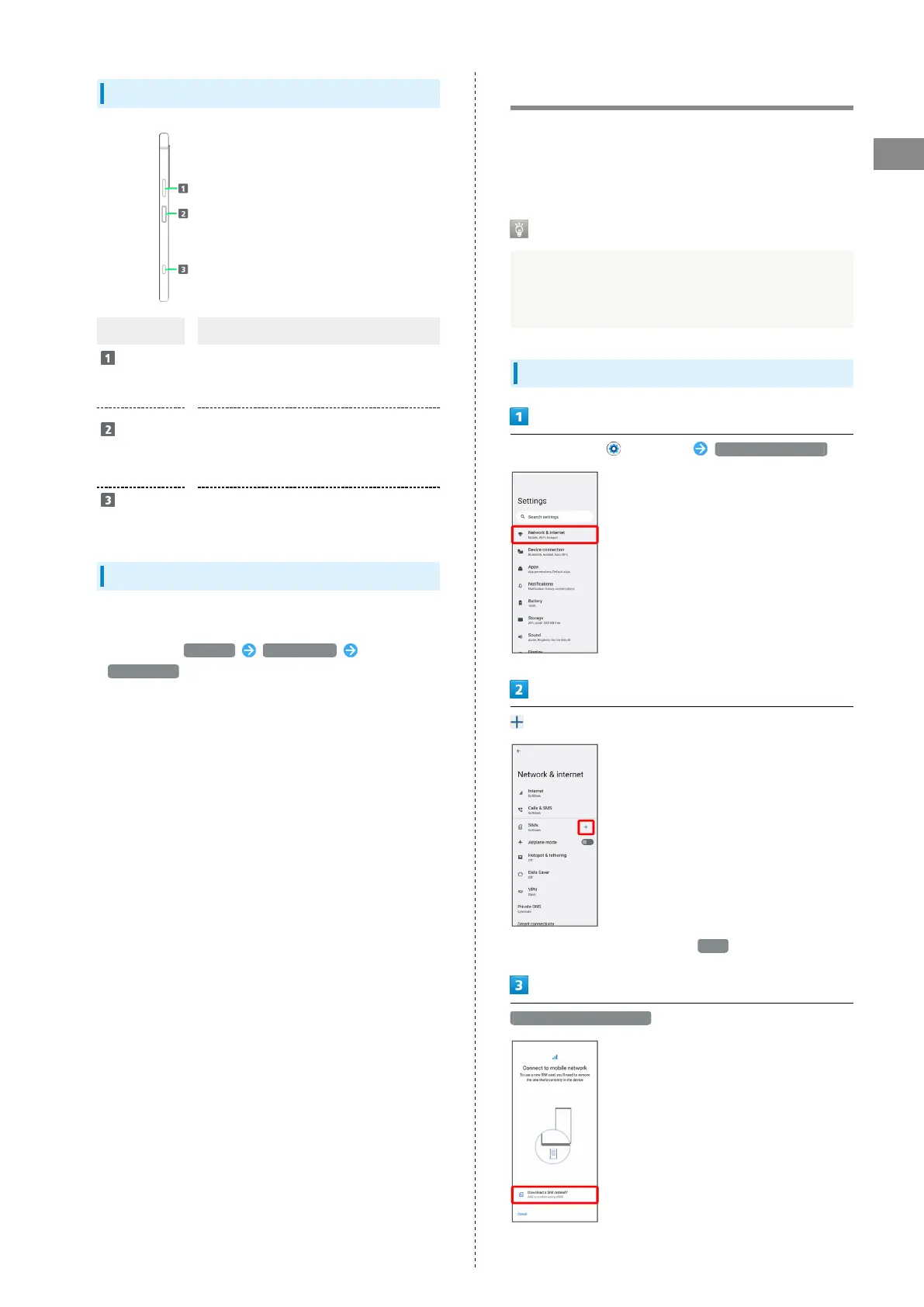
Handset Keys
Part Description
Volume/
Zoom Up/
Down Key
Adjust Volume.
Adjust Zoom while using Photo Pro.
Power Key/
Fingerprint
Sensor
Power on/off. For details, see " Power
On/Off."
Turn Display on/off.
Or, use Fingerprint authentication.
Shutter
Key
Use as Camera shutter.
Long Press to launch Photo Pro.
FCC ID
To view the regulatory compliance mark
・
Find and tap Settings About phone
Certificates
Regulatory compliance mark such as FCC ID is displayed on
the screen.
eSIM
eSIM is an integrated SIM already built into handset. An eSIM-
capable handset allows you to use a phoneline simply with a
contract subscription and configuring handset, without the
needed replacement of SIM cards.
Handling eSIM
For eSIM handling, see the following website. https://
www.softbank.jp/mobile/support/product/sim/esim/
(Japanese)
Downloading eSIM
In Home Screen, (Settings) Network & internet
for "SIMs"
・
If no SIM Card is installed, Tap SIMs .
Download a SIM instead?



 To Next Page