6
Parts & Functions
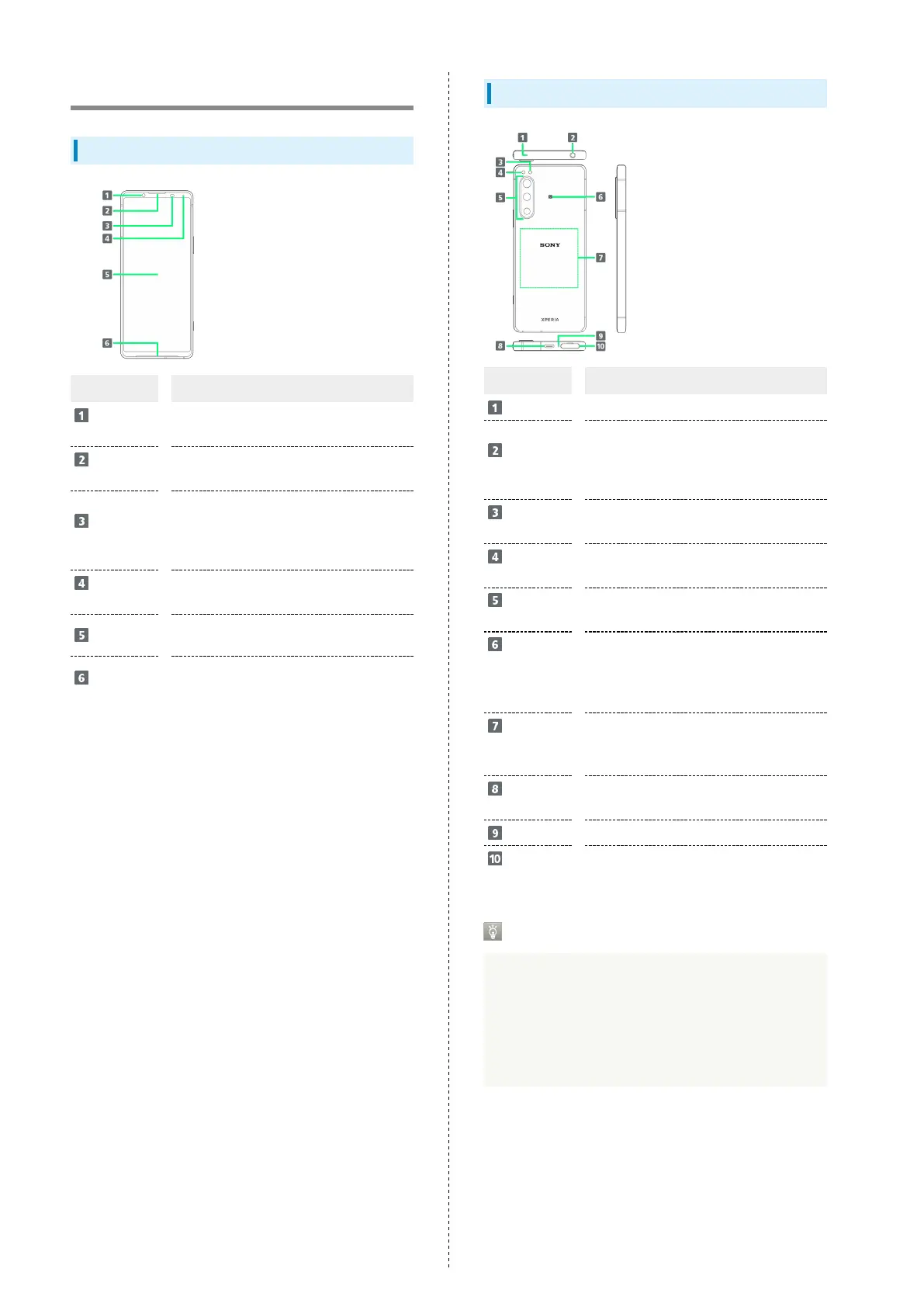
Handset (Front)
Part Description
Front
Camera
Use to shoot still images, videos of
yourself, etc.
Earpiece/
Speaker
Hear the other party's voice here.
Proximity/
Light Sensor
Detects surrounding brightness to
automatically adjust Display or backlight
and prevent Touchscreen misoperation
during a call.
Notification
Lamp
Flashes for notifications while Display is
off. Lights while charging.
Display
Touchscreen-type display, operate with
your fingers on Display.
Speaker
Listen to music as well as video, etc.
audio.
Handset (Back/Side)
Part Description
Second Mic
Reduces noise for calling.
Headset
Jack
Connect commercially available
headphones.
This port supports tetrapolar headset
that conforms to the CTIA standard.
RGB-IR
Sensor
Recognizes surrounding light sources when
shooting.
Flash/
Photo Light
Use as camera flash when taking photos,
etc.
Main
Camera
Capture still images and videos.
NFC/
Osaifu-Keitai
®
Detection
Area
Hold up to a reader/writer to use NFC/
Osaifu-Keitai
®
.
Wireless
Charging
Position
Position wireless charger.
USB Type-
C
®
Port
Connect USB Type-C cable (commercially
available), etc.
Mic
Speak here.
SIM Card/
SD Card Slot
Insert SIM Card/SD Card.
Using USB Type-C Port
Connect DisplayPort-compatible USB Type-C cable
(commercially available) and show handset screen on a
TV or computer monitor. Also, use a USB-LAN adapter
(commercially available) and connect to the Internet with a
wired LAN cable. Your USB Type-C cable, USB-LAN adapter,
or access point device might not work in some instances.


 To Next Page