78
Security Settings
Set security functions such as screen lock, PIN, etc.
Setting Screen Not to Lock
In Home Screen, (Settings) Security Screen
lock None
・If method for unlocking screen is setting other than
None or Swipe before changing setting, first Tap
Screen lock and enter method for unlocking screen, then
Tap None then DELETE .
Security Settings
Settings can be made for the following items.
Item Description
Google Play
Protect
Enable regular scanning of handset to
check for security threats.
Find My
Device
Set Find My Device on/off and check
method for finding handset.
Security
update
Check for updates. For details on security
update, see "Updating Software."
Google Play
system
update
1
Check for Google Play system updates.
Screen lock Set method for unlocking screen.
Fingerprint
Manager
Set fingerprints.
Press to
unlock with
fingerprint
Disable fingerprint authentication while
Display is off unless Power Key is Pressed.
Smart Lock
Set conditions for automatically unlocking
screen when method for unlocking screen
is "Pattern" / "PIN" / "Password."
Device admin
apps
Enable/disable handset management
applications.
SIM card lock Make settings for SIM Card lock.
Encryption &
credentials
Make settings for encryption and
credentials.
Trust agents
Set trust agents on/off when method for
unlocking screen is set to "Pattern," "PIN,"
or "Password."
App pinning
Set to keep only screen of specified
application in view. When set to ON,
pinned screen cannot be moved.
Confirm SIM
deletion
Enable handset to require user
verification before erasing an eSIM when
method for unlocking screen is set to
"Pattern," "PIN," or "Password."
1 Screen view may differ depending on usage.
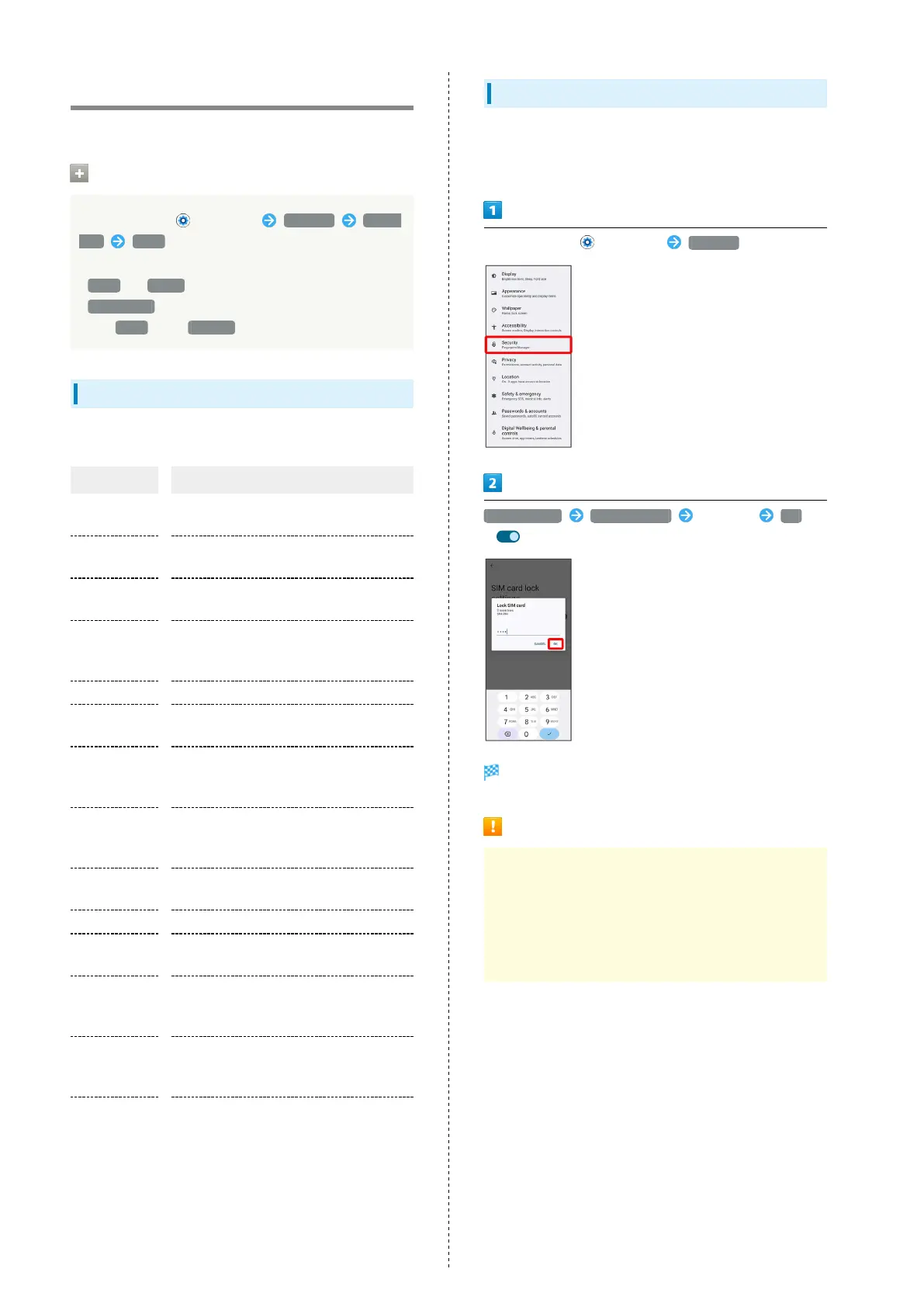
Enabling SIM PIN
When PIN is enabled, a window for entering PIN appears to
allow handset use each time handset is powered on with SIM
Card installed/eSIM enabled.
In Home Screen, (Settings) Security
SIM card lock Lock SIM card Enter PIN OK
( )
PIN is enabled.
PIN Cautions
Entering incorrect PIN three consecutive times activates
PIN Lock. To cancel, Personal Unblocking Key (PUK) is
required; contact Customer Service. Entering incorrect
PUK ten consecutive times locks SIM Card/eSIM, disabling
handset. For recovery, SIM Card/eSIM must be reissued by
SoftBank (fees apply).



 To Next Page