VESDA VLC Product Guide VESDA by Xtralis
26 www.xtralis.com
7.1.1 VESDAnet Terminals (VN Model only)
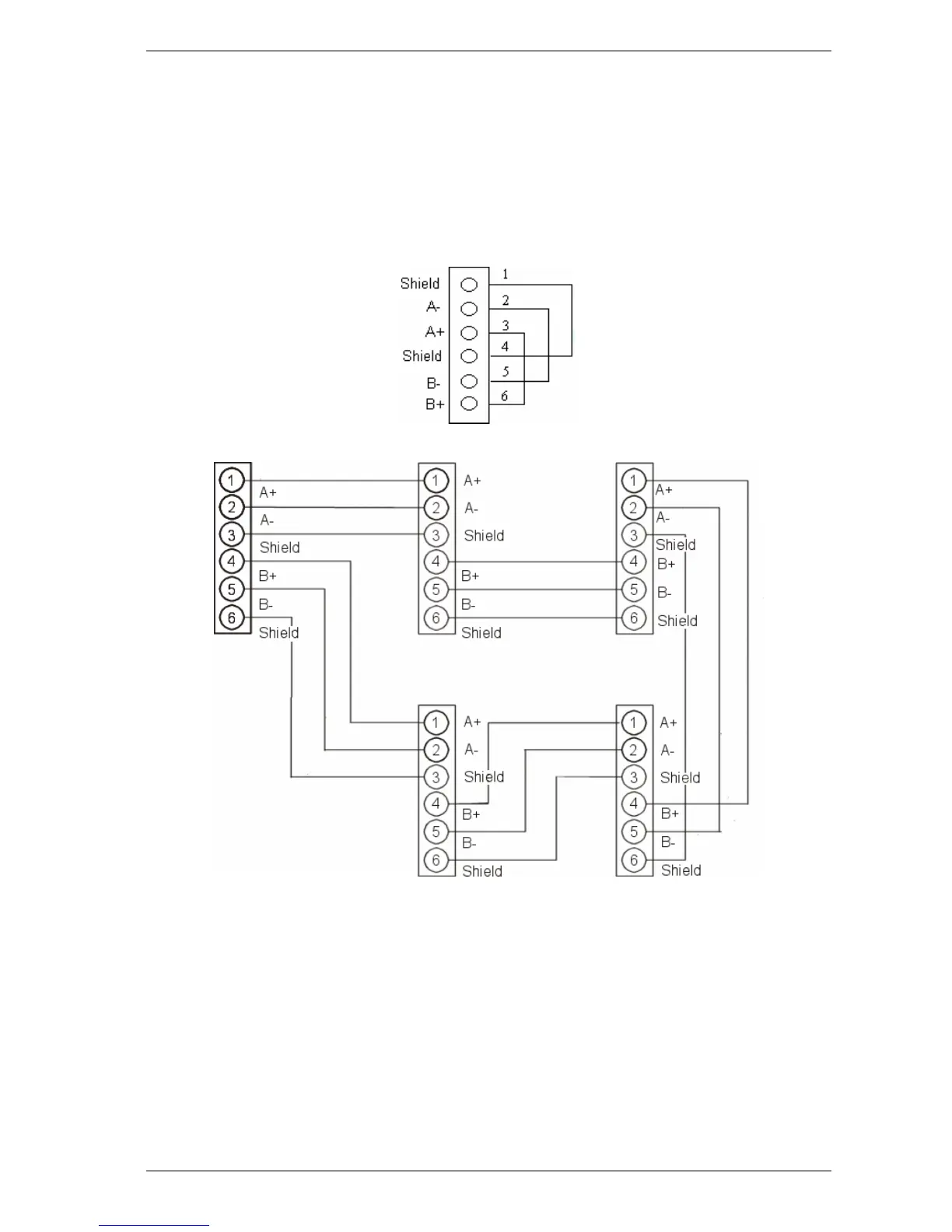
The VLC detector can be connected to VESDAnet through VESDAnet Terminals on the
Termination Card. The terminals enable VESDAnet communication cables to be brought into the
detector and then looped out to another device. Data communication between the detector and
other devices on VESDAnet are bidirectional. The polarity of the data wires must be maintained
throughout the network. It is recommended that RS 485 (BELDEN 9841 - 120 Ohm) twisted pair
cables (or similar) be used. The VLC is shipped without the VESDAnet A and B channels looped. If
the detector is not to be networked with other devices, then loop the A and B channels.
Figure 7-3: Stand -alone VESDAnet connection for VLC
Figure 7-4: An example of the wire connection for VESDAnet (closed loop)
7.1.2 Relay terminals
There are three relays designated Fault, Pre-Alarm and Fire. The relays can be used to connect to
the fire alarm control panel or to activate external devices. The default relay states are nonenergized
except the fault relay, which is set to the energized state on power up.













 To Next Page