VESDA by Xtralis VESDA VLC Product Guide
www.xtralis.com 27
7.1.3 Programming socket
The 15 pin or 9 pin programming socket on the termination card provides the communication
interface between the detector and a LCD Programmer or PC. Use the information listed below to
determine the type of programming device required to program the VN or the RO detector.
l VN model: The programming socket on the termination card has 15 pins. Use a LCD
Programmer and connect the programmer cable to the 15 pin VESDAnet programming
socket.
OR
l Use a PC with a VESDA PC-Link HLI and the appropriate data cables to connect to the 15 pin
VESDAnet programming socket.
l RO model: The programming socket on the termination card has 9 pins. The RO model is
programmed using a PC Software. Connect the PC to the detector using a RS232 data cable
directly to the 9 pin VESDAlink programming socket.
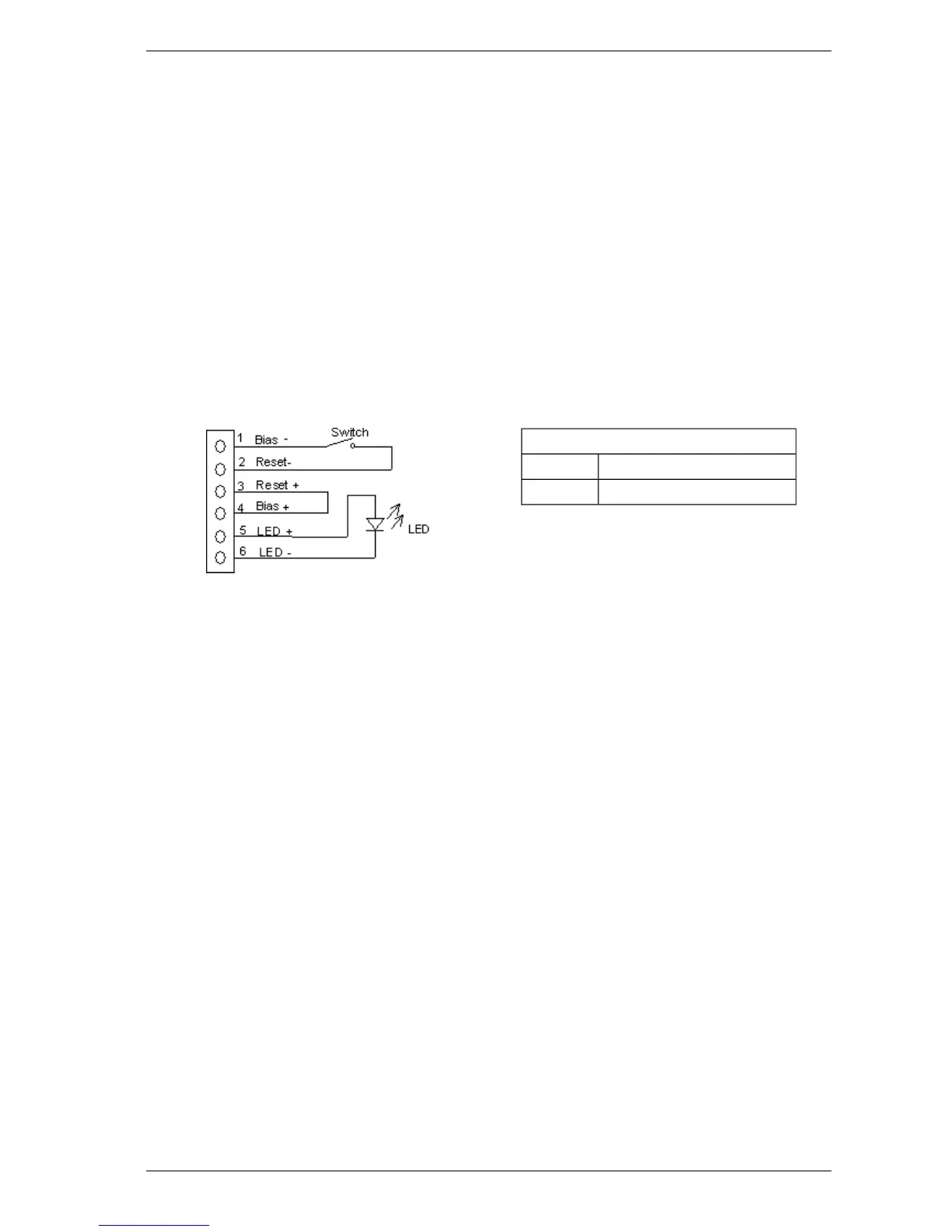
7.1.4 Auxiliary / GPI Terminals
Switch
Closed Isolate
Open Reset
Figure 7-5: Wire connection for Auxiliary / GPI Terminals
For further information refer to Auxiliary / GPI Terminals on page 19.













 To Next Page