English
31
1 2
3 4
5. Network
Settings
In order to connect your Xtreamer to a wireless environment you need to plug “USB WiFi Antenna (Optional
Item)” to a USB2 port on the back panel of your player.The Xtreamer WiFi Antenna supports 802.11N protocol.
Note. We recommend to use LEFT USB2 port as seen from the front.
5-2. Wireless LAN Setup
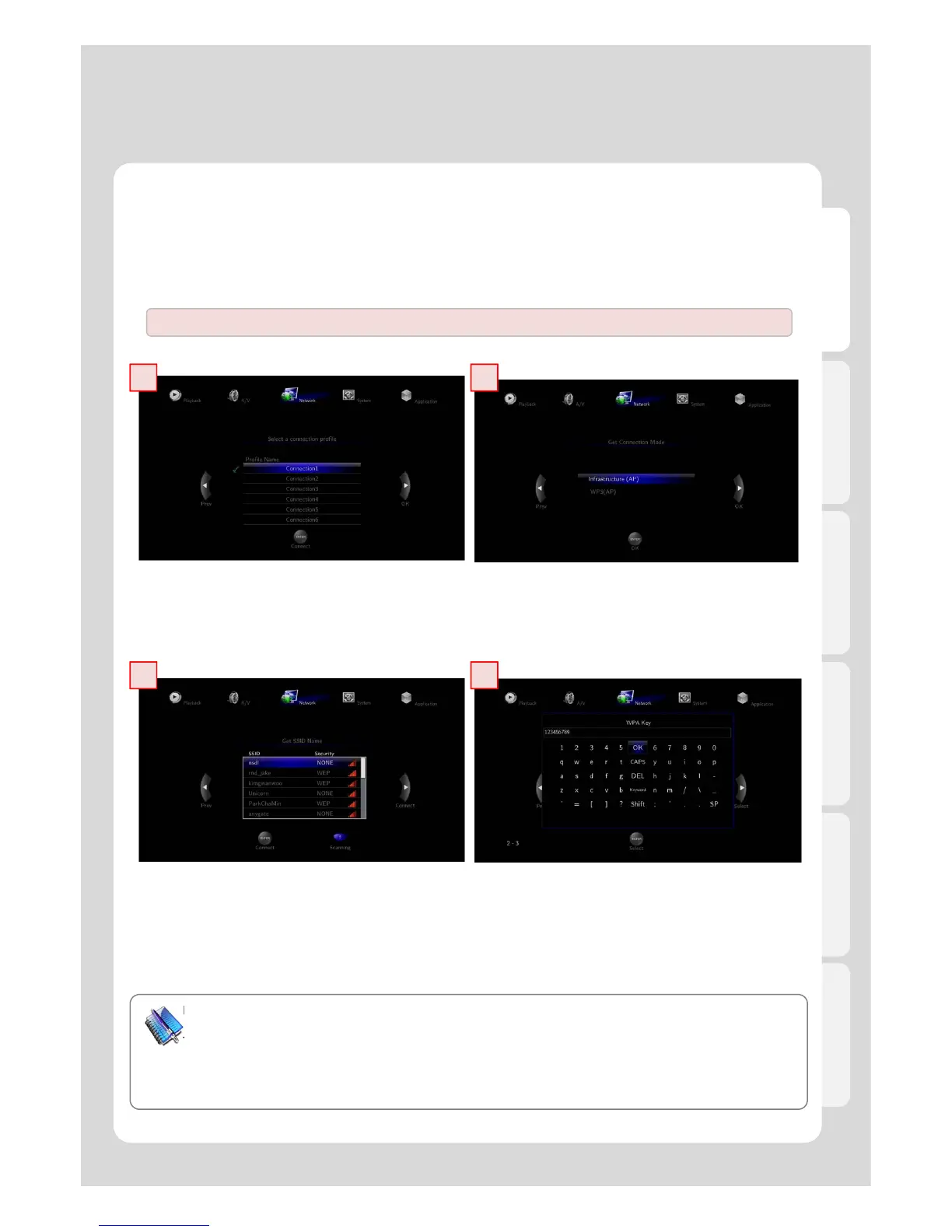
1. Insert USB WiFi Antenna
※ Xtreamer can be disturbed by other wireless network services which may result in a relative lower speed.
2. Select [Infrastructure (AP)].
3. Select SSID type (available wireless network), you may want to use.
4. Enter correct passkey, and then press [OK].
Note
- The “USB WiFi Antenna” can only be used with the Xtreamer line products. Any devices will not be compatible.
- Only “Web hex character codes” is supported.
- Web hex encoding supports 64-bit and 128-bit integers capable.
- If you have the problem of unstable wireless network or low speed, check you wireless channels for
optimum signal strength. Changing channel is available through your router.



 To Next Page